

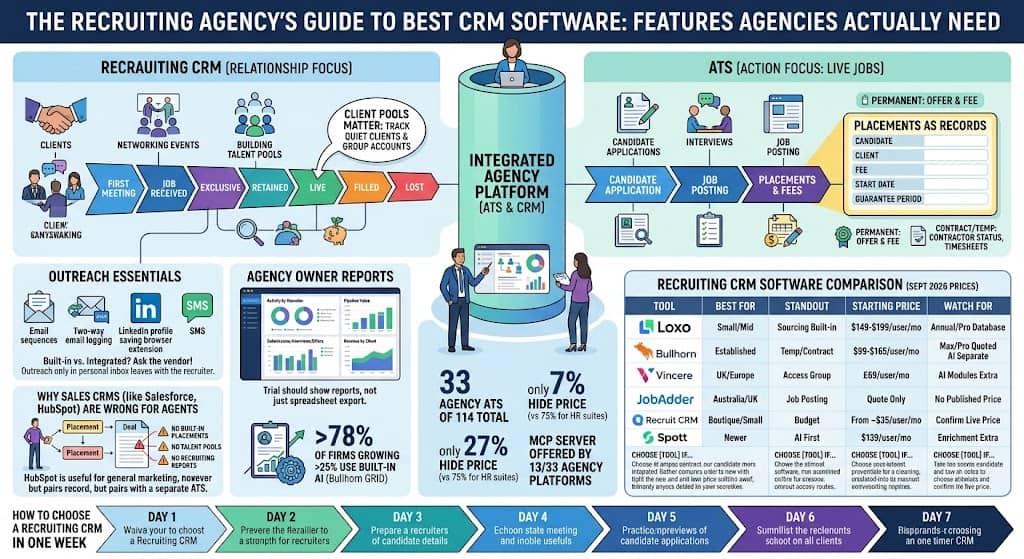
The best recruiting CRM software is the one built around what your agency actually tracks: client accounts, candidates, placements and fees.
For most small agencies that means an agency platform like Loxo, Bullhorn or Recruit CRM, not a general sales CRM like Salesforce or HubSpot.
If you are a UK or European agency, Vincere and JobAdder belong on the shortlist too. If you run a temp or contract business, pick the tool with the strongest placement and timesheet support, which usually points to Bullhorn and its partner marketplace.
Published prices for these tools run from about $35 to $199 per user per month, checked in September 2026. Larger plans are quoted. Always confirm the live price on the vendor’s own pricing page before you budget.
What is recruiting CRM software?
Recruiting CRM software is where a recruiting team keeps its relationships and sales pipeline: the hiring managers you pitch, the clients you work for, and the candidates you want to stay in touch with even when there is no open job.
Bullhorn draws the line clearly in its ATS vs CRM explainer. The applicant tracking system (ATS) handles candidates, submissions, interviews and placements. The CRM tracks contacts and the companies they work for.
Most agency platforms now sell both in one login. That is useful, but it means you have to check that the CRM half is real and not just a contact list with a recruiting label on it.
For corporate recruiting teams hiring for one employer, a recruiting CRM means something slightly different. It holds past applicants, referrals and strong runners up so they are not lost when a job closes. Our ATS vs CRM guide covers that split in depth.
What is the difference between a recruiting CRM, an ATS and a sales CRM?
A recruiting CRM manages relationships and business development, an ATS manages candidates moving through open jobs, and a sales CRM manages customers and deals for any kind of business. Agencies usually need the first two in one product, and rarely need the third for recruiting work.
| Recruiting CRM | ATS | Sales CRM (Salesforce, HubSpot) | |
|---|---|---|---|
| Main record | Client accounts, contacts, talent pools | Candidates, jobs, submissions, placements | Customers, companies, deals |
| Who uses it | Recruiters doing business development and candidate relationships | Recruiters filling live jobs | Sales and marketing teams |
| Keeps people after a job closes | Yes, that is its purpose | Often not | Yes, but not as candidates |
| Tracks placements and fees | In agency platforms, yes | Yes | Only if you build it yourself |
| Typical price | Per recruiter seat | Per recruiter seat or per job | Per sales seat, plus add ons |
What features should a recruiting CRM have?
A recruiting CRM should give you five things: a business development pipeline, searchable talent and client pools, placements as proper records, outreach that logs back to the record, and reports the agency owner will actually use. If a product is missing any of these, treat it as a contact list rather than a CRM.
What should a recruiting CRM pipeline track?
The pipeline should follow how an agency wins work, not how a software company closes a deal. Useful stages look like first meeting, job received, exclusive, retained, live, filled and lost.
Each client account needs an owner, a next action and a forecast in fees and start dates. If you meet a hiring manager for coffee and there is no job yet, that conversation still belongs in the CRM, not in your inbox.
Why do talent and client pools matter?
Talent pools are the candidates you already know: past placements, people who interviewed, and strong runners up. They are the most valuable data an agency owns, and they must stay searchable after a job closes.
Client pools matter just as much. A good recruiting CRM shows which clients gave you three jobs this year, which ones went quiet, and which ones you should not approach. If it cannot group accounts like that, it is only an address book.
How should a recruiting CRM handle placements?
A placement should be its own record that links a candidate to a client, a fee, a start date and a guarantee period. Permanent recruiters need the offer and the fee. Contract and temp recruiters also need the contractor’s status and a route into timesheets and payroll.
If placement fees live in a spreadsheet next to the CRM, the CRM is not your system of record, and your reports will always be wrong.
What outreach features does a recruiting CRM need?
Look for email sequences, two way email logging and a browser extension that saves profiles from LinkedIn and the open web into the database. Many agency platforms also add SMS.
Ask the vendor which features are built in, which need an integration, and which are just reminders. Outreach that only lives in a recruiter’s personal inbox leaves with that recruiter.
What reports should a recruiting CRM give the owner?
An agency owner needs activity by recruiter, pipeline value, submissions, interviews, offers, starts and how much revenue depends on each client. Recruiters need a simple list of what to do today.
Ask to see the owner’s report during the trial. If reporting means exporting a spreadsheet every two weeks, the CRM will never run your Monday meeting.
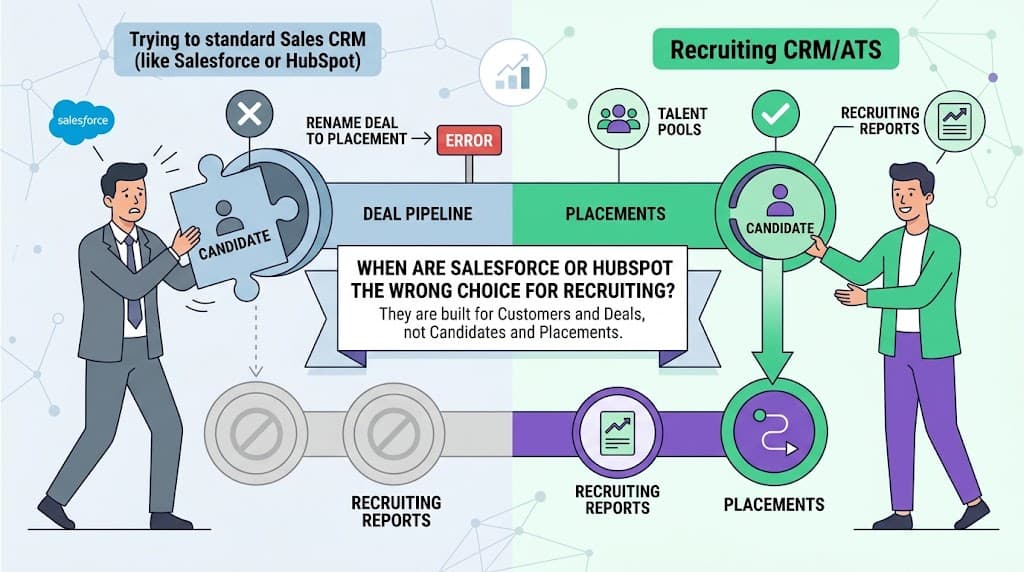
When are Salesforce or HubSpot the wrong choice for recruiting?
Salesforce and HubSpot are the wrong choice when your agency needs placements, talent pools and recruiting reports as built in features. They are built for customers and deals, and renaming “Deal” to “Placement” does not turn them into a staffing CRM.
HubSpot’s own recruiting CRM guide positions it for internal hiring teams that manage candidate relationships and outreach, and says it connects to separate ATS tools for structured applicant tracking. That is a fair description: useful for relationships, not a full agency system.
A sales CRM can still earn its place in an agency. Many firms use HubSpot to market the agency itself and win new clients, while the recruiters work in a dedicated recruiting platform.
The mistake is asking one sales CRM to be your business development tool, your ATS and your talent database at the same time. Pick one recruiting system as the home for clients, candidates and placements, and add a sales CRM only if agency marketing is a separate job.
How do Loxo, Bullhorn, Vincere, JobAdder, Recruit CRM and Spott compare?
These six platforms differ mainly in who they are built for and how they price, so the right pick depends on your agency’s size, region and type of work. The table below uses prices from each vendor’s own pricing page or our directory listing, checked in September 2026.
| Tool | Best for | Standout | Starting price | Watch for |
|---|---|---|---|---|
| Small and mid size agencies that want sourcing built in | ATS, CRM, AI sourcing and a large talent database in one login | $149 per user per month on Core, $199 on Professional, billed annually (Loxo pricing) | The talent database is only on Professional; annual plans paid up front | |
| Established agencies and temp or contract businesses | Large partner marketplace and deep staffing features | $99 per user per month on Starter, $165 on Core (Bullhorn pricing) | Pro, Max and larger plans are quoted, and many AI features are separate products | |
| UK and European agencies | Agency ATS and CRM from The Access Group, with AI built into Core and Pro | £150 a month for 1 user, £95 per user for 2 to 7 users, 30 day rolling contract (Vincere pricing) | Priced in GBP only; Pro for 7 or more users is quoted, from £85 per user | |
| Agencies in Australia and the UK | Job board posting, CRM and placements together | Quote only (JobAdder pricing) | No published price, so you cannot compare costs without a sales call | |
| Boutique and small agencies on a budget | Full agency ATS and CRM at a small team price | From about $35 per user per month (our listing) | Confirm the current plan price on the vendor site | |
| Newer agencies that want an AI first platform | AI native agency ATS and CRM | $139 per user per month on Core, billed annually | Enrichment credits cost extra |
Choose Loxo if you want candidate sourcing and your CRM in the same product and can commit to an annual plan. Choose Bullhorn if you run temp or contract staff, or you need a wide choice of add on partners for payroll, onboarding and compliance.
Choose Vincere if you are a UK or European agency comfortable with pound pricing. Startup and Core run on a 30 day rolling contract. Choose JobAdder if job board posting in Australia or the UK is central to how you fill roles.
Choose Recruit CRM if price is the deciding factor and you are a small team. If you are deciding between Loxo and Spott specifically, our Loxo vs Spott comparison goes through both in detail.
What do the numbers say about recruiting CRM software?
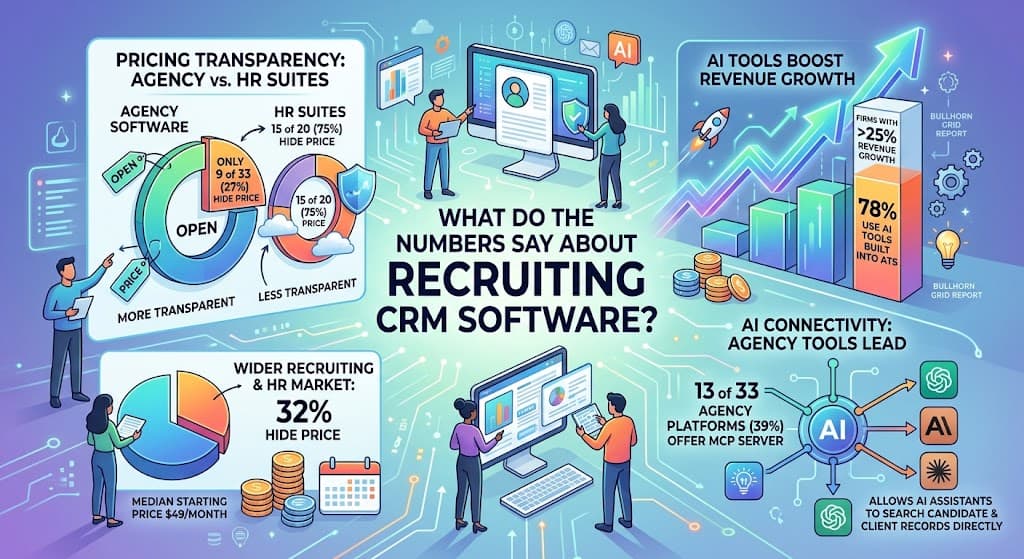
Agency software is one of the most transparent corners of the recruiting market. In our count of 114 applicant tracking systems, 33 are built for agencies, and only 9 of those 33 (27%) hide their price, compared with 15 of 20 HR suites (75%), according to our ATS market statistics.
Across the wider market, 32% of the 687 recruiting and HR tools we track hide their price, and the median published starting price is $49 a month, based on our recruiting software pricing data.
AI features inside the recruiting platform are now tied to growth. Bullhorn’s GRID survey of nearly 2,300 recruitment professionals found that 78% of firms growing revenue by more than 25% use AI tools built into their ATS, as reported in the Bullhorn GRID report.
Agency tools also lead on AI connections. 13 of the 33 agency platforms we track (39%) offer an MCP server, which lets assistants like Claude or ChatGPT search your candidate and client records directly. Read what MCP means if that matters to your team.
What breaks when a recruiting agency grows?
Most recruiting CRMs work fine for a single small team. The problems show up when you add offices, mix permanent and contract work, or handle candidate data across borders.
What goes wrong with multiple teams or offices?
Ownership breaks first. You need rules for shared candidate pools, protection against recruiters poaching each other’s candidates, a way to stop duplicate client records, and reports by team and by office.
Permissions matter too. Check that one recruiter cannot export the whole database on the way out the door. If the vendor cannot show this during the trial, the CRM will struggle once you have a second team.
What changes for contract and temp recruiting?
Contract and temp work puts pressure on the placement record, which has to hold a permanent fee as well as an ongoing contractor assignment. If the CRM is weak on timesheets and payroll, you will need a back office tool alongside it.
Bullhorn’s partner marketplace is the usual answer for that setup. Reddit threads summarised in a Happlicant roundup show high volume temp agencies moving to TempWorks or Avionté when they need timesheets, payroll and compliance in one place.
How should a recruiting CRM handle candidate consent and privacy?
Consent belongs on the candidate record. Opt ins, opt outs and deletion requests must be stored where the recruiters actually work, not in a separate marketing tool.
If you recruit in the UK or Europe, ask where the data is hosted and ask for the vendor’s data processing agreement before you sign. A sales CRM that emails a candidate list without a recruiting consent field is a risk, not a shortcut.
How do you choose a recruiting CRM in one week?
Run a structured trial rather than a vendor demo tour. Test two products side by side against your real work, and decide at the end of the week.
- Day one: decide what the CRM must handle, such as client pipeline, talent pools, placements or all three, and write down three real scenarios to test.
- Days two to four: run those scenarios in both products. Add a new client with no job yet, search your talent pool without an open job, and record a placement with a fee and a start date.
- Day five: send and receive email to check it logs both ways, open the owner’s report, and ask which outreach features are built in and which cost extra.
- Day six: price the plan you will actually use, including annual terms, minimum contracts and add ons.
- Day seven: pick one system to hold clients, candidates and placements, so you never run two sources of truth for the same client.
For a small agency, a published per seat price and a short setup beat a six month implementation. For a larger agency mixing contract and permanent work, placement depth and partner integrations matter more than a slick email builder.
What do recruiters ask about recruiting CRM software?
These are the questions agency owners and recruiters raise most often, including the ones that come up repeatedly in Reddit recruiting threads.
What is the best recruiting CRM software for a small agency?
For a small agency, Loxo, Recruit CRM and Bullhorn Starter are the most common picks because they publish a per seat price and cover both CRM and ATS work. Recruiters on Reddit often name Loxo and Recruiterflow for new agencies, with mixed reviews depending on workflow.
What is the best CRM for a brand new recruiting agency?
A brand new agency should pick the cheapest product that still tracks clients, candidates and placements in one place. Recruit CRM starts from about $35 per user per month and Bullhorn Starter from $99, so you can begin small and upgrade later.
Is a recruiting CRM the same as an ATS?
No. An ATS tracks candidates through open jobs to placement, while a recruiting CRM tracks relationships with clients and candidates over time. Most agency platforms now combine both in one product.
Can I use HubSpot as a recruiting CRM?
You can use HubSpot for candidate relationships and outreach, but not as a full agency system. It has no built in placements or recruiting reports, so most agencies pair it with a dedicated ATS or skip it entirely for recruiting work.
How much does recruiting CRM software cost?
Published recruiting CRM prices run from about $35 to $199 per user per month in September 2026. Recruit CRM starts around $35, Bullhorn Starter at $99, Spott at $139, Loxo at $149 and Vincere at £95 per user (£150 a month for one user). JobAdder and larger Bullhorn plans are quoted.
Why do agencies switch away from Bullhorn?
Agencies that leave Bullhorn usually cite cost and complexity. High volume temp firms often move to tools like TempWorks or Avionté that bundle timesheets and payroll, while small agencies look for a cheaper, simpler product.
Can a small agency just use a spreadsheet instead of a CRM?
A spreadsheet works for your first few clients, but it cannot log email, run sequences or report on fees without manual work. Many agencies that pay for a CRM still slip back into spreadsheets, so choose a product simple enough that your recruiters will actually use it.
What should a staffing CRM include?
A staffing CRM should include a client pipeline, searchable talent and client pools, placement records with fees, outreach that logs to each record, and owner reports. Timesheets, job board posting and AI sourcing are extras to buy only if your agency needs them.
Free newsletter
Get the Work Insiders weekly
One email a week: the recruiting and HR tech news that mattered, the tools we just added to the directory, and one practical guide. No spam, and you can unsubscribe in one click.