

By Ryan Bradshaw · Updated November 1, 2026
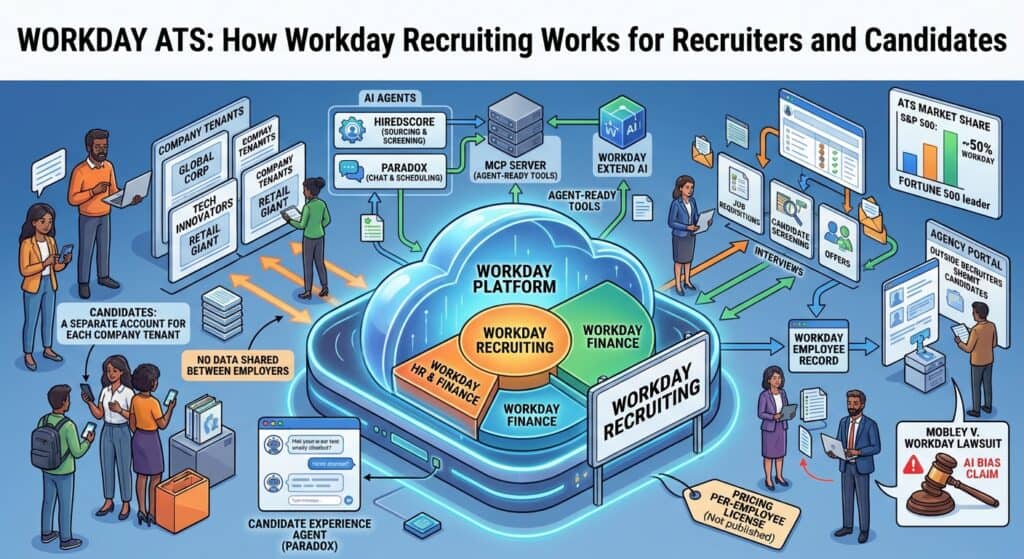
Quick answer: The “Workday ATS” is Workday Recruiting, the hiring module inside Workday’s HR system. It is the most used applicant tracking system among large US employers: 50% of the S&P 500 companies we could identify in our own scan, and more than 40% of the Fortune 500 in Jobscan’s 2026 report. Each employer runs its own private copy of Workday, which is why candidates create a new account for every company. Workday does not publish prices. Recruiting is licensed per employee as part of the Workday HR contract.
Is Workday an ATS?
Workday itself is a full HR and finance platform: employee records, payroll, benefits, time tracking, accounting and planning. Its applicant tracking system is one module, Workday Recruiting. When people say “Workday ATS”, that module is what they mean.
That matters because companies rarely choose Workday Recruiting on its own. They choose Workday as their HR system, then take the recruiting module so new hires flow straight into the employee record without a separate integration. Workday reported more than 11,500 customers in its fiscal 2026 results and says its software is used by more than 65% of the Fortune 500. Not every one of those customers uses the recruiting module, but many do.
How many companies use Workday for recruiting?
Among the largest employers, more than any other system. Jobscan’s 2026 ATS usage report puts Workday at more than 40% of the Fortune 500, up from 39.2% in 2025, with SAP SuccessFactors a distant second at 12%. Our own S&P 500 ATS market share study, which checks every company’s careers site and is refreshed every 90 days, currently shows Workday at 50% of the companies whose ATS we could identify.
Across companies of every size, the lead shrinks. In Jobscan’s wider sample of more than 13,000 companies, Workday holds 17.5%, just behind Greenhouse at 19.0%. Workday is the enterprise standard, not the default for smaller teams.
What does Workday Recruiting do?
| Area | What Workday Recruiting handles |
|---|---|
| Requisitions | Job requests tied to the org chart, budget and approvals already in Workday HR |
| Career sites | External career sites for candidates and internal ones for employee mobility |
| Candidate accounts | Candidate Home accounts where applicants track applications and complete tasks |
| Screening | Questionnaires, knockout questions and resume parsing into the application |
| Interviews | Scheduling, interviewer feedback and stage tracking |
| Agencies | A separate career site where approved recruiting agencies see jobs and submit candidates |
| Offer and hire | Offers, then a direct handoff into the Workday employee record for onboarding and payroll |
| Reporting | Recruiting reports built on the same data as the rest of Workday HR |
What AI does Workday Recruiting use?
Workday built its recruiting AI largely through two acquisitions.
- HiredScore, bought in 2024, now powers Workday’s Recruiting Agent for AI sourcing, screening and matching candidates to roles, including past applicants already in the system.
- Paradox, a conversational recruiting company Workday agreed to buy in August 2025 and completed in late 2025, powers the Candidate Experience Agent. It answers candidate questions, screens by chat and lets candidates book their own interviews, mainly for high-volume frontline hiring.
Workday says it was named a Leader in the 2026 Gartner Magic Quadrant for Talent Acquisition on the strength of these agents. If you see a Paradox chatbot on a careers page, do not assume the employer runs Workday underneath. Jobscan notes that Paradox also connects to SuccessFactors, Greenhouse, iCIMS and others.
Does Workday have an MCP server?
Yes, as of October 2026. At its Workday Rising conference on October 13, Workday made its MCP server, called Agent-Ready Tools, generally available as part of Workday Extend AI, The New Stack reported. Workday’s CTO said it launched with 275 tools that read data and 54 that write or delete it. Users sign in with their own Workday login, and an agent acting for them cannot see anything their own account cannot.
Two caveats for recruiting teams. First, there is no public address to plug in: each employer’s Workday administrators have to turn it on for their own tenant, so an individual recruiter cannot connect it alone. Second, Workday’s own product chief said building directly on these tools suits only a small set of tasks, and pointed most customers to a route where Claude passes requests to Workday’s own agent layer, Sana. Our guide to ATS MCP servers compares Workday with Greenhouse, Bullhorn and others.
Why do you need a new Workday account for every company?
Because you are not applying to Workday. You are applying to the employer, and each employer runs its own separate copy of Workday, called a tenant. Your account, resume and application live inside that employer’s tenant and are not shared with any other company. Workday’s own administrator guide shows that each employer sets up its own Candidate Home accounts and can choose to require one for every application.
To make it less painful:
- Use the same email for every Workday account, and save each one in a password manager under the company name.
- Always start from the job link on the employer’s own careers site, so you land in the right tenant.
- Keep one clean, single-column resume ready. Workday fills in the application form from it, so a cleaner file means fewer fields to fix. Our ATS-friendly resume format guide covers the layout.
- Read every prefilled field before you submit. Recruiters search those fields, not just your attached file.
- If you already have an employee login at the same company, it is usually separate from the candidate login. Use the link on the job posting.
How does Workday work for agency recruiters?
If you recruit for clients that run Workday, you will usually work through the agency portal. According to Workday’s administrator guide, each approved agency gets its own internal career site where it sees the jobs the client releases to it and submits candidates. The client sets an ownership period, which starts once your candidate reaches the Review stage, and more than one agency can own the same candidate.
Two practical points follow. Submit early, because ownership is tied to when the candidate reaches Review in the client’s system, not when you first spoke to them. And tell your candidates to expect an email from the client’s Workday asking them to create a Candidate Home account to finish questionnaires. Candidates who ignore that email often stall the submission.
How much does Workday Recruiting cost?
Workday does not publish US prices. Recruiting is licensed as part of a Workday HR subscription and quoted on the number of employees, not the number of recruiters. That means a company with 5,000 employees and three recruiters pays on 5,000 people.
Outside estimates vary widely and none come from Workday. Software buying adviser Redress Compliance, for example, reports a median of about $9 per employee per month for the recruiting module across 25 contracts it reviewed, with a range of roughly $4 to $16, on top of the core HR subscription. Treat any figure like that as a starting point for negotiation, not a price. Implementation is usually done by a Workday partner, and our guide to Workday Recruiting implementation partners compares eight firms.
What is the Mobley v. Workday lawsuit?
Derek Mobley sued Workday in federal court in California in February 2023, alleging that the AI screening tools employers use through Workday rejected him and others because of age, race and disability. The court has let the case go forward as a nationwide collective action on the age claims, and notice went to applicants aged 40 and over who applied through Workday’s platform from September 24, 2020 onward. On June 22, 2026, the judge largely denied Workday’s latest motion to dismiss, letting key California law and disability claims continue.
No court has found that Workday discriminated, and Workday has said the case is without merit and has sought an appeal of the certification ruling. The case matters to every employer because it tests whether a software vendor can be held responsible for biased screening, not just the company that hires. Our guide to the AI resume screener covers the wider rules on automated hiring.
Workday ATS vs the alternatives
| System | Best fit | Why teams choose it over Workday |
|---|---|---|
| Companies whose HR and finance run on SAP | Same suite logic, different vendor estate | |
| Oracle shops | Ties into Oracle HR and finance | |
| Mid-market and tech companies with structured hiring | A recruiter-first tool with a large integration marketplace and its own MCP server | |
| Large employers that want a standalone ATS | Recruiting depth without buying an HR suite | |
| Fast-growing companies | ATS, CRM, scheduling and analytics in one, with a published starting price |
Some Workday HR customers still run Greenhouse or iCIMS for recruiting and pass hires into Workday. See every option on our Workday alternatives page, or start with our plain-English explainer on what an ATS is.
Quick answers
Is Workday an ATS?
Workday is an HR platform. Its ATS is the Workday Recruiting module, which most people mean when they say “Workday ATS”.
Why does Workday make me create a new account for every job?
Each employer runs its own private copy of Workday. Your account belongs to that employer’s copy and is not shared with other companies.
Does Workday reject resumes automatically?
Employers set the rules. Knockout questions can screen applicants out, and some employers use AI ranking, but recruiters review applications in most setups.
How do I know if a company uses Workday?
Click apply on one of its jobs. A web address containing myworkdayjobs.com means Workday. Our free Hiring Radar extension shows the ATS on any careers page.
How much does Workday Recruiting cost?
Workday does not publish prices. It is quoted per employee as part of a Workday HR contract, and outside estimates vary widely.
Can Claude or ChatGPT connect to Workday?
Yes, through Workday’s MCP server, released in October 2026, but only after the employer’s Workday administrators turn it on.
Free newsletter
Get the Work Insiders weekly
One email a week: the recruiting and HR tech news that mattered, the tools we just added to the directory, and one practical guide. No spam, and you can unsubscribe in one click.