

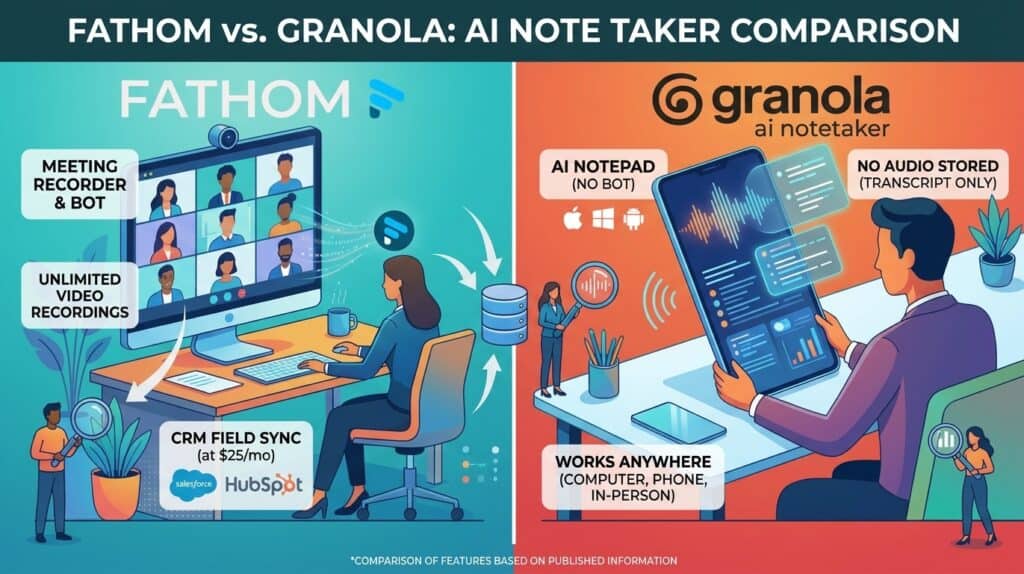
Pick Fathom if you want full video recordings you can clip and share, a free plan with unlimited recordings, and CRM field sync on Business at $25 per user a month billed annually. Pick Granola if you want no bot in the call: it listens through your own device audio, keeps no audio file, and turns your typed jottings into notes, from $14 per user a month. Neither one pushes notes into an ATS such as Greenhouse, Lever or Bullhorn. With Granola, no bot shows up to tell candidates they are being transcribed, so turn on its chat message or watermark, or tell them yourself.
Prices and features checked on each vendor’s own site on 21 October 2026. Neither vendor paid for or reviewed this article.
What is the difference between Fathom and Granola?
Both are AI note takers that write a summary of your call when it ends. The difference is how they capture the call and what they keep afterwards.
Fathom is a meeting recorder. In its classic setup a Fathom bot joins your Zoom, Google Meet or Microsoft Teams call, records audio and video, and sends an AI summary as soon as the call ends. Its pricing page now also offers bot free capture in beta.
Granola is an AI notepad. It never sends a bot. You open a note, Granola transcribes your microphone and computer audio, and when the call ends it combines your own typed notes with the transcript. Its security page says it does not store meeting audio, only the transcript and your notes.
How do Fathom and Granola compare side by side?
This table uses each vendor’s own pricing pages and help centers.
| Feature | Fathom | Granola |
|---|---|---|
| How it captures | Bot joins the call; bot free capture in beta on Mac | Device audio only, no bot ever |
| Keeps a recording | Yes, audio and video, unlimited storage | No; audio is not stored |
| Meeting apps | Zoom, Google Meet, Microsoft Teams | Any app that plays through your computer, plus in person on mobile |
| Platforms | Mac and Windows; iOS app for in person talks | macOS, Windows, iOS, Android, Apple Watch |
| Free plan | Unlimited recordings, transcripts and summaries | Unlimited notes, last 30 days visible |
| Paid entry price | $15 per user a month billed annually (Team, 2 user minimum) | $14 per user a month (Business, billed monthly) |
| Chat across meetings | Ask Fathom; account wide version in beta | Granola Chat on every plan |
| CRM | HubSpot, Salesforce, Close; field sync on Business | HubSpot, Attio, Affinity on Business; Salesforce via Zapier |
| ATS integration | None documented | None documented |
| Public API | Yes, with webhooks and SDKs | Yes, on Business and Enterprise |
| MCP server | Yes, first party | Yes, first party |
| Recording notice | Visible bot, banner, or chat message | Optional chat message or camera watermark |
How much do Fathom and Granola cost in 2026?
Both publish their prices. Fathom shows annual and monthly rates, and its team plans need at least 2 users. Granola’s billing help page says Basic and Business are billed monthly, and annual billing is only offered on Enterprise contracts.
| Plan | Published price | What it adds |
|---|---|---|
| Fathom Free | $0 | Unlimited recordings, transcripts, instant summaries, clips |
| Fathom Premium | $16 per user a month annually, $20 monthly | For individuals: advanced summaries, AI action items, meeting assistant, custom bot |
| Fathom Team | $15 per user a month annually, $19 monthly | 2 user minimum; global search, shared playlists, comments, folders, keyword alerts |
| Fathom Business | $25 per user a month annually, $34 monthly | 2 user minimum; CRM field sync, Deal View, coaching metrics, custom summaries |
| Fathom Enterprise | Quote | SSO, SCIM, custom data retention, dedicated success manager |
| Granola Basic | $0 | Unlimited notes, 30 days of history, chat, templates, Slack |
| Granola Business | $14 per user a month | Unlimited history, briefs before meetings, follow up emails, integrations, API |
| Granola Enterprise | From $35 per user a month | SSO, SCIM, admin policies, HIPAA workspaces, enforced recording notice |
Note that Fathom Team at $15 is cheaper per seat than Premium at $16, but Team needs a second paying user. Granola’s help page lists Enterprise as “from” $35, so larger teams may get a different figure.
What does each one cost per year by team size?
This is a Work Insiders calculation from the published prices above. Fathom figures use annual billing. Granola Business figures are 12 monthly payments, since it has no annual option. Taxes are not included.
| Users | Fathom Team ($15) | Fathom Business ($25) | Granola Business ($14) | Granola Enterprise ($35) |
|---|---|---|---|---|
| 1 | Not offered; Premium is $192 | Not offered | $168 | $420 |
| 2 | $360 | $600 | $336 | $840 |
| 5 | $900 | $1,500 | $840 | $2,100 |
| 10 | $1,800 | $3,000 | $1,680 | $4,200 |
| 25 | $4,500 | $7,500 | $4,200 | $10,500 |
For a 10 person recruiting desk, Granola Business costs $120 a year less than Fathom Team. If you need CRM field sync, the like for like Fathom plan is Business at $3,000.
Is Fathom free forever?
Fathom says so. Its pricing page labels the free plan “free forever”, and its cost FAQ says the free version includes unlimited storage and recordings. Some features, such as advanced summaries and Ask Fathom, are marked as limited use on free.
What is the catch with Granola’s free plan?
History. You can take unlimited notes on Basic, but only the last 30 days show in the app. Granola says older notes are stored, not deleted, and come back when you upgrade. Basic also limits integrations to Slack and chat to the Auto model.
Does Granola join the call as a bot?
No. Granola’s transcription guide says there is no meeting bot. It runs on your computer and uses your system audio and microphone, so it works with Zoom, Meet, Teams, Slack huddles and internet calling apps. You have to open a note for it to start; it does not record meetings on its own.
Fathom works the other way by default. A bot joins as a visible participant, and Fathom’s help center says it can only record if you are also on the call. Its newer desktop experience adds capture modes: transcript only, audio only and full audio and video with the bot. Fathom’s upgrade guide says this is Mac only for now, with Windows bot free capture in a limited Teams alpha.
Who is responsible for recording consent?
You are, with either tool. Recording and transcription laws differ by state and country, and some require every person on the call to agree. Both vendors give you ways to notify people, but neither takes on the legal duty for you.
Fathom’s consent FAQ says there is no way to record silently. With the bot, participants see it in the list and Fathom shows a recording banner. In bot free mode, its Recording Notice posts this in the meeting chat: “Fathom is recording and taking notes, and you consent by continuing.” If that notice is off, Fathom asks you to confirm consent in the app.
Granola offers an automated chat message and a camera watermark, which users can switch on for themselves on Basic and Business. On Enterprise an admin can enforce them. Its consent guide recommends getting consent whenever you transcribe others, and its notice page says customers “remain responsible for determining what notice or consent is required”.
Which note taker is better for candidate interviews?
It depends on what you need after the call. If hiring managers want to watch a clip of the candidate, Fathom is the only one of the two that keeps video.
If you run phone screens and back to back calls and only need clean written notes, Granola fits well. It also works on phone calls through its iOS app and in person on mobile. You still need to tell candidates, and Granola’s notice tools only work if you switch them on.
For structured interview scorecards and ATS sync, neither is built for it. See our Metaview vs BrightHire comparison for tools made for interviews.
How good are the summaries and transcripts?
Neither vendor publishes an accuracy rate, so test both on your own calls.
Fathom’s languages page lists transcripts in 38 languages, with translated summaries in six of them. Paid plans add more than 15 summary templates, including sales frameworks like BANT and Sandler, and Business adds custom summary templates for your organization.
Granola builds its notes around what you type, so your own shorthand guides the summary. Speaker tags name each person on Meet, Zoom and Teams on Mac and Windows; without them, the transcript shows “Me” and “Them”. You can add personal jargon to improve spelling of names and terms, and Business adds a workspace dictionary. Templates and saved prompts called recipes are on every plan.
Does Fathom or Granola sync notes to a CRM or ATS?
Both sync to CRMs. Neither documents a native integration with Greenhouse, Lever, Bullhorn or any other ATS on its integrations pages, which we checked on 21 October 2026.
Fathom connects to HubSpot, Salesforce and Close. Its Salesforce guide says it matches external attendees to Contacts by email and logs the summary as a Task. It does not match against Leads. Field mapping into specific CRM fields needs the Business plan.
Granola’s integrations page lists its own connectors for HubSpot, Attio and Affinity, and Salesforce through Zapier. Its pricing page puts these on Business, with a more advanced Salesforce option on Enterprise.
Both connect to Zapier, which you could test as a route into an ATS. Neither vendor documents one.
Can I ask questions across all my meetings?
Yes, with both. Fathom’s Ask Fathom answers questions about one call, and an account wide version that searches all your calls is in beta. Paid plans have unlimited lookback on your own calls.
Granola Chat works on every plan, across one meeting, a folder, selected meetings or everything. Its chat guide says Basic can reach the last 30 days and paid plans reach your full history. Business also lets you pick the AI model.
Do Fathom and Granola have an API or MCP server?
Both have a first party MCP server, so Claude, ChatGPT and other AI assistants can search your meeting notes. Fathom’s MCP docs give the server address as api.fathom.ai/mcp. Its integrations page says the Claude and ChatGPT connections are on every plan, while its pricing table lists the public API and MCP among paid features.
Granola’s MCP reaches your own notes from the last 30 days on Basic, and personal plus shared workspace notes on Business. Its MCP page says MCP is off by default for enterprises until an admin turns it on. The Granola API, with webhooks, is on Business and Enterprise.
Who should choose Fathom?
- Solo recruiters who want unlimited free recordings and summaries.
- Teams that share video clips of calls with hiring managers or clients.
- Agency desks that want call notes written into HubSpot or Salesforce.
- Buyers who want a 90 day money back guarantee on paid plans.
Who should choose Granola?
- Recruiters who do not want a bot in candidate or client calls.
- People who like to type their own notes and have AI fill the gaps.
- Teams that prefer no stored audio for privacy reasons.
- Recruiters who take phone and in person meetings as well as video calls.
- Small teams paying month to month at $14 a seat.
Which one should I pick?
| If you need | Choose | Why |
|---|---|---|
| Video you can replay and clip | Fathom | Granola keeps no audio or video |
| No bot in the participant list | Granola | Fathom’s bot free mode is still in beta on Mac |
| Unlimited free history | Fathom | Granola Basic shows 30 days |
| Lowest paid price for one person | Granola | $14 a month against Fathom Premium at $16 annually |
| Notes written into CRM fields | Fathom Business | Field mapping into Salesforce and HubSpot |
| Phone and in person meetings | Granola | Mobile apps on iOS and Android |
| Interview notes in your ATS | Neither | Look at Metaview or BrightHire |
What are the best alternatives to Fathom and Granola?
If neither fits, these listings cover similar ground.
| Tool | What it does differently | Best for |
|---|---|---|
| AI notes built for interviews | Teams that want interview notes in the ATS | |
| Interview intelligence platform | Structured interviewing at scale | |
| Bot free notepad that fills a screening sheet live | Agency screens on video, phone and WhatsApp | |
| Bot free notes with free viewer seats | Teams where many people read notes | |
| Live transcripts during the call | People who want to read along | |
| Transcription in 100+ languages, API on all plans | Multilingual teams | |
| Free recordings, 30+ languages | Budget video recording | |
| Meeting coach and search across email and chat | People who want coaching |
See every tool in our AI note takers category.
How should you trial both before you choose?
Both have free plans, so you can run them side by side without paying. Fathom’s paid plans also come with a free trial and a 90 day money back guarantee. Granola offers time limited trials of Business and Enterprise and lets you cancel at any time, with the plan running to the end of the billing period.
Run the same five calls through each: a candidate screen, a client intake call, an internal meeting, a phone call and one with a strong accent or jargon. Set up your consent message before the first external call, not after.
Look for program discounts too. Fathom offers up to 2 years of Team free for startups backed by select VCs and 10 free seats for nonprofits. Granola offers 12 months of Business free for accepted startups and students, and 50% off for nonprofits.
Quick answers
Is Granola cheaper than Fathom?
Slightly, per seat. Granola Business is $14 per user a month, billed monthly. Fathom Team is $15 billed annually or $19 monthly, with a 2 user minimum. Fathom Business, which adds CRM field sync, is $25 annually.
Does Granola record audio?
It transcribes audio but does not store it. On Mac and Windows it transcribes in real time; on mobile it caches audio briefly and deletes it once the transcript is done.
Can Fathom work without a bot?
Yes, in beta. Fathom’s newer desktop app offers bot free capture on Mac running macOS 14.2 or newer. Windows bot free capture is in a limited Teams alpha.
Do I need to tell candidates I am using an AI note taker?
Recording laws vary by location, and both vendors say consent is your responsibility. Fathom’s bot and notices make it visible. With Granola, turn on its chat message or watermark, or tell candidates yourself.
Does either one integrate with Greenhouse, Lever or Bullhorn?
Not natively. Neither lists an ATS integration. Both connect to Zapier, which you could test as a workaround.
Do Fathom and Granola work with Claude and ChatGPT?
Yes. Both run a first party MCP server. Granola’s free plan reaches the last 30 days of your notes; Fathom says its Claude and ChatGPT connections are on every plan.
Does Granola work on Windows?
Yes. Granola has desktop apps for macOS and Windows, and mobile apps for iPhone, Android and Apple Watch.
Free newsletter
Get the Work Insiders weekly
One email a week: the recruiting and HR tech news that mattered, the tools we just added to the directory, and one practical guide. No spam, and you can unsubscribe in one click.