
Free tools/Chrome extension

Hiring Radar: see who’s hiring on any company site
Open any company website and see what they are hiring for, how long each role has been open, the hiring system they use and the contacts they publish. Built by recruiters for agency recruiters and staffing business development.
- 98job systems read live
- Freeno account
- Localyour data stays in Chrome
Coming soon to the Chrome Web StoreSee what it does
Free. No account. Works in Chrome · version 2.4.4.
On any company site
What Hiring Radar shows you
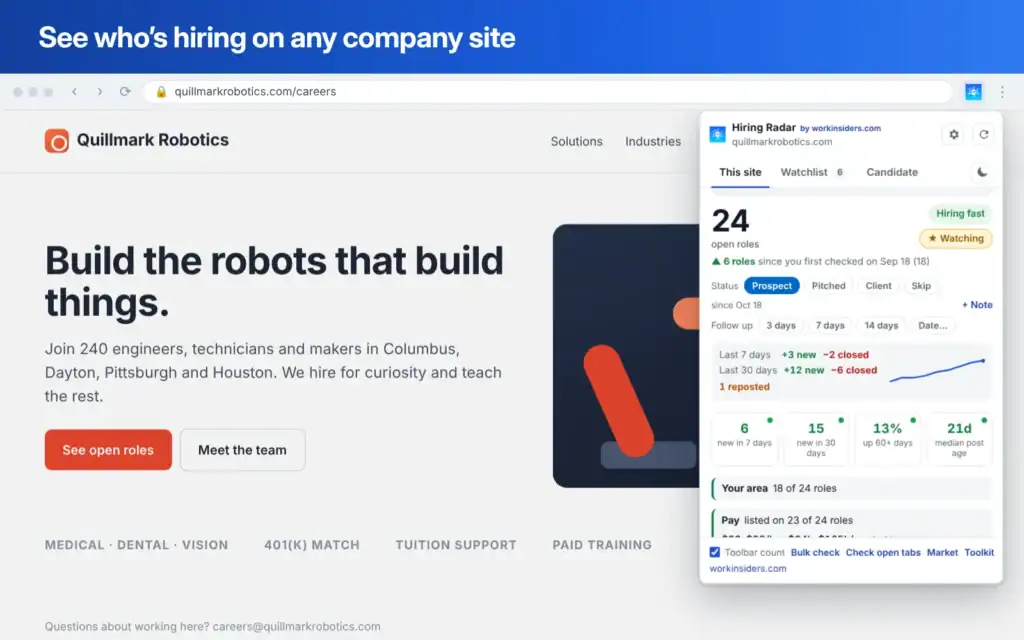
Click the icon on a company's website. Hiring Radar finds the company's real job board and turns it into a hiring picture in seconds. On Indeed, LinkedIn, Glassdoor, ZipRecruiter or Dice, it finds the company's own site and checks that instead.
Every open role
Each role with its location, team, job type and posted pay, newest first. Filter by your area, remote, days open or keyword.
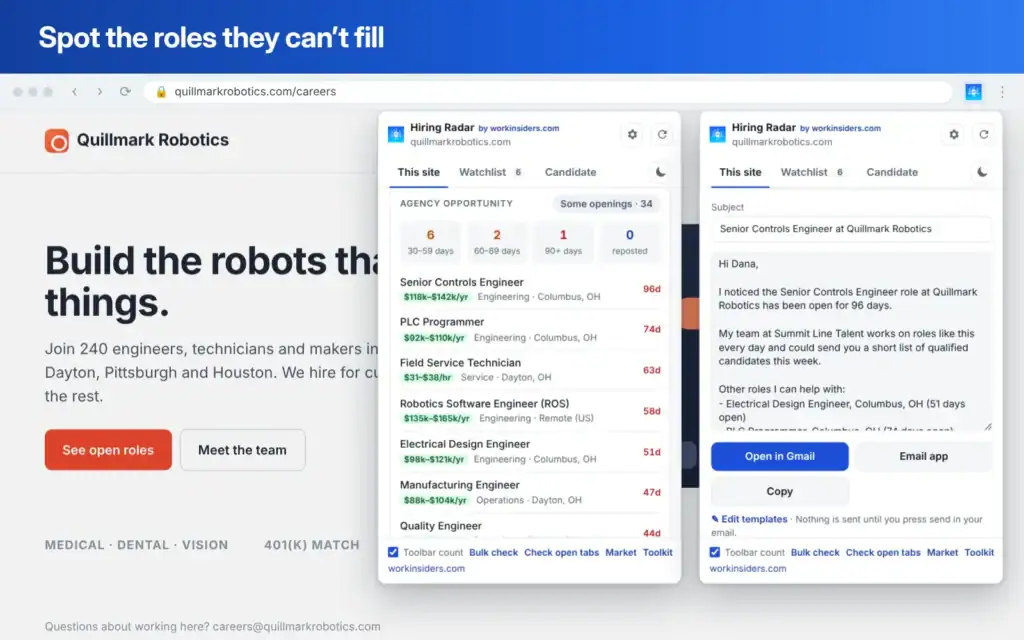
Roles they cannot fill
Roles open 30, 60 and 90+ days or reposted are tagged hard to fill. An opportunity score and an A, B or C grade rank the account.
The hiring system they use
Greenhouse, Workday, iCIMS, Bullhorn and 94 more, plus the interview, chat and job ad tools on their careers pages.
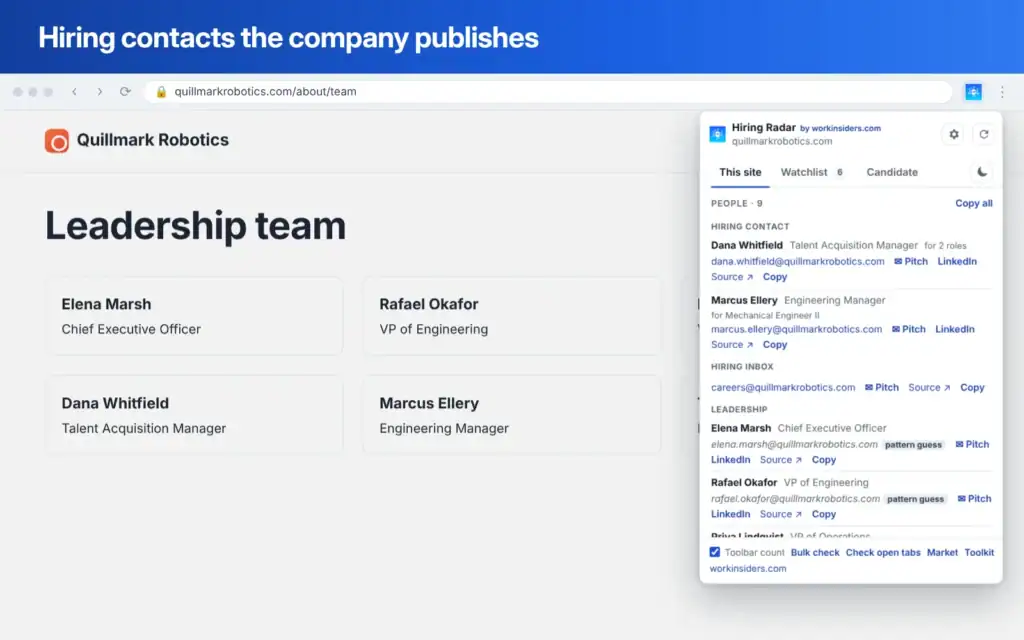
Contacts they publish
Recruiters, hiring managers and hiring inboxes named in job posts and on the team page, with phone numbers where listed.
Hiring signals
New posts in 7 and 30 days, roles closed and reposted, teams and cities hiring, contract share, urgent posts and a trend line.
Company context
What they do, size, industry, recent news, funding filings, H-1B sponsorship, the software they run and the ad networks on their site.
Screenshots
See it in action
For agency recruiters
From a company website to a pitch in three steps
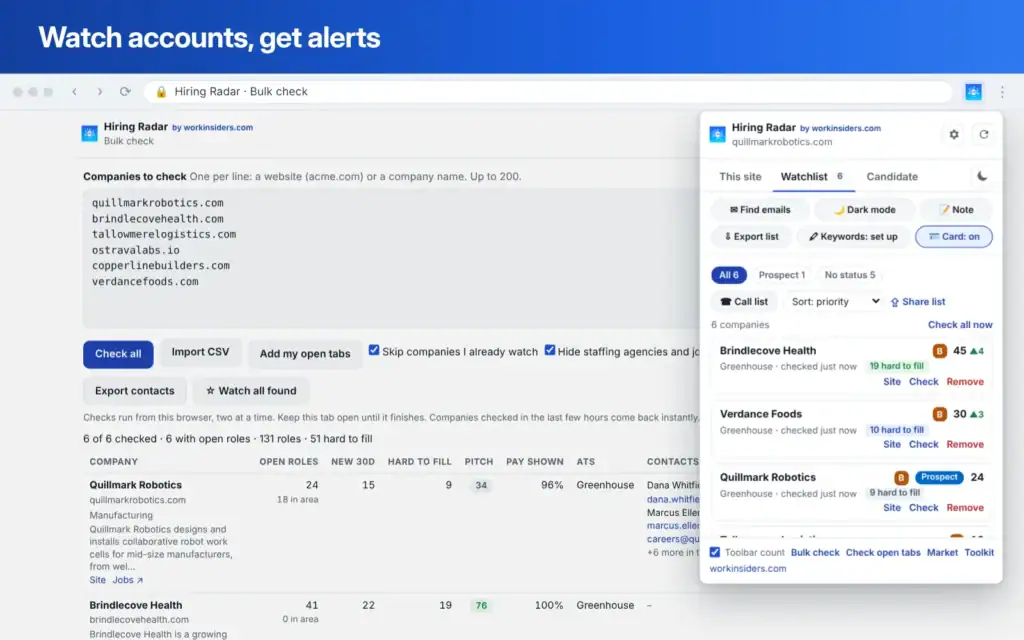
- Check. Open a prospect's site, or paste up to 200 companies into Bulk check. Each one gets open roles, hard to fill roles, pay, the hiring system and the top contacts in one row.
- Watch. Add the good ones to your watchlist. Hiring Radar re-checks them in the background and tells you when they post new roles, open a new team or city, or a client starts hiring again.
- Pitch. Write the pitch from what you found: the contact, the role open longest and how long it has been open. Open it in Gmail, set a follow-up, and the weekly call list tells you who to call next.
Also included
A recruiting toolkit in your browser
Card on LinkedIn, Gmail and GitHub
See a company's open roles, your status and notes right on a profile or an email. It only reads the page you are on.
Text snippets
Type ;pitch or ;follow in any text box and get your full message with the first name, company and longest open role filled in.
Follow-up emails
A three step follow-up list with the emails due each day, ready to open in Gmail. Mark a reply and the sequence stops.
Off-limits list
Mark clients and do-not-contact companies. A red warning shows on their people's profiles and emails.
Job post checker
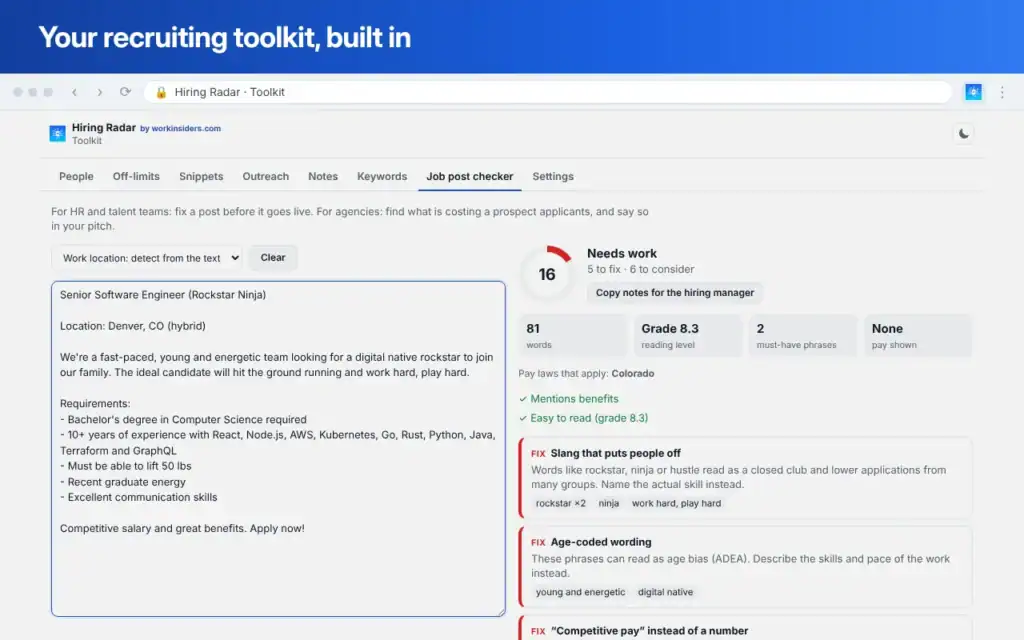
Scores a job post and flags pay range laws for the state or city, off-putting phrases, length and missing basics.
Screenshots with markup
Full page or area captures with arrows, boxes and blur for names and emails, sized for LinkedIn and slides.
Sticky notes and highlights
Leave notes on any page and highlight must-have and watch-out keywords on job posts and profiles.
Dark mode for websites
Turn any site dark with one shortcut. Sites that are already dark are left alone.
Privacy
Your data stays in your browser
- No account, no tracking. There is nothing to sign up for, and Hiring Radar never sends your browsing, the companies you check or your notes to Work Insiders.
- Stored on your computer. Results, the watchlist, saved people and notes live in your own Chrome profile. Sync to your other computers uses your own Chrome sign-in and can be turned off.
- Public information only. It reads company job boards and the contacts companies publish themselves. It never reads passwords, payment card fields or the body of your emails.
- Anonymous counts are opt-in. Weekly feature counts go to Work Insiders only if you switch them on, and you can see exactly what is sent first.
Every outside service it contacts, and why, is listed in the Hiring Radar privacy policy.
FAQ
Questions about Hiring Radar
Is Hiring Radar free?
Yes. Hiring Radar is free, with no account, no sign-up and no paid tier. Work Insiders makes it to help recruiters, and it links back to the Work Insiders directory when a company uses a tool we review.
How does it know which jobs a company has open?
It reads the company's own job board, the same public feed its careers page uses. It reads live jobs from 98 hiring systems, including Greenhouse, Lever, Workday, iCIMS, Bullhorn, JobDiva and SmartRecruiters. Where a company has no hiring system, it reads the job markup on its pages or the job list on its careers page.
Where do the hiring contacts come from?
Only from what the company publishes itself: named contacts in job posts and careers pages, hiring inboxes like careers@, and the team page. When a company publishes emails in a clear pattern, Hiring Radar can suggest an address for a named contact, and it always labels that suggestion as a pattern guess, never as a confirmed email.
Does it work on LinkedIn and Gmail?
Yes. A small card on LinkedIn profiles and company pages, open Gmail emails and GitHub profiles shows that company's open roles, your status and notes. It only reads the page you are looking at. It never clicks, scrolls or sends anything on LinkedIn, and you can turn the card off for one site or everywhere.
Is my data sent to Work Insiders?
No. Your results, watchlist, notes and saved people stay in your own Chrome profile. Nothing goes to Work Insiders unless you turn on anonymous weekly usage counts, which are off by default. The privacy policy lists every outside service it contacts and why.
Who is it for?
Agency recruiters and staffing business development first: finding companies that struggle to fill roles, seeing who to contact and keeping track of the pitch. In-house recruiters and sales teams that sell to hiring companies use it too.
Which browsers does it work in?
Google Chrome 130 or later on Windows, Mac, Linux and ChromeOS. Chrome extensions from the Chrome Web Store also install in Microsoft Edge and Brave.
Can I export to my CRM or ATS?
Yes. Contacts export as a CSV with standard column names, or in HubSpot, Bullhorn and Salesforce column layouts. Roles, bulk checks, saved people and page lists export to CSV too.
See who's hiring before your competitors do
Free for every recruiter. Install it, open a company site and click the icon.
Coming soon to the Chrome Web Store