

Key takeaways
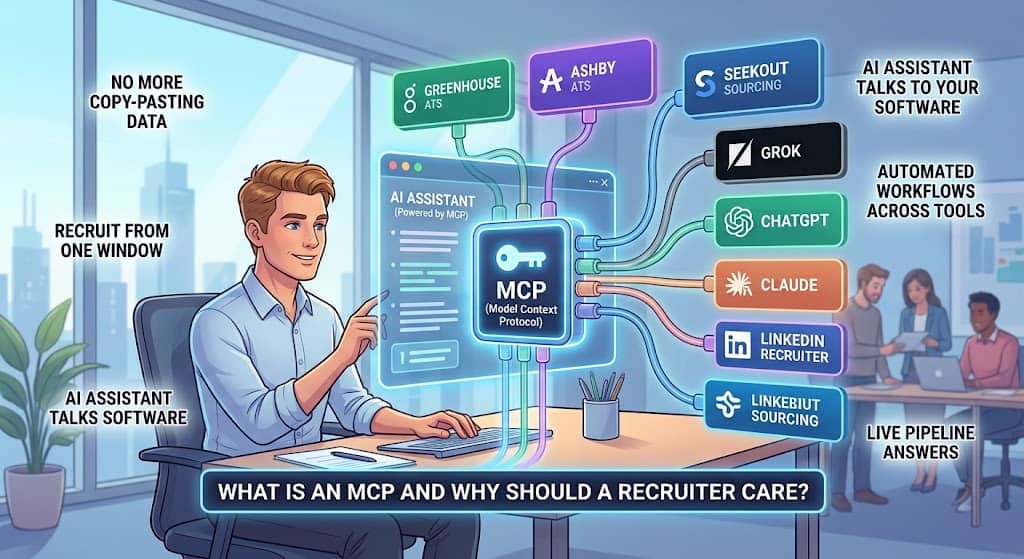
- MCP stands for Model Context Protocol. It is an open standard that lets an AI assistant such as Claude, ChatGPT or Grok connect directly to the software you already use, read what is in it, and take actions inside it from a chat window.
- Anthropic released it in November 2024. OpenAI, Google, Microsoft and AWS all adopted it within about a year, and it now lives under the Linux Foundation, so it is not one vendor’s pet project.
- For a recruiter, the practical change is simple: no more copying candidate data between tabs. You ask a question about your live pipeline and the AI answers from the real record, then updates it if you tell it to.
- Greenhouse, Ashby, SeekOut, Spott and a growing list of ATS and sourcing vendors shipped official MCP servers in 2026. Our own directory count found 180 of 778 recruiting, lead generation and HR products with their own MCP server, about 23 percent, and we list 30 of the best known by name below.
- MCP is a door, not a lock. It is only as safe as the permissions you give it. Use your own login, keep write access narrow, and start with read only questions.
What is an MCP in plain English?
MCP is a shared language that lets an AI assistant talk to other software. Think of it as a universal charging port for AI. Before MCP, every vendor had to build a separate connection for every AI product, and most never bothered.
With MCP, a vendor builds one connection, called an MCP server, and any AI assistant that speaks MCP can plug into it. The official MCP site describes it as an open standard for connecting AI applications to external systems.
The word “server” makes it sound heavier than it is. An MCP server is just the piece your ATS or sourcing tool publishes so that an AI can see a menu of things it is allowed to do: search candidates, read a job, move someone to a new stage, pull a pipeline report.
The AI reads that menu, decides which item fits your request, and calls it. You see the result in the same chat where you asked.
Anthropic launched MCP in November 2024, and in December 2025 donated it to the Linux Foundation’s Agentic AI Foundation, with AWS, Google, Microsoft, OpenAI, Bloomberg and Cloudflare backing it.
That matters for a recruiter because it means the standard will outlive any single AI vendor. A tool that supports MCP today will still work with whatever assistant you are using in three years.
How is MCP different from an API or a Zapier style integration?
An API is a set of instructions a developer follows to make two systems talk. It works, but someone has to write code for every pairing, and the code has to be maintained when either side changes.
Most recruiting teams never had that someone, so “we integrate with your ATS” usually meant a limited sync that a vendor built once and rarely improved.
Automation tools like Zapier connect systems with fixed recipes. When a candidate reaches stage X, send email Y. They are useful, but they only do what you pre wrote, and they do not understand plain language.
MCP is different because the AI decides which tool to call and in what order, based on what you ask.
Find me every candidate we rejected for the senior engineer role in the last six months who had strong feedback on the technical screen” is a single sentence for an MCP connected assistant. It is a weekend project in Zapier.
The best way to picture it: an API is a phone line, a Zapier recipe is a voicemail script, and MCP is a colleague who can pick up the phone, understand the question, and go find the answer.
If you want the technical comparison between MCP and the other protocol AI agents use to talk to each other, we cover it in MCP vs A2A. To see agents doing recruiting work end to end, read our AI recruiting agents guide.
| Question | API | Zapier style automation | MCP |
|---|---|---|---|
| Who sets it up? | A developer, per pairing | You, one recipe at a time | You, one sign in per tool |
| Understands plain language? | No | No | Yes |
| Decides which step to run? | No, the code does | No, the recipe does | Yes, the AI does |
| Can chain several tools in one request? | Only if coded | Only if pre built | Yes |
| Breaks when the vendor changes something? | Often | Sometimes | Rarely, the vendor maintains the server |
| Works with any AI assistant? | No | No | Yes, that is the point |
Why does MCP matter for recruiters right now?
Because the volume problem got worse and the tools finally caught up. Greenhouse reports that job applications have surged 412 percent since 2023 while open roles barely moved. AI polished resumes flood every posting.
A recruiter reading applications by hand cannot keep up, and an AI that cannot see your ATS cannot help. MCP is the bridge that lets the AI see it.
The vendors you already pay for are shipping it
In 2026 the major ATS platforms stopped treating MCP as an experiment. Greenhouse announced its MCP as a governed way for hiring teams to connect AI tools to Greenhouse, and its setup guide shows it working with Claude, ChatGPT and Grok.
Ashby’s MCP server lets Claude and ChatGPT work directly with Ashby data: summarize a pipeline, prepare an interview brief, move a candidate to a new stage.
SeekOut launched SeekOut MCP in July 2026 so you can search its talent index and your own ATS data from the assistant you already use. Spott built one for recruitment agencies.
Adoption is not a niche story anymore
The developer kits behind MCP were downloaded roughly 100,000 times in the launch month.
By March 2026 that figure had reached 97 million monthly downloads. A 2026 survey of software companies found nearly half using MCP in production, and the official registry held close to 10,000 servers as of May 2026.
Those are technology industry numbers, and recruiting lags the technology industry by a year or two. That lag is your window. The recruiters who learn this now will be the ones running the desk when it becomes normal.
It changes what to ask a vendor
Once any MCP compatible assistant can connect to any MCP compatible tool, “do you integrate with my ATS” stops being a differentiator. Every tool with an MCP server integrates with everything.
The better question becomes what the server actually lets the AI do, whether it respects your user permissions, and whether every action is logged. If a vendor says “we have AI” but cannot answer “do you have an MCP server,” their AI is sealed inside their product and cannot work alongside the rest of your stack.
What can a recruiter actually do with MCP today?
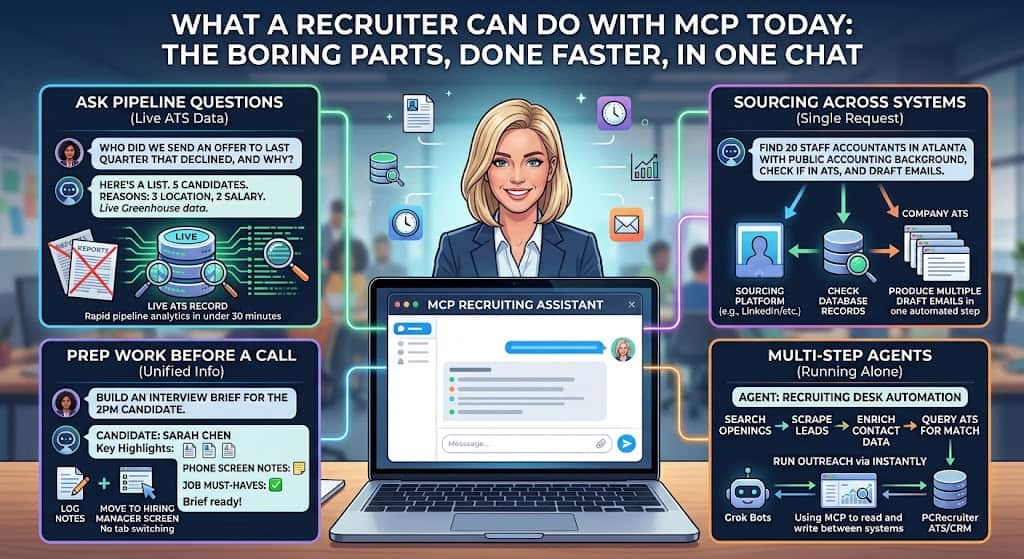
The honest answer is: the boring parts of your day, done faster, without leaving one chat window. Here is what teams are running right now.
Ask questions of your own pipeline
“Which of my open roles has had no candidate movement in ten days?” “How many people are sitting in the onsite stage across all engineering reqs?” “Who did we send an offer to last quarter that declined, and what reason did they give?”
With an MCP connection, the assistant answers from your live ATS record instead of from a report someone exported last week. A Greenhouse customer described pipeline analytics that used to need a business intelligence team now arriving in under 30 minutes.
Prep work before a call
“Build me an interview brief for the candidate I am meeting at two, pulling their resume, our notes from the phone screen, and the job’s must haves.” The assistant reads the candidate record, reads the job, and hands you a one page brief. After the call, “log my notes and move her to the hiring manager screen” writes the record back. No tab switching, no retyping.
Sourcing across systems
This is where MCP earns its keep, because sourcing is where the most tools have shipped servers.
Connect a sourcing platform and your ATS to the same assistant and you can say “find 20 staff accountants in Atlanta with public accounting backgrounds, check whether any are already in our ATS, and draft a first touch email for the ones who are not.” Each step used to be a different browser tab. Now it is one request that runs while you do something else.
Multi step agents that run without you
An assistant answers a question. An agent is given a task and works through it on its own, using MCP connections to read and write across your tools.
We run this ourselves. Our recruiting desk uses PCRecruiter as the ATS and CRM, with an MCP connection to Grok, and a team of Grok Bots that search job openings for leads, scrape and enrich contact data, and query the ATS for matching records. Instantly then runs the outreach from what the bots gathered.
None of that would hold together without a standard way for the bots to reach the database. If you want the beginner version of that setup, read our guide to Grok Bot for recruiting.
Which recruiting tools have an MCP server?
Fewer than you would guess from the marketing, and more than there were six months ago.
We flag MCP support on every listing in our directory, and our latest census found 180 of 778 products, or 23 percent, with their own MCP server. Email verification tools lead at 58 percent, then email finders at 43 percent and sourcing tools at 42 percent. ATS platforms sit at 21 percent and HRIS at 20 percent.
Another 218 products have an API but no MCP server, which means a developer could connect them but you cannot do it yourself.
| Category | Share of tools with an MCP server |
|---|---|
| Email verification | 58 percent (15 of 26) |
| Email finders | 43 percent (43 of 101) |
| Sourcing | 42 percent (35 of 83) |
| ATS | 21 percent (24 of 117) |
| HRIS | 20 percent (9 of 46) |
| All 778 products in the directory | 23 percent (180 products) |
There are two kinds of MCP server, and the difference matters. Official servers are built and maintained by the vendor, sit behind your normal login, and respect the same permissions you have in the product.
Community servers are built by outside developers on top of the vendor’s API. They often expose more of the product, but they are unsupported, you usually paste an API key into a config file to use them, and they can break when the vendor changes something.
HeroHunt’s review of the space lists Lever, Bullhorn, Recruitee and Crelate as covered by community servers only, while Teamtailor has since shipped its own official server. For candidate data, use the official one when it exists.
| Official MCP server | Community MCP server | |
|---|---|---|
| Built by | The vendor | An outside developer |
| How you sign in | Your normal login | An API key pasted into a config file |
| Respects your user permissions | Yes | Usually whatever the API key allows |
| Supported when it breaks | By the vendor | Nobody, or a volunteer |
| Setup skill needed | None | Some technical comfort |
| Examples in recruiting | Greenhouse, Ashby, Workable, Teamtailor, SeekOut, Spott, Manatal | Lever, Bullhorn, Recruitee, Crelate, JazzHR |
| Use for candidate data? | Yes | Only with a technical owner and a narrow key |
You can filter our recruiting tools directory to show only tools with an MCP server, by category. We recheck the flags every quarter because vendors add servers fast.
Which recruiting tools have an official MCP server right now?
We checked each vendor’s own documentation on 1 October 2026. A tool makes this list only if the vendor itself publishes the server or its setup guide. Community servers and “AI ready” claims do not count. Live means the vendor documents it with no beta label.
Every server below signs in as you, or with a key you control, so the assistant should see only what your account can see. Many also need a particular plan, so check the access column before you promise your team anything.
Applicant tracking systems and recruiting CRMs
| Tool | What the AI can do | Access and plan | Status |
|---|---|---|---|
| Search candidates, jobs and interviews; add notes, create candidates and move stages | An admin switches it on; you sign in with your Ashby login | Beta (Ashby docs) | |
| Read and update recruiting data inside the scopes an admin sets | Core, Plus or Pro plans; an admin sets it up | Open beta (Greenhouse support) | |
| More than 90 actions across jobs, candidates, offers, requisitions and time off | Included on all plans | Live (Workable help) | |
| Answer questions about jobs and candidates, summarize profiles, move stages and comment | An add on an admin activates; every action is logged | Live (Teamtailor support) | |
| Search candidates and jobs, read notes and matches | Enterprise Plus plan | Live (Manatal docs) | |
| Search, create and update records, pipelines and tasks; it cannot delete | Sign in with your Recruit CRM account | Live (Recruit CRM) | |
| About 180 actions across people, jobs, deals and placements | Professional plan and up | Live (Loxo MCP page) | |
| Connects an assistant to your Pinpoint hiring data | API key | Documented (Pinpoint MCP page) |
Sourcing and interview tools
| Tool | What the AI can do | Access and plan | Status |
|---|---|---|---|
| Pipelines, scorecards, outreach and analytics | Sign in with your Gem login | Launched August 2026 (Gem announcement) | |
| Search over a billion profiles, get contact details and export to your ATS | Sign in with your SeekOut login | Live (SeekOut MCP page) | |
| Read projects, shortlists and analytics | Paid plans | Live (Juicebox docs) | |
| Source and review candidates | Sign in with your Pin account | Beta (Pin docs) | |
| Talent data through Findem Studio | Findem customers | Launched September 2026 (Findem news) | |
| Interview transcripts, notes and reports; create outreach sequences | Switch it on in Metaview settings | Live (Metaview blog) | |
| Interview data, summaries and analysis | One click install in Claude | Live (BrightHire blog) |
HR and payroll platforms
| Tool | What the AI can do | Access and plan | Status |
|---|---|---|---|
| Employees, time off, goals, applicant records and comments | Sign in with your BambooHR login | Beta (BambooHR docs) | |
| Contracts, people, payroll and time off | Sign in, or use a personal token | Live (Deel developer docs) | |
| Search people and time off; draft new hires for a person to approve | Needs the Rippling AI subscription | Live (Rippling docs) | |
| Payroll and people questions; onboarding and payroll runs, with each change confirmed | Admins only | Live (Gusto MCP page) | |
| Reviews, one to ones, goals and feedback | Works in Claude, ChatGPT and Slack | Live (Lattice MCP page) | |
| Agent tools for HR data over MCP | Workday Extend Professional | Early access; general release planned for late 2026 (Workday newsroom) |
Outreach, scheduling and job boards
| Tool | What the AI can do | Access and plan | Status |
|---|---|---|---|
| Search and enrich contacts, add them to sequences | Sign in, or use an API key | Live (Apollo docs) | |
| Find and verify contacts, research accounts and run workflows | Sign in with your Clay account | Live (Clay guide) | |
| More than 40 actions on leads, campaigns and sequences | Sign in, or use an API key | Live (lemlist docs) | |
| Campaigns, leads and analytics | API key | Live (Instantly docs) | |
| Pipeline insights and create actions; deleting is off by default | Needs the Amplify add on | Live (Outreach support) | |
| Read and update CRM records | Sign in with your HubSpot login | Generally available since April 2026 (HubSpot changelog) | |
| Check availability, book and cancel meetings | Sign in with your Calendly login | Live (Calendly docs) | |
| Job search, job details, company data and your own resume. Built for job seekers, not employers | Claude only; sign in with Indeed | Beta (Indeed docs) | |
| Job search only, for job seekers | No login needed | Live (ZipRecruiter docs) |
Watch out for job board servers
The Indeed and ZipRecruiter servers are built for people looking for work. They search public job listings. They do not post jobs, search resumes or touch your employer account, so they will not help you fill a req.
Which popular tools still have no official MCP server?
Lever, SmartRecruiters, Bullhorn, JazzHR, JobAdder, Recruitee and hireEZ connect to AI assistants only through community built servers or unified API services such as Unified.to. We found no MCP server at all for LinkedIn Recruiter, Paradox or HireVue. Every “LinkedIn MCP” you see online is built by a third party.
If your tool is on that list, ask the vendor for their MCP plans and use exports or an automation tool in the meantime. The free MCP readiness checker checks a whole stack in one go.
Do you need to be technical to use MCP?
For an official server, no
If your ATS or sourcing tool ships its own MCP server, connecting it looks like connecting any other app to your phone. You open the connectors or apps area of your AI assistant, pick the tool, sign in with the account you already use, and approve the permissions it asks for.
Greenhouse’s own guide walks a site admin through it in a handful of clicks, and the only real requirement is that your AI tool and your Greenhouse login use the same email address. Nobody writes code. Nobody opens a terminal.
For a community server, some
Community servers usually mean editing a settings file, pasting in an API key, and running a small program on your own computer.
It is not hard for someone who has done it before, but it is not a recruiter’s job. If the only MCP server for your tool is a community one, ask someone technical to set it up, or wait. Vendors are shipping official servers quickly and the gap closes every quarter.
What you do need is a clear question
The skill that matters is the one recruiters already have: knowing exactly what you want to know. “Show me the pipeline” gets you a wall of data.
Which candidates in the final stage for the controller role have not had contact in five days, and draft a check in note for each” gets you something you can act on. Good MCP use is good delegation, and recruiters delegate for a living.
Is MCP safe to connect to candidate data?
It can be, and it is worth being clear eyed about why the answer is not a flat yes. MCP itself is a way of describing and calling tools. It has no built in security model.
Everything that makes a connection safe or unsafe sits around it: whose login the AI is using, how much it is allowed to change, and whether anyone can see what it did. Read “open standard” as “standard,” not as “safe by default.”
The four risks that actually matter
First, over broad access. If the AI connects with an admin account, it can do anything an admin can, including delete. Connect with your own account and it can only do what you can. Second, shared or leaked keys.
Community servers often use a static API key sitting in a plain text file, which security audits through 2026 found leaking in bulk. Official servers use a normal sign in flow, which is one more reason to prefer them. Third, prompt injection. If an AI reads a resume or an email that contains hidden instructions, it can be tricked into acting on them.
This is a real, unsolved problem across the whole AI industry, and the practical defense is to keep anything destructive behind a human approval step. Fourth, no record. If your vendor cannot show you a log of every action the AI took, in your name, you cannot audit a mistake.
| Risk | What it looks like | What stops it |
|---|---|---|
| Over broad access | AI connected with an admin account | Connect with your own login only |
| Leaked keys | API key sitting in a plain text file | Prefer official servers with a normal sign in |
| Prompt injection | Hidden instructions inside a resume or email | Keep rejections, deletions and sends behind a human approval |
| No record | Nobody can say what the AI changed | Use a vendor that logs every action in your name |
A sensible way to start
Connect with your own login, never a shared one. Start with questions, not actions, for the first few weeks. When you move to actions, keep them reversible: stage moves and notes, not rejections or deletions.
Ask your ATS vendor whether the MCP server respects your role permissions and logs every call. And loop in whoever owns privacy at your company before candidate data flows through a new tool, because your obligations under GDPR, CCPA and your own candidate privacy notice do not change just because the tool is an AI.
What are recruiters asking about MCP on Reddit?
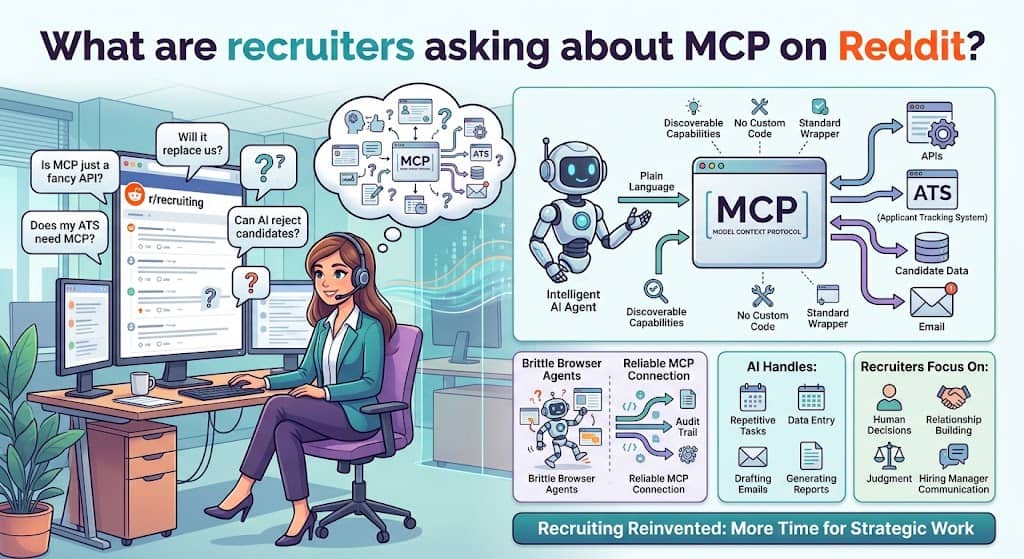
The same handful of questions keep surfacing in the recruiting and AI communities. Short answers below, written so you can paste them to a colleague.
Is MCP just a fancy name for an API?
No. An API is the underlying pipe. MCP is a standard wrapper that lets an AI discover what the pipe can do and use it in plain language, without a developer writing custom code for every pairing.
Does my ATS need MCP or can the AI just log in and click around?
Browser clicking agents exist, but they are slow, brittle and easy to break with a layout change. An MCP connection is faster, more reliable, and leaves a proper audit trail. If your ATS offers one, use it.
Will this let the AI reject candidates on its own?
Only if you let it. The MCP server exposes a menu of actions and your account permissions decide which the AI can use. Most teams keep rejections and offers as human decisions and let the AI handle research, drafting and record keeping.
Which AI assistants work with it?
Claude, ChatGPT and Grok all support MCP connections, as do Microsoft Copilot Studio and Amazon Q. Greenhouse’s setup guide lists all of them. The point of a standard is that you are not locked to one.
Is this going to replace recruiters?
It replaces the parts of recruiting that were never really recruiting: retyping, tab switching, pulling reports, drafting the same email fifty times. The judgment calls, the relationship with the hiring manager and the conversation that closes a candidate are still yours. The recruiters most at risk are the ones who keep doing the retyping by hand.
What should a recruiter do next?
Find out whether your ATS has an official MCP server. Search the vendor’s help center for “MCP” or check the listing in our MCP directory filter. If it does, ask your admin to enable it for your account and connect it to whichever assistant your company already pays for.
Spend a week asking it questions about your pipeline before you let it change anything. Then pick one repetitive task, an interview brief or a weekly pipeline summary, and hand that over. That is the whole on ramp. You do not need a project plan, a budget or a developer to take the first step.
Quick answers
What does MCP stand for?
Model Context Protocol. It is an open standard, released by Anthropic in November 2024 and now governed by the Linux Foundation, that lets AI assistants connect to outside software.
What is an MCP server in recruiting?
The connection point a recruiting tool publishes so an AI assistant can search, read and update its data. Greenhouse, Ashby, SeekOut and Spott are among the vendors with official ones.
How many recruiting tools support MCP?
Our directory census found 180 of 778 products, or 23 percent, with their own MCP server. Email verification, email finder and sourcing tools lead.
Do I need to be technical to use MCP?
Not for an official server. You sign in once and start asking questions. Community servers built by outside developers do need some setup.
Is MCP secure?
The protocol has no security built in. Safety comes from connecting with your own login, keeping write access narrow, keeping destructive actions behind human approval, and using a vendor that logs every action.
Why should a recruiter care about MCP?
Because it is the difference between an AI that can only talk about recruiting and an AI that can do recruiting work inside the tools you already use, and the vendors you pay for are shipping it now.
Free newsletter
Get the Work Insiders weekly
One email a week: the recruiting and HR tech news that mattered, the tools we just added to the directory, and one practical guide. No spam, and you can unsubscribe in one click.