

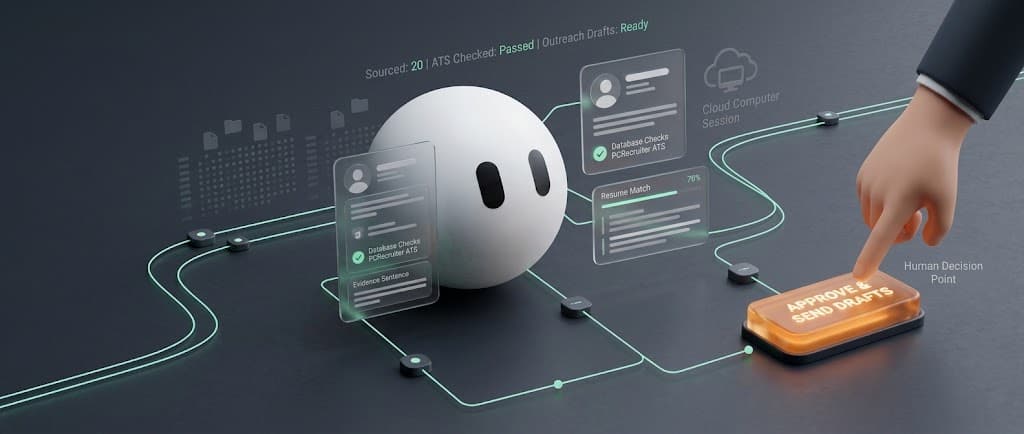
Grok Bot for recruiting works when you treat it as a junior sourcer that finds evidence and drafts work, while you stay the person who sends, rejects, and decides.
A hiring chatbot answers a question and leaves you inside five other tabs. A recruiting bot is supposed to finish a desk job: build a shortlist, write the note, file the record, and stop before anything leaves the building.
Grok, the chat model on X, is not Grok Bot. SpaceXAI launched Grok Bot in August 2026 as named teammates that sit on a cloud computer, sign into your tools, and come back when a human call is required. Read the Grok Bot launch post.
On September 24, 2026 xAI published its own recruiting team guide. Their recruiters run four bots that prep interviewers, draft scorecards, source overnight and find where candidates fail. We break that playbook down below and show how an agency desk adapts it.
Recruiting is already the most common place AI shows up in HR, at 27 percent of organizations using it, according to SHRM’s 2026 AI research. LinkedIn found companies that use AI assisted messaging most are nine percent more likely to make a quality hire, in its Future of Recruiting report.
In short
- Treat Grok Bot as a junior sourcer: it finds evidence and drafts, you send and decide.
- xAI’s own recruiters run four bots: Preppy, Pulse, Scout and eVal.
- Agency desks should add a CLEAR or FLAG check before any batch goes out.
- Start with one Talent Scout bot and a do not contact rule.
The rule we do not bend: nothing reaches a candidate until you approve the exact wording.
What is Grok Bot for recruiting?
Grok Bot is a named AI teammate with memory and a persistent cloud computer that has a browser, files, and a terminal.
You message it the way you would message a sourcer on your team. You give it a role, a source list, a stop rule, and a deliverable. It works across apps and websites, including tools with no clean API, and it keeps going after you close the laptop.
xAI treats Talent Scout as a first class job. The starter prompt in its official use cases is the beginner playbook: find 20 people who meet the must have criteria, exclude anyone already in the ATS, explain the evidence, draft outreach in your voice, do not contact anyone.
Work Insiders lists free recruiting templates on the AI agents for recruiting page. They cover sourcing, screening, outreach, interviewing, and people ops. Our guide to recruiting agent workflows covers costs and hard cases.
How do we run Grok Bot at Work Insiders?
We do not write about this from the docs alone. Work Insiders runs a Grok Bot team every day. One bot searches new and old job openings for hiring leads. One finds candidates on the public web and builds shortlists. One researches vendors for our tool directory, and we check its work before anything goes live.
One writes competitor reports. One queries our ATS, PCRecruiter, over its MCP connection so no shortlist repeats a name we already hold. The outreach itself runs through Instantly, on data the bots gathered, and every sequence is approved by a person before it starts.
Every rule below is one we learned by breaking it first. See the full stack on our best recruiting tools page, and our count of which recruiting tools have an MCP server shows which ATS and CRM platforms a bot can query directly.
What does xAI’s own recruiting team use Grok Bot for?
xAI’s recruiters built four bots at a team offsite, each aimed at one daily problem. The official recruiting guide, written by Holly Dyche, describes them this way.
| Bot | What it does | Where the recruiter stays in charge | On Work Insiders |
|---|---|---|---|
| Preppy | Drops one Slack note before an interview: who the candidate is, why the team is excited, the stage, focus areas and what is already covered | The interviewer still runs the conversation |  Preppy listing |
| Pulse | Pulls the call transcript, matches it to the role scorecard and drafts the feedback form, then asks for your rating and gut read before it redrafts | Your rating and your take go into the form |  Pulse Scorecards Demo |
| Scout | Learns from scorecards of hired and rejected people, sources overnight, adds leads to the ATS and drafts sequences | You approve the send, then it tracks replies | Not listed: the shared template shows no details |
| eVal | Finds where candidates fail later in the loop and turns that into questions for the recruiter screen | You decide which questions to adopt |  eVal listing |
The real lesson is the chain. Context moves with the candidate from bot to bot, so nobody explains the same person four times.
- eVal finds where people fail and sharpens the profile
- Scout sources from that profile and drafts outreach you approve
- Preppy briefs the interviewer before the call
- Pulse drafts the scorecard and asks for your view
Their tips for getting there: walk the bot through a task once and have it save that as a skill, point it at your best outreach and debrief notes before it drafts, and turn every repeated correction into a standing rule.
One caution. xAI’s team runs a mature in house stack with Ashby, Slack, Notion and Granola, and its Scout writes leads into the ATS on its own. On a new desk, keep ATS writes behind your approval too until the bot has earned it.
How does an agency recruiter adapt xAI’s playbook?
xAI’s guide is written for an in house team running interview loops. An agency desk has different jobs: win the client, take the brief, submit candidates and chase the offer. The pattern that fits best comes from xAI’s SDR guide, not the recruiting one.
Before any batch goes out, the bot checks every name against your ATS, CRM and sequencer and sorts it into two buckets. Nothing sends on its own.
CLEAR Safe to draft and stage, unsent. These names keep moving.
FLAG Something is unclear, so the bot stops and you decide.
For an agency, FLAG should catch the costly mistakes: a candidate already submitted to that client, a contact another consultant owns, a person who opted out, or a client with an open fee dispute. Edge cases stop at you.
| Agency job | What the bot prepares | What you keep |
|---|---|---|
| Business development | A weekly list of companies showing hiring signals with a why now note (tutorial) | Which clients to call |
| Client intake | A one page brief from your call notes, plus the questions you missed | Agreeing the brief and fee |
| Sourcing | A shortlist with evidence, checked against your database first | Who gets a message |
| Submittals | A candidate summary in the client’s format, flagged if already sent | What the client sees |
| Interview prep | A Preppy style brief for the candidate and the client | The prep call itself |
| Follow up | Drafts for candidates and clients who went quiet | Every send |
How is Grok Bot different from a hiring chatbot?
A hiring chatbot answers in one chat window and leaves you to open LinkedIn, the ATS, the sequencer and the calendar yourself. Grok Bot finishes that middle stretch inside the real tools and keeps working after you close the laptop. Grok answers. The bot acts. We unpacked that split in What is Grok Bot vs a chatbot.
Several bots share one cloud computer on your account. Files, browser sessions, and logins are shared on purpose so handoffs work, according to the Grok Bot docs. That is also the security warning. A sourcing bot that can open Gmail can read Gmail. Grant the least access you can live with.
What recruiting work can a beginner hand over first?
Start with read and prepare work. Do not start with send. The jobs that pay off in week one are the jobs a junior recruiter already owns: turn a messy intake into a tight brief, find people who match must haves, write evidence next to each name, and leave outreach in draft.
Can Grok Bot source candidates for you?
Yes, if you give it a narrow role and a place to look. Name the must haves, the nice to haves, the locations you hire in, and the companies that are out of bounds. Ask for a list with a public profile URL, an evidence sentence, and a gap note. Tell it to skip anyone already in your ATS.
That last instruction is not polish. Nearly half of sourced hires, 46 percent, now come from people already in the ATS or CRM, up from 26 percent in 2021, according to Gem’s 2026 benchmarks. A bot that cannot check the database just adds duplicates to the pile.
Templates such as Hiring Signal Desk and Req-to-Outreach are built for this shape of work. Req-to-Outreach takes a job description and returns a ranked shortlist plus one email per person. It still waits for your yes.
Do not ask the bot to scrape LinkedIn. The LinkedIn User Agreement forbids scripts, robots and crawlers that copy profiles. If a workflow would get a human sourcer banned, it will get a bot banned faster.
Can Grok Bot screen resumes without making the hire?
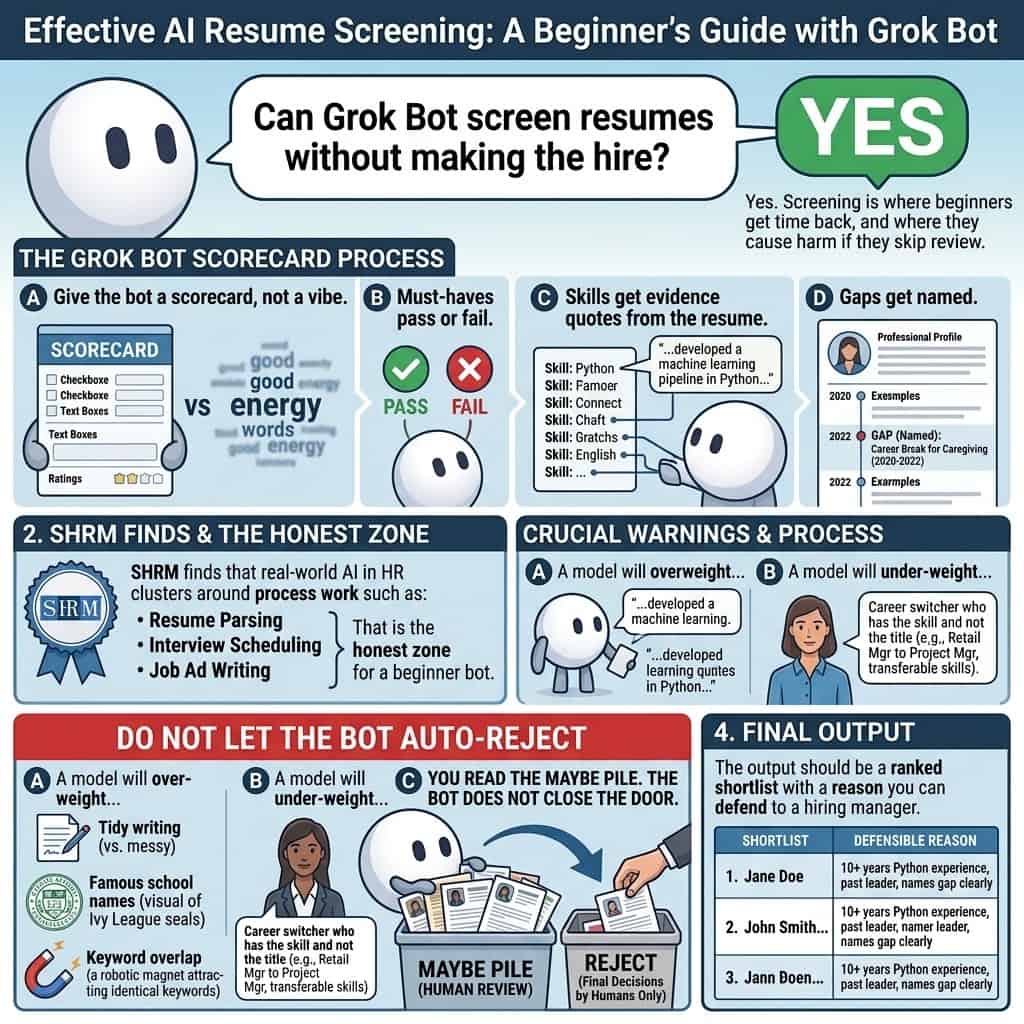
Yes. Screening is where beginners get time back, and where they cause harm if they skip review. Give the bot a scorecard, not a vibe. Must haves pass or fail. Skills get evidence quotes from the resume. Gaps get named.
Do not let the bot auto reject. A model will over weight tidy writing, famous school names, and keyword overlap. You read the maybe pile.
Can Grok Bot write outreach that candidates will answer?
It can draft outreach that sounds like you, if you feed it your voice and one true hook. A good first line names a real project or team change, not their journey.
Keep send in your hands. Approve the exact wording, then send from the outreach tool you already trust. We cover the outbound version of this desk in Grok Bot for cold outreach.
Can Grok Bot run interview logistics?
Yes, as a coordinator, not as the interviewer of record. Scheduling, prep notes in the style of Preppy, stalled follow ups, and a morning brief are fair game. It should not invent availability, send updates before you say send, or decide who advances. See our scheduling tutorial and scorecards tutorial.
How do you set up your first recruiting bot?
Do not staff six bots on night one. Start with one named Talent Scout and one stop rule. Install from the Grok Bot download page and sign in with an eligible plan. The desktop app runs on macOS, Windows and Linux, and the mobile app on iPhone, iPad and Android, per the official docs. For step by step recruiting setups, see our Grok Bot tutorials for recruiters.
Create the bot with a short name, one job, and a review point: Talent Scout, source and draft, never contact a candidate. Then give it this first task.
Your first prompt, ready to paste
You are Talent Scout. Your job is to source and draft. You never contact anyone.
Role: [paste job description]
Must haves: [list]
Nice to haves: [list]
Locations we hire in: [list]
Companies out of bounds: [list]Find 20 people who meet every must have. Check each name against our ATS first and skip anyone already in it. Use only approved search tools and public pages. Do not use any LinkedIn automation.
Sort every name into CLEAR or FLAG. FLAG anyone already submitted, owned by a colleague, or who opted out, and say why.
Return a table: name, current role, one evidence sentence with its source, one gap, public profile URL, and a three sentence outreach draft in my voice that opens with a specific project or change from their profile.
Then stop and wait. I choose who gets a message.
When the bot hits a login, you take over the computer for the password, two factor code, or CAPTCHA. The session can stick so later bots on the same account reuse it. Treat that shared computer like a shared desk, not like a vault.
After the first shortlist looks usable, save the path as a skill and rerun it weekly. Monday morning is enough; daily runs create more rows than you can verify. Our routines tutorial covers the setup.
Read what a Grok Bot template is allowed to do before you add it. It copies instructions and skills, not the other person’s files or logins.
What should you never let the bot do alone?
Never let it send the first touch, reject a human, sign an offer, or change production data without a yes. Those four gates protect the candidate, the client, and your accounts.
| Hand to the bot | Keep for yourself |
|---|---|
| Turn a messy intake into a brief | Approve the brief |
| Find candidates who match must haves | Choose who gets a message |
| Write the evidence next to each name | Read the maybe pile |
| Rank a screen with quotes from the resume | Every reject and every advance |
| Draft outreach in your voice | Send it |
| Draft the scorecard from the transcript | Your rating and your take |
| Draft the offer | Sign it |
Title VII still applies when a tool scores people. If the bot down ranks a group because it favors a certain school or writing style, the company owns that outcome. Tell candidates when AI is in the process if your state or your counsel requires notice. This is not legal advice. Our candidate data tutorial lists the settings to check.
How much does Grok Bot cost for a hiring team?
There is no standalone Grok Bot checkout for most people. Since August 26, 2026, access is included with SuperGrok, SuperGrok Plus, SuperGrok Heavy, Cursor Pro, Cursor Pro+, Cursor Ultra and Cursor Teams plans, according to xAI’s plans update. X Premium+ subscribers can link their account for Grok Bot too, per X’s Premium help page. Check the live plan screen before you budget.
| Plan | Monthly price on x.ai | Grok Bot included |
|---|---|---|
| Cursor Pro | $20 | Yes, weekly usage included |
| SuperGrok | $30 | Yes, by linking |
| X Premium+ | See X’s site | Yes, by linking |
| Cursor Teams | $40 per seat | Yes, plus team billing and a shared marketplace |
Bot usage is metered separately from Grok chat and resets weekly. A tight Talent Scout job lasts; an overnight crawl does not.
What are recruiters asking about Grok Bot?
Will an agent get my LinkedIn account banned?
It can, if you let it act like a scraper. Stay inside approved search and keep send manual.
Does xAI have an official recruiting guide?
Yes. The Grok Bot for Recruiting guide from September 2026 covers four bots: Preppy, Pulse, Scout and eVal.
Can Grok Bot send candidate email?
It can draft it. You should send it. xAI’s own use cases and the Work Insiders templates all stop before send.
Does it work for agency recruiters?
Yes. Use the CLEAR and FLAG check so it never stages a duplicate submission or a contact a colleague owns.
How many bots should a beginner run?
One, then two. A Talent Scout plus a coordinator is enough. Add a third only when the handoff is stable.
Where do I get recruiting templates?
Start with the AI agents for recruiting page and our Grok Bot hub.
The beginner move is not to automate hiring. Staff one bot, give it one desk job, and keep the send key.
Last updated October 2026. Plan names, pricing, and platform support are rechecked quarterly alongside our directory census.
Free newsletter
Get the Work Insiders weekly
One email a week: the recruiting and HR tech news that mattered, the tools we just added to the directory, and one practical guide. No spam, and you can unsubscribe in one click.