

When people search how does an ATS work, Google often mixes two products. An applicant tracking system is recruiting software. It is not an automatic transfer switch, the electrical gear sold for generators by vendors such as Eaton.
Dave Zielinski wrote in this SHRM guide that an ATS is the backbone of recruiting technology. It is a core platform that collects and stores candidate resumes and automates job postings and other manual tasks.
The software sits between a public apply button and a hiring decision. It files people. It can screen them. It can leave them unread. Those are different events. They get mixed together in the phrase “the ATS rejected me.”
This is a software explainer, not a resume trick sheet. Other posts on this site cover resume keywords for remote jobs and more career advice. This page is about the software itself.
What is an applicant tracking system?
An applicant tracking system is the database and workflow tool a company uses to run hiring. The LinkedIn Talent Blog calls it recruiting software: a centralized repository for applications, resumes, and notes or feedback. It can automate interview scheduling and filter unqualified candidates. That blog cites a GetApp study of talent professionals: 86.1 percent said an ATS increased hiring speed and 78.3 percent said it improved quality of hire.
The Indeed Employer Guide (updated 31 Jul 2025) says an ATS stores and manages resumes, posts roles to job boards, runs keyword searches, moves applicant data through hiring stages, sends auto messages, schedules interviews, and sends offer paperwork.
SAP defines an ATS as HR software that is the central database for job and applicant information. It covers job descriptions, posting to career sites and job boards, resume scanning, interview scheduling, feedback, background checks, and offer letters with electronic signatures. Applicants use the same system to search, apply, and check status.
The Workday software page describes an ATS as the platform that organizes candidates from application to hire. It names resume parsing and screening, interview scheduling with calendars, and reporting that includes diversity metrics. A related Workday explainer says a parsing engine extracts education, skills, and work history into structured profiles, often with natural language processing. Recruiters can also search with filters such as years of experience or certifications.
SHRM says automation has particular value in sourcing, screening, and scheduling interviews. Vendors ship a database, forms, parsers, rules, pipelines, calendars, emails, and reports. Employers turn those pieces on or off.
How does an ATS work from apply to hire?
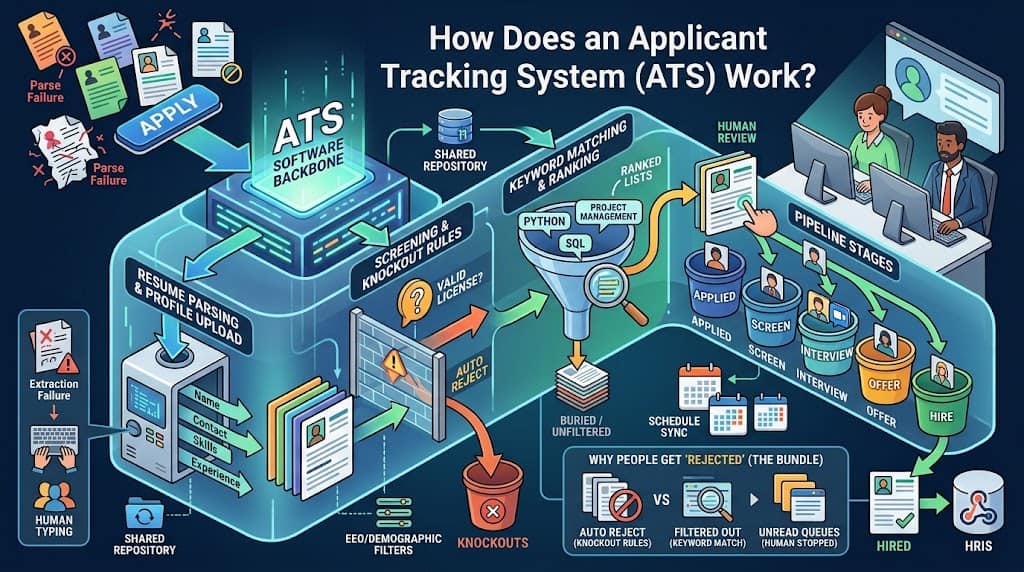
A requisition opens. The job is posted. Applications land in one system. Screening rules may fire. Recruiters search and move people. Interviews are booked. An offer is created. The hire record may pass to an HR system.
What happens when you click apply?
You submit a resume, form fields, and often extra questions. The ATS creates a candidate record and attaches the file. Oracle Recruiting documents a Profile Upload block that extracts information and fills part of the online submission. Candidates can review the extracted information and change it in later steps.
iCIMS stores that person as structured fields. The iCIMS Person Profile model includes name, addresses, phones, and related contact data. Recruiters search those fields, not only a PDF preview.
What gets stored after you submit?
Parsing tries to copy name, contact, jobs, and dates into those fields. Screening questions capture facts the resume may not state, such as a license or a shift. Knockout rules can change status before a recruiter opens the inbox. Keyword matching can sort the remaining pile. That is intake, not a hire.
How does a candidate move after the first screen?
A recruiter or hiring manager reviews a list, a score, or a structured profile. Greenhouse stage rules can send an availability request, a self schedule request, a Calendly request, or a templated email when a candidate enters a stage. If someone is hired, Greenhouse can Create Offer or Mark Candidate as Hired and fire webhooks that send data to an HRIS partner.
How does applicant tracking system software parse a resume?
Parsing is extraction, not a human read. Greenhouse resume parse help says the parser scans an imported resume and auto fills fields it detects. If the parse fails, the resume is only attached. Staff must type the fields by hand.
Greenhouse cannot parse resumes larger than 2.5 MB. Documented failures include spaces between letters; graphics, photos, or word art; image uploads rather than a .docx or .pdf file; tables, headers, and footers; name and contact in a header, footer, or text box; a columned layout; unclear sections; and company names that omit Inc, Co, LTD, or LLC.
Lever resume parsing help says the parser extracts name, organization, and contact details into profile fields. If parse fails, staff type the fields. OCR is not assumed. An image file can sit as an attachment while structured fields stay empty.
Oracle Recruiting often runs resume parsing through a third party partner. A call goes to the partner web service. Returned data populates the application. Oracle does not describe that step as in house OCR in the pages reviewed here, so this article does not claim OCR.
Greenhouse Talent Matching extracts skills, job titles, years of experience, start and end dates, and company names. It uses machine learning models. Structured application form data is not included in that calculation. If the system cannot process a resume, the candidate is surfaced for manual review. Humans still decide whether to advance or reject.
Indeed warns that a format the software is not set to recognize can mean hiring managers never see the file.
What are knockout questions and keyword matching?
These are two different machines. People blame both as “the ATS.”
Knockout questions are form rules. Greenhouse Auto Reject uses answers to Yes/No, single select, or multi select questions. The documented example is a Class A Commercial Drivers License. The system can assign a rejection reason and optionally send a rejection email. People set up to get new application notifications are not notified of auto rejected applicants.
Greenhouse application rules also cover Auto Advance. If Auto Advance and Auto Reject both trigger, Auto Reject wins.
Jobvite prescreening forms can use knockout or knock in questions to change status to Rejected. Candidates rejected through knockout do not automatically receive a rejection email. Knockout is not retroactive.
SmartRecruiters documents knockout questions on screening. A high volume article uses the ability to stand 5 to 8 hours as a knockout example. SAP learning says any Yes/No or dropdown screening question except diversity questions can be a knockout. Auto reject requires a rejection reason. A delayed rejection email is optional.
Keyword matching is search and score. Workday says automated resume ranking uses keyword filtering. The software extracts qualifications and scores applicants against job requirements.
Indeed says the employer inputs requirements, the software scans resumes, and it may move matches forward. The same guide lists the misses: career changers without expected keywords, a format the system does not recognize, and misspelled keywords in setup.
Greenhouse Talent Matching does not automatically advance or reject. SmartRecruiters lets teams sort by SmartAssistant match score. A low score can bury a file without deleting it.
Who sees your application?
The first viewer is often software. Then a recruiter, a hiring manager, interviewers, and if you are hired, an HRIS.
LinkedIn Talent Blog stresses a shared repository so teammates can see applications, notes, and feedback. Indeed notes that hiring managers can leave notes and ratings and share them.
Greenhouse can hide sensitive answers. API only questions can collect employer EEOC or demographic questions so answers do not surface in the recruiting UI.
Auto reject changes who is told you applied. Greenhouse says new application notifications skip auto rejected applicants. Your record can exist while the hiring team never gets a ping.
When does a recruiter actually look at your file?
Not at submit. A recruiter looks when they open the requisition, scan a queue, run a search, or click a name. If Auto Reject already fired, Greenhouse will not notify them that you applied. If parse failed, they may see empty fields and skip the row. If they sort by match score, they may stop after the first page.
Indeed says screening can move matches forward automatically, so a recruiter’s first look may already be a filtered subset. Lever’s pipeline help treats moving candidates between stages as a user action. In the Interview section, those moves are manual. Software can sort. A person still has to click.
Teams often stop reading once they have enough people in later stages, even while the posting stays live. Silence can mean never opened. Greenhouse says humans must type failed parse fields. Busy teams often do not.
How do pipeline stages, interviews, and offers work?
Stages are buckets with names the employer chooses: applied, screen, interview, offer, hired. Lever says pipeline stages organize opportunities, a split covered in our ATS vs CRM guide. Interview stages can auto populate interviewers, durations, and feedback forms. Moving a person is still a user action.
Greenhouse stage transition rules attach work to those buckets. Enter a phone stage and the system can request availability. Enter a later stage and it can send a self schedule link, a Calendly request, or a templated email.
Workday names interview scheduling that syncs calendars. Indeed lists scheduling and offer paperwork as standard ATS jobs. The offer stage is still inside the ATS. Greenhouse can Create Offer or Mark Candidate as Hired, then send a webhook to a partner HRIS.
How does an ATS support EEO and contractor recordkeeping?
The system keeps applications because the law keeps applications.
The EEOC summary of 29 CFR Part 1602 says private employers must keep personnel and employment records, including application forms, for one year from the date of the record or the personnel action, whichever is later. If a charge is filed, records related to the charge stay until final disposition. The EEOC recordkeeping page repeats the one year rule and the charge hold.
Federal contractors have a longer default. The OFCCP internet applicant rule defines an Internet Applicant only when four tests are met: an expression of interest through the internet or related electronic tools, the contractor considers the person for a particular position, the expression shows basic qualifications, and the person has not withdrawn. That definition lives in 41 CFR 60.1.3.
The OFCCP retention rule still requires applications, resumes, internet expressions of interest that were considered, resume database search criteria, tests, and interview notes, even when a person does not meet the Internet Applicant tests. The default is two years if the contractor has 150 or more employees and a government contract of at least $150,000. Otherwise the period is one year.
The same rule requires records of resumes added to an internal database, the date added, the position searched, the search criteria, and the date of the search. Electronic copies still count. DOL OFCCP electronic records guidance says records must be readable and capable of being copied. The ATS is often that copy.
Greenhouse API only questions exist so EEO answers can be stored without sitting in the recruiting UI.
Why do people say the ATS rejected them?
They mix three failures into one villain.
First, parse failure. The file is attached. Fields are empty. Search misses you. Greenhouse and Lever both say a human then has to type. Indeed says a format the system does not recognize can keep managers from seeing the file.
Second, knockout questions. You answered a Yes/No or dropdown in a way the employer marked as disqualifying. Greenhouse Auto Reject, Jobvite knockout status, and SmartRecruiters knockout questions can close the file without a recruiter opening it. Jobvite does not auto send a rejection email for that path. SmartRecruiters can delay the email.
Third, a human never opened the file. Ranked lists and full inboxes mean the recruiter stopped. LinkedIn Talent Blog says an ATS can filter unqualified candidates. Greenhouse Talent Matching still leaves the advance or reject click to a person.
“The ATS rejected me” is a bundle, not a diagnosis. The software may have rejected you, misfiled you, or shown you to no one.
Questions job seekers ask about ATS software
Can the software reject you the minute you apply?
Yes, if a knockout rule is on. Greenhouse Auto Reject and SmartRecruiters knockout questions can change status as soon as the form is in. Jobvite can set Rejected without mailing you.
Does a recruiter actually open every resume?
Vendor docs do not say yes. Greenhouse withholds new application alerts for auto rejected people. Indeed describes auto moving matches forward. Lever makes interview stage moves a manual user action.
Why would a clean looking PDF still fail?
Parsers read text and layout, not the picture of a page. Greenhouse lists image uploads, word art, columns, headers, footers, and text boxes as parse risks. OCR is not promised.
Who besides the recruiter can see the file?
Hiring managers, interviewers, and other users with permissions. EEO answers may be hidden, per Greenhouse API only questions. After hire, an HRIS may receive a subset through a webhook.
Does a low keyword score mean you were rejected?
Not necessarily. Workday ranks with keyword filtering. SmartRecruiters sorts by match score. Greenhouse Talent Matching does not auto reject. The job seeker cannot tell buried from deleted.
Why is there no rejection email?
Email is a setting. Jobvite help says knockout rejections do not automatically send one. Greenhouse and SmartRecruiters make the rejection email optional.
When do they stop looking at new applicants?
When they have enough people in later stages, a knockout already filtered you out, or a search never returned your name. Acceptance is not review.
What should you remember about the software?
An Applicant Tracking System is recruiting software that stores you as a record. It parses what it can. It files what it cannot. It can auto reject on form answers. It can rank on keywords. It can wait for a person who never clicks.
SHRM calls it the backbone of recruiting technology. Vendors document the same arc with different switches. Parsing failures, knockout questions, and unread queues are three systems. “ATS rejected me” names none of them.
Free newsletter
Get the Work Insiders weekly
One email a week: the recruiting and HR tech news that mattered, the tools we just added to the directory, and one practical guide. No spam, and you can unsubscribe in one click.