

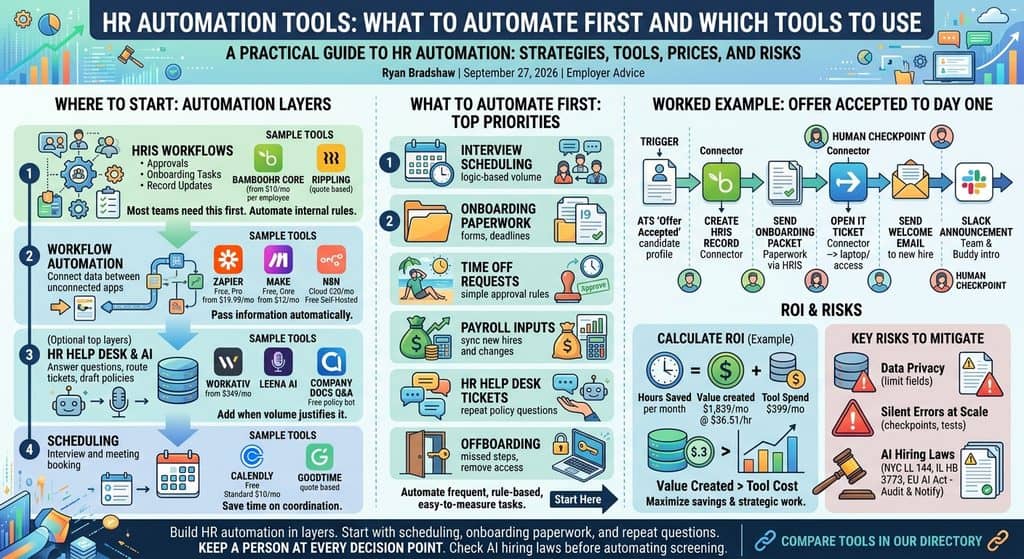
Quick answer: The best HR automation tools are the workflows already inside your HRIS, plus one connector tool such as Zapier, Make or n8n to link the systems your HRIS cannot reach. Automate high volume, rule based work first: interview scheduling, onboarding paperwork, time off approvals, payroll inputs, repeat HR questions and offboarding. Add AI only after the rules run cleanly.
Who it suits: HR teams of one to ten people who spend their week copying data between an ATS, an HRIS, payroll, IT and Slack.
What to check: which steps your HRIS can already automate, how many tasks or runs your connector plan allows per month, and whether any automated step makes or shapes an employment decision, because that step may fall under AI hiring laws.
What are HR automation tools, and which layer do you need first?
HR automation tools are software that moves HR data and tasks between people and systems without someone doing it by hand. They come in five layers, and most teams need the first two before anything else. The table below maps each layer to what it automates and example tools from our directory, with prices confirmed on vendor pricing pages.
| Layer | What it automates | Example tools and price as listed, September 2026 |
|---|---|---|
| HRIS workflows | Approvals, onboarding and offboarding tasks, record updates | BambooHR Core from $10 per employee per month (flat from $250 per month for 25 or fewer); Rippling quote based |
| Workflow automation | Moving data between apps that do not talk to each other | Zapier free, Professional from $19.99 per month; Make free, Core $12 per month; n8n Starter €20 per month billed annually, free self hosted Community Edition |
| HR help desk | Answering and routing employee questions | Workativ Business $349 per month; Leena AI and ServiceNow HRSD quote based |
| AI people ops | Drafting, summarizing and answering from policy docs | Company Docs Q&A bot, free |
| Scheduling | Interview and meeting booking | Calendly free, Standard $10 per seat per month billed yearly; GoodTime quote based |
Compare the full connector category in our automation tools directory, and see which ones have usable free plans on our free automation tools page.
How much HR work can actually be automated?
A large share of HR admin can be automated with current tools, but few teams are getting value from it yet. McKinsey estimated that 56 percent of typical hire to retire tasks could be automated with current technologies and limited process changes. In one example from the same piece, a company that automated offer letter drafting cut processing time by 66 percent.
Adoption is rising fast. SHRM’s 2025 Talent Trends survey of 2,040 HR professionals found that 43% of organizations use AI in HR tasks, up from 26% in 2024. Results lag behind the spending, though: Gartner reported that 88% of HR leaders say their organizations have not realized significant business value from AI tools. The gap usually comes from automating the wrong things first, or adding AI on top of a messy process.
Which HR processes should you automate first?
Automate the processes that are frequent, rule based and easy to measure, and leave judgment calls to people. The order below suits most small and mid size HR teams.
| Process | Why automate it | Best tool type | Human checkpoint |
|---|---|---|---|
| Interview scheduling | High volume, pure calendar logic | Scheduling tool connected to the ATS | Recruiter handles reschedules for senior roles |
| Onboarding paperwork | Same forms for every hire, hard deadlines such as Form I9 | HRIS onboarding workflow | HR completes I9 Section 2 review |
| Time off requests | Simple approval rules and balances | HRIS approvals | Manager approves exceptions |
| Payroll inputs | New hires, changes and hours feed payroll every cycle | HRIS to payroll sync, or a connector | Payroll admin reviews changes before the run |
| HR help desk tickets | The same policy questions repeat weekly | HR help desk or policy bot | Sensitive cases route to a named person |
| Offboarding | Missed steps leave accounts and laptops out | HRIS trigger plus IT provisioning | IT confirms access removed |
Practitioners agree on where to start. In an r/humanresources thread on HR ops automations, one detailed reply advised starting with ticket deflection because it is high volume and easy to measure, and another commenter warned that an agent is only as good as the handbook it reads.
What can your HRIS automate before you buy anything else?
Your HRIS can usually automate approvals, onboarding tasks and record updates on its own, so check it before adding a connector. BambooHR includes workflows and approvals for employee information updates and time off requests in its Core plan, according to its pricing page. Rippling goes further into IT, creating software accounts and setting access permissions when a new employee is added. Compare suites in our HRIS directory.
The limit shows up at the edges. In an r/msp thread on IT onboarding and offboarding, IT admins said most HR platforms handle the identity provider well but struggle to remove leavers from every other SaaS app, so the HRIS should be the trigger and other tools should do the rest.
When do Zapier, Make or n8n earn their place?
A workflow automation tool earns its place when your ATS, HRIS, payroll, IT desk and Slack need to pass data to each other and no native integration exists. The three main options differ on limits and hosting.
Zapier’s free plan includes 100 tasks per month and two step Zaps only, so any real HR flow with several actions needs Professional, from $19.99 per month, or Team, from $69 per month for 25 users, per Zapier pricing. Make’s free plan gives 1,000 credits per month with a 15 minute minimum interval between runs, and Core costs $12 per month for 10,000 credits, per Make pricing. n8n Cloud Starter costs €20 per month billed annually for 2,500 workflow executions, and the Community Edition can be self hosted for free, per n8n pricing.
Which connector is safest for employee data?
Self hosted n8n keeps employee data on infrastructure you control, which makes it the easiest option to approve with a security team, but someone has to run and patch it. Zapier and Make are faster to start with. Whichever you choose, send only the fields each step needs, never full records with salary or ID numbers.
What does an HR help desk automate?
An HR help desk answers repeat employee questions from a knowledge base and routes the rest to the right person, often inside Slack or Microsoft Teams. Workativ’s Business plan costs $349 per month for 500 AI chat sessions, 2 AI agents and 5 actions, and it stops responding for the rest of the billing period if you exceed the session limit, per Workativ pricing. Enterprise options such as Leena AI and ServiceNow HRSD are quote based. See all of them in our HR help desk directory.
Smaller teams can start with a free policy bot. Company Docs Q&A answers policy questions from your live docs and cites the source on every answer, so a wrong answer points at the document that needs fixing. More bots like it are listed under AI people ops.
How do you automate interview scheduling?
Interview scheduling is automated by letting candidates book from live calendar availability instead of trading emails. Calendly’s free plan covers one event type and one calendar, and Standard at $10 per seat per month adds unlimited event types, reminders and Zapier and webhook connections, per Calendly pricing. For panel interviews at volume, GoodTime prices by the number of candidates per year rather than by user. Compare tools in our scheduling directory, and see how AI agents handle the wider hiring flow in our guide to AI recruiting workflows.
What does a worked example look like, from offer accepted to day one?
A worked example shows how one trigger can replace a dozen manual steps. This flow uses an ATS, BambooHR, a connector such as Zapier or n8n, an IT help desk and Slack. It needs a multi step plan, so Zapier’s free tier is not enough.
| Step | What happens | Tool | Human check |
|---|---|---|---|
| 1. Trigger | Candidate status changes to offer accepted in the ATS | ATS webhook or connector trigger | Recruiter confirms start date and pay |
| 2. HRIS record | New hire record created with name, role, manager, location and start date | Connector to BambooHR | HR reviews record before payroll sync |
| 3. Paperwork | Onboarding packet sent: offer, W4, direct deposit, Form I9 Section 1 | BambooHR onboarding | HR completes I9 Section 2 within 3 business days of start |
| 4. IT ticket | Ticket opened for laptop and accounts, filled from role and location | Connector to IT help desk | IT confirms before start date |
| 5. Welcome email | First day details, time, place and buddy name sent to the new hire | Connector or HRIS email template | None |
| 6. Slack | Team channel announcement and a direct message to the buddy | Connector to Slack | Manager edits the intro |
The same trigger in reverse, a termination date entered in the HRIS, should drive offboarding: IT ticket, access removal and equipment return. For tool picks by company size, see our guide to the best onboarding software.
How do you calculate the ROI of HR automation?
You calculate ROI by multiplying the minutes saved per case by monthly volume and an hourly cost, then subtracting tool spend. The example below uses the US median pay for HR specialists of $36.51 per hour from the Bureau of Labor Statistics. Volumes and minutes are assumptions for a company of about 150 people; swap in your own.
| Process | Assumption | Hours saved per month | Value at $36.51 per hour |
|---|---|---|---|
| Onboarding paperwork | 8 hires, 90 minutes saved each | 12.0 | $438 |
| Interview scheduling | 60 interviews, 15 minutes saved each | 15.0 | $548 |
| HR help desk | 300 tickets, 40% deflected, 6 minutes each | 12.0 | $438 |
| Time off approvals | 80 requests, 4 minutes saved each | 5.3 | $195 |
| Payroll inputs | 2 runs, 90 minutes saved each | 3.0 | $110 |
| Offboarding | 3 leavers, 60 minutes saved each | 3.0 | $110 |
| Total | Tools: Zapier Professional $19.99, Calendly Standard 3 seats $30, Workativ Business $349 | 50.3 | $1,839 value against $399 in tools |
Median pay is not the full cost of an employee, so the real value is higher once benefits and taxes are added. Hours saved only turn into value if the team uses them well, and Gartner found that only 7% of organizations give employees guidelines on how to use time saved by AI.
What are the risks of HR automation?
The main risks of HR automation are data privacy, silent errors at scale and AI hiring laws. Privacy comes first because HR data includes pay, health and identity details, so limit every flow to the fields it needs and check where each vendor stores and processes data. Errors are the second risk: one commenter in the r/humanresources thread warned about a logic error hitting 5,000 people at once, which is why every flow above has a human checkpoint and a test run on one record.
AI hiring laws are the third risk, and they apply to tools that screen, rank or decide. New York City’s Local Law 144 bars employers from using an automated employment decision tool unless it had a bias audit within one year, the audit summary is public and required notices are given. Illinois HB 3773, effective January 1, 2026, makes it a civil rights violation to use AI that has the effect of discriminating against protected classes, or to fail to notify employees that AI is being used. The EU AI Act lists AI used for recruitment, promotion, termination and performance monitoring as high risk systems. Scheduling, paperwork and ticket routing rarely fall under these rules; screening and scoring usually do.
Quick answers
What is the cheapest way to start automating HR?
Turn on the workflows in your HRIS, then add a free connector plan. Make’s free plan gives 1,000 credits a month, and n8n’s Community Edition is free if you can self host it.
Is Zapier’s free plan enough for onboarding automation?
No for most teams. The free plan allows 100 tasks a month and two step Zaps only, while an onboarding flow usually needs four or more steps.
Which HR process gives the fastest payback?
Interview scheduling and repeat HR questions usually pay back first because volume is high and the time saved is easy to count.
Can AI make hiring decisions on its own?
It should not. NYC, Illinois and EU rules put obligations on AI that screens or decides, so keep a person accountable for every employment decision.
Do I need an HR help desk if I have under 50 staff?
Usually not. A shared inbox plus a policy bot that cites your handbook covers most questions until volume grows.
What should I automate in offboarding?
Use the termination date in your HRIS to open an IT ticket, remove access, schedule equipment return and stop payroll changes, with IT confirming each step.
The bottom line
Build HR automation in layers: switch on your HRIS workflows, add one connector for the gaps, then add a help desk or AI only where volume justifies it. Start with scheduling, onboarding paperwork and repeat questions, keep a person at every decision point, and check AI hiring laws before automating any screening. Compare connectors in the automation directory.
Sources: McKinsey HR automation, SHRM Talent Trends, Gartner HR survey, BLS HR specialists, Zapier pricing, Make pricing, n8n pricing, Workativ pricing, Calendly pricing, BambooHR pricing, NYC AEDT law, Illinois HB 3773, EU AI Act
Free newsletter
Get the Work Insiders weekly
One email a week: the recruiting and HR tech news that mattered, the tools we just added to the directory, and one practical guide. No spam, and you can unsubscribe in one click.