

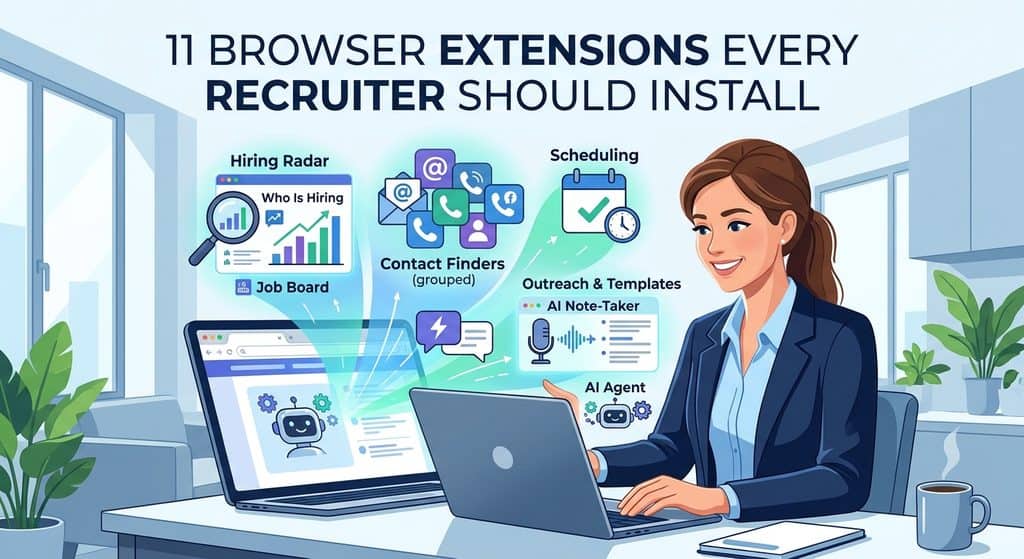
The browser extensions every recruiter should install in 2027 are Hiring Radar to see who is hiring and what they cannot fill, one contact finder (SignalHire, ContactOut, Lusha, Hunter or Wiza), Calendly for scheduling, Fathom for interview notes and Text Blaze for messages you type every day. Add Apollo if you want data and sequences in one login, and Claude for Chrome if you want an AI agent that works inside your tabs. You can start the whole stack for $0: every pick except Claude for Chrome has a free plan.
Prices and free plan limits checked on each vendor’s own pricing page on 22 October 2026. No vendor paid for a place on this list. Hiring Radar is made by Work Insiders; it sits at number one because it covers a job no other extension here does, and it is free.
Which 11 browser extensions should recruiters install in 2027?
Most lists of recruiting extensions are written by a vendor that ranks itself first and fills the rest with contact finders. This one is grouped by the job each extension does, so you can pick one per job instead of installing eleven tools that overlap.
| # | Extension | Job it does | Free plan | Paid from |
|---|---|---|---|---|
| 1 |  Hiring Radar Hiring Radar | Who is hiring, roles open longest, hiring contacts | Free, no account | Free |
| 2 | Emails and phones on LinkedIn, GitHub and X | 10 credits a month | $57 a month | |
| 3 | Personal and work emails from LinkedIn | 5 emails a day | $49 a month | |
| 4 | Business emails and mobiles | 40 credits a month | $37.45 a month | |
| 5 | Email patterns on any company website | 50 credits a month | $34 a month | |
| 6 | Bulk export from Sales Navigator | 20 emails, 5 phones | $49 a month | |
| 7 | Contact data plus email sequences | Yes | $49 a user a month | |
| 8 |  Text Blaze Text Blaze | Message templates in any text box | 20 snippets | $2.99 a month |
| 9 | Interview scheduling links | 1 event type | $10 a seat a month | |
| 10 | AI notes for interviews and client calls | Unlimited recordings | $16 a month | |
| 11 | AI agent that reads pages and fills forms | No | Paid Claude plan |
Paid prices are the lowest paid plan, using the yearly rate where the vendor offers one. Monthly billing costs more; each section below gives both.
Why do recruiters need browser extensions in 2027?
Because almost all recruiting work now happens in a browser tab: LinkedIn, Gmail, company careers pages, the ATS. Extensions put the tool on the page you already have open, so you stop copying names and emails between tabs.
The time is real. LinkedIn’s Future of Recruiting 2025 report found that 37% of organizations were actively integrating or testing generative AI in hiring, and that teams using it saved about 20% of their workweek, roughly one day, according to HR Executive’s coverage. Extensions are where most recruiters meet that AI first.
What changes in 2027 is the kind of extension worth installing. Two years ago the list was contact finders and a scheduler. Now there are three more jobs a browser can do for you: reading a company’s hiring activity live, writing up every interview, and running whole multi step tasks with an AI agent. This list covers all of them.
Which extension shows you who is hiring before you pitch?
Every contact finder answers “what is this person’s email?” None of them answer the question an agency recruiter asks first: “is this company hiring, and what are they struggling to fill?” That is why the top pick is not a contact finder.
1. Hiring Radar: see who is hiring on any company site
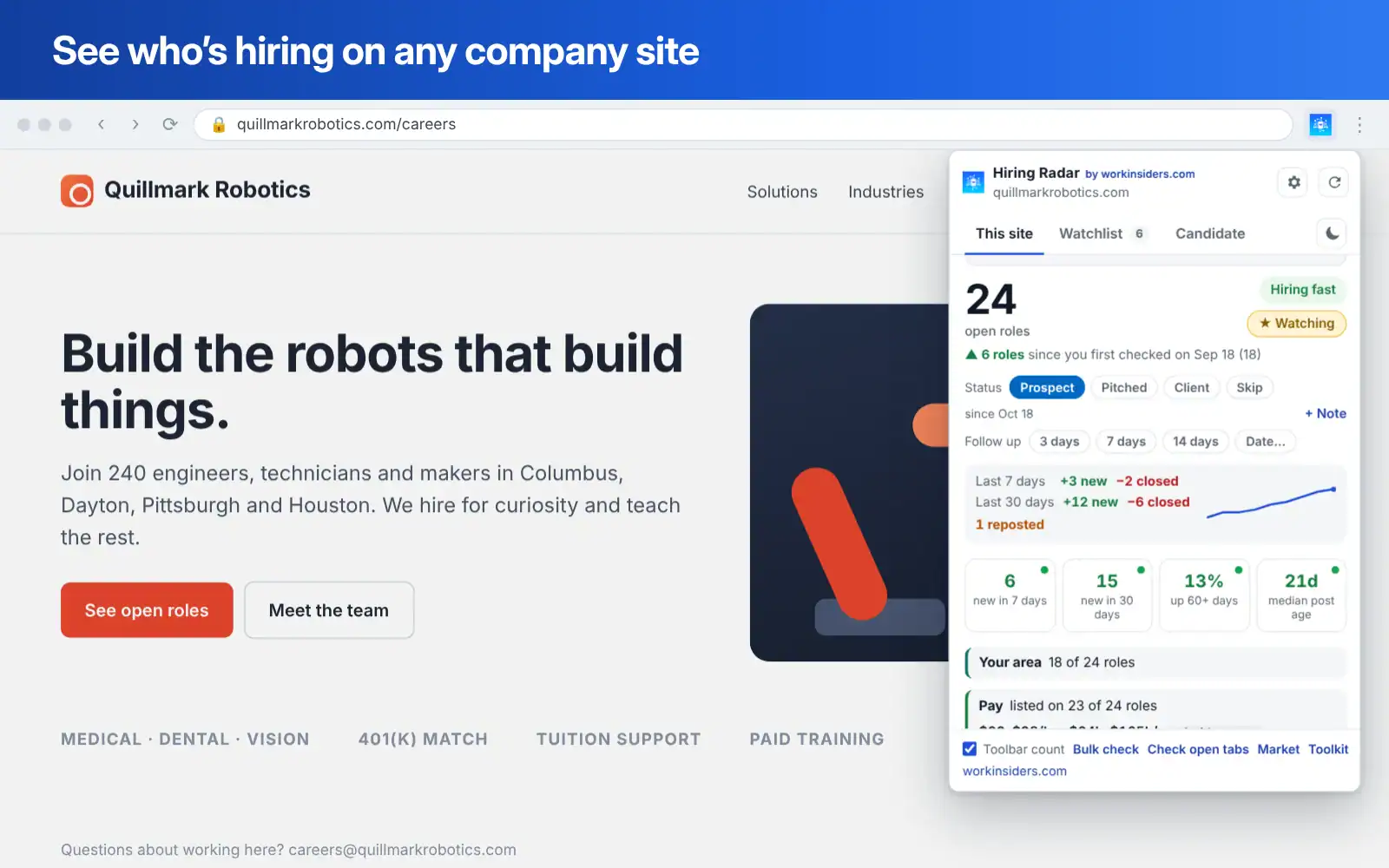
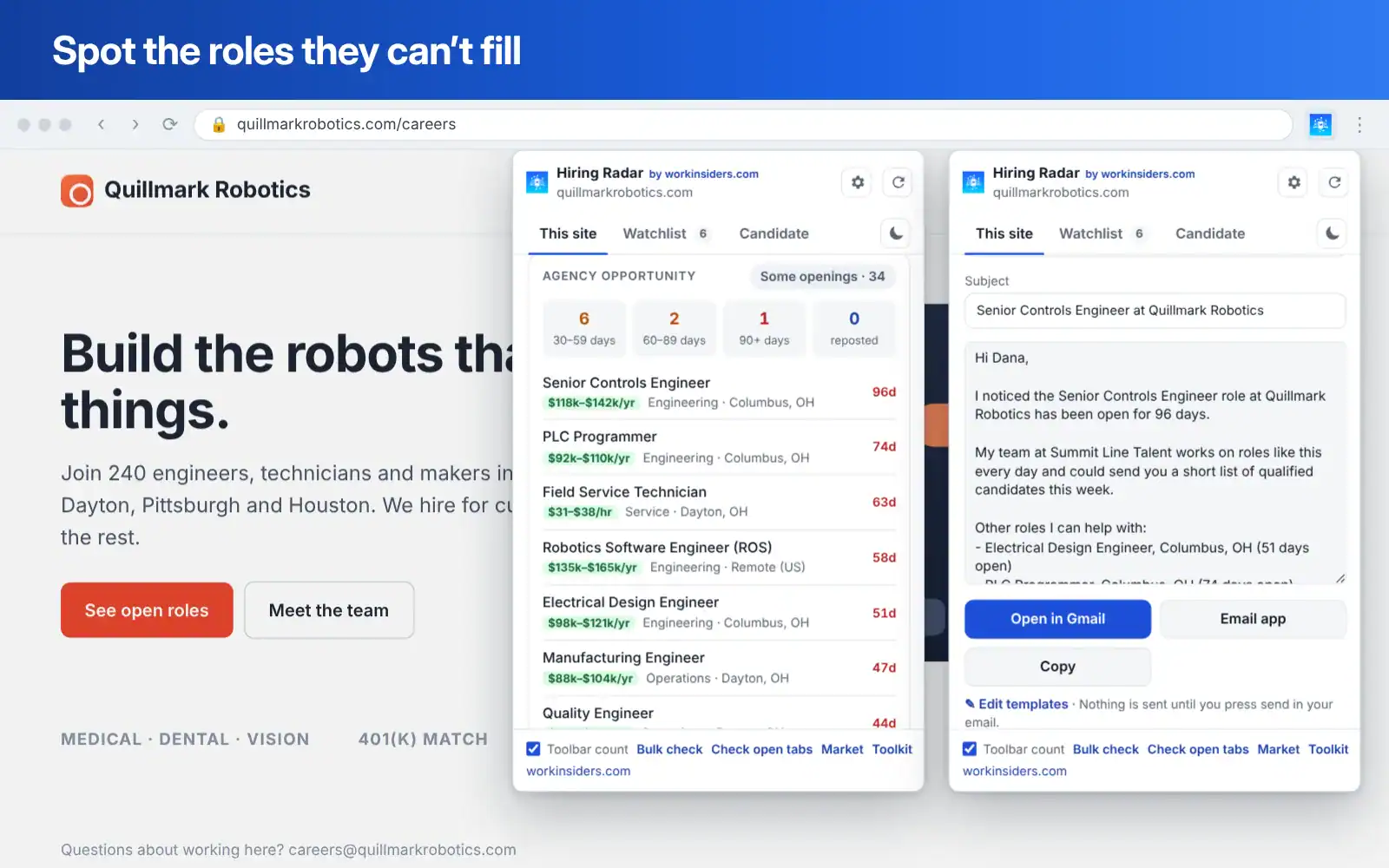
Open any company’s website, click the Hiring Radar icon, and it finds the company’s real job board and reads it live. You see every open role with location, team and posted pay, how long each has been open, and which roles have been open 30, 60 or 90+ days or reposted, tagged hard to fill. It reads jobs from 98 applicant tracking systems, including Greenhouse, Lever, Workday, iCIMS and Bullhorn, and falls back to the careers page when a company has no system.
It also lists the hiring contacts a company publishes itself: recruiters and hiring managers named in job posts, hiring inboxes like careers@, and the team page. When it suggests an email from a company’s pattern, it labels it a pattern guess, never a confirmed address. On Indeed, LinkedIn or Dice it finds the company’s own site and checks that instead.
- Pricing: Free, with no account, no sign up and no paid tier.
- Standout feature: Bulk check up to 200 companies at once, then a watchlist that rechecks them in the background and alerts you when they post new roles or open a new team or city.
- Also included: An agency opportunity score and A, B or C account grade, a company card on LinkedIn, Gmail and GitHub, text snippets, a follow up list, an off limits list for clients, and CSV export in HubSpot, Bullhorn and Salesforce layouts.
- Watch out for: It is new to the Chrome Web Store, so it has no store reviews yet. It only finds contacts a company publishes, so pair it with a contact finder below for everyone else.
Your results, watchlist and notes stay in your own Chrome profile; the Hiring Radar privacy policy lists every outside service it contacts. Add Hiring Radar free.
Which contact finder extensions are worth installing?
You need one, maybe two. They overlap heavily, so pick by where you source: LinkedIn profiles, company websites, GitHub, or Sales Navigator searches. Database sizes below are vendor claims, not independent tests.
2. SignalHire: contacts beyond LinkedIn
SignalHire’s extension shows emails, phone numbers and social links on profiles on LinkedIn, GitHub, Facebook, X and Meetup, from a database it puts at 900M+ profiles. A credit is only used when at least one email or phone comes back. Every plan allows unlimited users, and contacts are shared across the team.
- Pricing: Free with 5 credits, or 10 a month once the extension is installed. Emails, Phones, and Emails and Phones plans from $57 a month billed yearly, or $69 month to month, per the SignalHire pricing page.
- Standout feature: GitHub and X coverage for engineers who barely use LinkedIn, plus API access on paid plans.
- Watch out for: It is one database rather than a waterfall, so hit rates on niche profiles can trail tools that check several sources.
3. ContactOut: personal emails for candidate outreach
ContactOut overlays LinkedIn profiles with personal and work emails plus phone numbers, and adds a search portal and simple email campaigns. Personal email matters for candidates, because a work address is the inbox they least want a recruiter in.
- Pricing: Free with 5 emails, 5 phones and 5 exports a day. With US and UK data included, Email lists at $49 a month and Email plus Phone at $99. Prices change with a US and UK data toggle on the ContactOut pricing page, so check the version you need.
- Standout feature: Email reveals are unlimited on paid plans, under a fair use cap.
- Watch out for: Exports stop at about 300 a month on Email and 600 on Email plus Phone, and entry plans allow one user per company.
4. Lusha: business contacts with a usable free plan
Lusha reveals business emails and mobile numbers from LinkedIn and company websites, and syncs to Salesforce and HubSpot. One credit balance covers the extension, web app, API and MCP.
- Pricing: Free with 40 credits a month and no card. Starter is $49.90 a month, or $37.45 billed yearly. An email costs 1 credit and a phone number 5, per the Lusha pricing page.
- Standout feature: On monthly plans, unused credits roll over up to twice your plan limit.
- Watch out for: At 5 credits a number, the free plan covers only 8 phone reveals a month. It finds contacts but does not send.
5. Hunter: emails from any company website
Hunter works on company websites rather than LinkedIn profiles. Open a company’s site and it shows the email pattern it uses and the addresses it has found, each verified. That makes it the natural partner to Hiring Radar: one tells you the company is hiring, the other gets the hiring manager’s address.
- Pricing: Free with 50 credits a month. Starter is $49 a month, or $34 billed yearly, for 2,000 credits a month, per the Hunter pricing page. Every plan allows unlimited team members.
- Standout feature: No credit is used when Hunter cannot find an email, and verification costs half a credit.
- Watch out for: No phone numbers at all. Built around work email, so it is weaker for reaching candidates privately.
6. Wiza: whole Sales Navigator searches at once
Wiza turns a LinkedIn Sales Navigator search or list into a spreadsheet of verified emails and phone numbers. If your sourcing starts with a search of 200 people rather than one profile, it saves the most clicks.
- Pricing: Free with 20 valid emails and 5 phones. Starter is $49 a month for 100 emails and 100 phones. Email is $83 a month billed yearly with unlimited email reveals, and Email plus Phone is $166, per the Wiza pricing page.
- Standout feature: Yearly plans include unlimited reveals with 2,500 exports a month.
- Watch out for: Bulk export needs a Sales Navigator seat, which is a separate LinkedIn subscription.
Which extensions handle outreach and follow up?
7. Apollo: contact data and sequences in one login
Apollo’s extension reveals contacts on LinkedIn and in Gmail, then drops them into Apollo’s email sequences. It is built for sales, but many agency recruiters use it for business development because finding and emailing hiring managers happens in one place.
- Pricing: Free plan. Basic is $49 a user a month billed yearly, or $59 monthly; Professional is $79, or $99 monthly. Plans and credit rules are on the Apollo pricing page.
- Standout feature: Email sequences on every account, including free.
- Watch out for: Credits reset each billing cycle and do not roll over. Free accounts can only send from Gmail. The screens assume deals, not candidates.
8. Text Blaze: the messages you type 40 times a day
Text Blaze turns a short shortcut into a full message in any text box: LinkedIn messages, Gmail, your ATS notes. Snippets can include fill in fields, so “/screen” can drop in a screening invite with the candidate’s name and role filled in.
- Pricing: Free with 20 snippets. Pro is $2.99 a month billed yearly; Business is $6.99 a user a month, per the Text Blaze plans page.
- Standout feature: Works in any website, so one set of templates covers every tool you use.
- Watch out for: The free plan limits dynamic features to 5 uses a day.
Which extensions save time on scheduling and interviews?
9. Calendly: no more email tennis over interview times
Calendly’s extension puts your booking links into Gmail, LinkedIn and anywhere else you write, so candidates pick a slot from your live calendar.
- Pricing: Free with 1 event type and 1 calendar, browser extension included. Standard is $10 a seat a month billed yearly; Teams is $16 and adds round robin, per the Calendly pricing page.
- Standout feature: Round robin on Teams spreads interviews across a hiring panel.
- Watch out for: One event type on free means one interview length. Most recruiters need at least a screen and a full interview, which means Standard.
10. Fathom: interview notes you do not have to write
Fathom records calls, transcribes them and writes a summary when the call ends. For recruiters that means screening notes, client intake calls and debriefs captured without typing during the conversation. Its Chrome extension covers Google Meet.
- Pricing: Free forever with unlimited recordings, transcripts and AI summaries. Premium is $16 a month billed yearly, or $20 monthly, per the Fathom pricing page.
- Standout feature: The free plan has no recording cap, which is rare among note takers.
- Watch out for: Advanced summaries and Ask Fathom are limited on free. Tell candidates you are recording; consent rules vary by state.
Which AI browser extension should recruiters add in 2027?
11. Claude for Chrome: an AI agent in your tabs
This is the newest kind of extension on the list. Claude for Chrome can navigate pages, click and fill in forms, run tasks in the background, and repeat workflows on a schedule. For a recruiter that might mean pulling details from 20 careers pages into one table, or tidying a calendar ahead of an interview day.
- Pricing: In beta on all paid Claude plans, per the Claude for Chrome page. There is no free option.
- Standout feature: It handles whole multi step tasks rather than one lookup.
- Watch out for: Anthropic warns that hidden text on a page can try to override your instructions, a risk called prompt injection. Start on sites you trust, approve sensitive actions yourself, and do not let any agent click or send on LinkedIn for you.
How much do these recruiting extensions cost?
| Extension | Free plan | Lowest paid, yearly | Lowest paid, monthly | Seats |
|---|---|---|---|---|
| Hiring Radar | Everything, free | Free | Free | Anyone |
| 10 credits a month | $57 a month | $69 a month | Unlimited users | |
| 5 emails, 5 phones a day | Check page | $49 a month | 1 per company | |
| 40 credits a month | $37.45 a month | $49.90 a month | 1 on Starter | |
| 50 credits a month | $34 a month | $49 a month | Unlimited users | |
| 20 emails, 5 phones | $83 a month | $49 a month | Per user | |
| Yes | $49 a user | $59 a user | Per user | |
| Text Blaze | 20 snippets | $2.99 a month | $3.49 a month | Per user on Business |
| 1 event type | $10 a seat | Higher | Per seat | |
| Unlimited recordings | $16 a month | $20 a month | Per user | |
| No | Paid Claude plan | Paid Claude plan | Per user |
Wiza’s yearly plans cost more than its monthly Starter because they include unlimited reveals; Starter is capped at 100 emails a month. Read the credits, not just the price: Lusha’s $37.45 buys 5 credits per phone number, while Hunter’s $34 buys 2,000 credits a month with no phones at all.
Can you build a recruiting extension stack for $0?
Yes. Hiring Radar, Hunter’s free 50 credits, Lusha’s free 40 credits, Calendly free, Fathom free and Text Blaze free together cost nothing. That covers finding hiring companies, getting emails, scheduling, interview notes and templates. Pay for the first tool whose free limit you hit every week; that is the one earning its keep.
Which extension stack fits your type of recruiting?
Three to five extensions is plenty. Every extra one is another set of permissions in your browser and another thing to keep updated.
| If you are | Install | Why |
|---|---|---|
| Agency recruiter doing business development | Hiring Radar, Hunter, Text Blaze, Calendly | Find companies with roles they cannot fill, get the hiring manager’s email, pitch fast |
| Agency recruiter filling roles | Hiring Radar, ContactOut or SignalHire, Fathom, Calendly | Personal emails for candidates, notes on every screen |
| In house talent acquisition | Lusha or ContactOut, Calendly Teams, Fathom, Text Blaze | Round robin panels and consistent interview notes |
| Technical sourcer | SignalHire, Hiring Radar, Hunter, Claude for Chrome | GitHub and X contacts, company checks, research at scale |
| Sales Navigator power user | Wiza, Text Blaze, Calendly | Whole searches to a spreadsheet in one pass |
| Solo recruiter on no budget | The $0 stack above | Every core job covered free |
Not sure where to start? Our free recruiting stack recommender suggests tools for your desk, and the full list of 264 recruiting Chrome extensions links each one to its official store page.
Are recruiting Chrome extensions safe to install?
Most are, but the store alone does not guarantee it. A Stanford and CISPA study, What is in the Chrome Web Store, found that over 346 million users installed an extension containing malware, breaking store policy or carrying known vulnerable code between July 2020 and February 2023. Google says fewer than 1% of installs in 2024 included malware, as TechSpot reported. Both can be true; at Chrome’s scale, 1% is a lot of people.
Recruiting extensions see candidate names, emails and phone numbers, so check five things before you install one.
- Publisher. Install from the vendor’s own website link, not a store search, so you get the official listing and not a copy.
- Permissions. An extension that reads “all sites” sees everything you browse. Prefer ones that only act on the page you click.
- Updates. The Stanford study found almost 60% of extensions never received an update. Check the “Updated” date on the store page.
- Data handling. Read where your lookups and notes are stored. Some keep everything in your browser; others sync to the vendor.
- LinkedIn behavior. Tools that only read a profile are low risk. Tools that click, connect or message for you are the ones that get accounts restricted.
Will LinkedIn restrict my account for using extensions?
Reading a profile you opened yourself is the low risk end. The LinkedIn User Agreement bars bots and other automated ways of accessing the site, scraping, and sending messages automatically. That is why this list leaves out LinkedIn automation tools that send connection requests for you, and why we suggest keeping AI agents off LinkedIn.
How did we pick these 11 extensions?
We started from the 264 tools in the Work Insiders directory that link to an official Chrome Web Store listing, then scored each on five things:
- Job coverage: one strong pick per recruiting job, rather than five tools doing the same thing.
- Free plan: whether a recruiter can use it properly before paying.
- Price transparency: published prices and credit rules on the vendor’s own page.
- LinkedIn risk: read only tools over tools that automate actions.
- Fit for 2027: whether it covers where recruiting is heading, such as hiring signals and AI.
Prices and free limits come from each vendor’s pricing page on 22 October 2026; Lusha’s plan prices were last checked on 2 October 2026. We did not buy every paid plan, so features come from vendor documentation. Hiring Radar is our own extension, which we disclose above.
Quick answers
What is the best Chrome extension for recruiters?
It depends on the job. For finding companies that are hiring and what they cannot fill, Hiring Radar, which is free. For candidate contact details, ContactOut or SignalHire. Most recruiters run three to five extensions, one per job.
Is there a free Chrome extension that shows who is hiring?
Yes. Hiring Radar shows every open role on a company’s website, how long each has been open, the ATS they use and the hiring contacts they publish. It is free with no account.
What is the best free email finder extension for recruiters?
Hunter gives 50 free credits a month and works on company websites. Lusha gives 40 credits a month on LinkedIn. ContactOut gives 5 emails a day, which adds up to more if you use it daily.
How do agency recruiters find companies that are hiring?
Check the company’s own careers page, not just job boards, because many roles never reach Indeed or LinkedIn. Hiring Radar reads that page for you and flags roles open 30, 60 or 90+ days, which are the best ones to pitch.
How many Chrome extensions should a recruiter install?
Three to five. One for hiring signals, one contact finder, one scheduler, and optionally a note taker and a template tool. More than that adds risk and slows your browser.
Do these extensions work in Edge or Brave?
Usually, yes. Edge, Brave, Arc and Opera are built on Chromium and install from the Chrome Web Store. Check the vendor’s help page if you rely on one of them.
Can an AI extension do my sourcing for me?
It can research and fill in data, but not safely on LinkedIn, where automated access breaks the User Agreement. Use AI agents for careers pages, research and admin, and keep LinkedIn actions manual.
Where should you start?
Start with the job that costs you the most time today. For most agency recruiters that is knowing which companies to call, so install Hiring Radar first, add one contact finder, then a scheduler. Add the rest only when a gap shows up in your week.
Get Hiring Radar free, open a company site and click the icon.
Free newsletter
Get the Work Insiders weekly
One email a week: the recruiting and HR tech news that mattered, the tools we just added to the directory, and one practical guide. No spam, and you can unsubscribe in one click.