


Key takeaways up front
- LinkedIn supports five Boolean tools: quotation marks, AND, OR, NOT, and parentheses. Operators must be typed in capital letters or LinkedIn treats them as ordinary words.
- LinkedIn does not support wildcards (the asterisk), plus or minus signs, or field commands like title:. Every spelling variation has to be written out with OR.
- Free LinkedIn caps the number of operators in one query. Sales Navigator allows roughly 15. Recruiter and Recruiter Lite have no published operator limit and add Boolean to individual filters.
- The order of operations is quotes first, then parentheses, then NOT, then AND, then OR. Most “broken” searches are a precedence problem, not a LinkedIn problem.
- LinkedIn is still the top social channel for recruiting, with 71 percent of recruiters using it or planning to, according to the Employ Recruiter Nation report. Boolean is how you get value out of that reach.
What is LinkedIn Boolean search and why do recruiters still use it?
LinkedIn Boolean search is a way of combining keywords with logical operators so LinkedIn returns only the profiles that match your exact conditions.
Instead of typing “java developer” and scrolling through thousands of loosely related people, you tell LinkedIn to find people who have “Java” AND (“Spring” OR “Hibernate”) NOT “recruiter”. The search becomes a filter you control rather than a guess LinkedIn makes for you.
Recruiters still use it in 2026 because it is the fastest way to turn a job description into a shortlist.
AI search features now exist inside Recruiter, and LinkedIn’s own research found that 73 percent of talent professionals expect AI to change how organizations hire, according to the Future of Recruiting report.
But AI search still guesses at intent. Boolean lets you say exactly what you mean, repeat it tomorrow, and explain to a hiring manager why a candidate appeared in the list.
Which Boolean operators does LinkedIn actually support?
LinkedIn’s official guidance lists five ways to shape a search: quoted searches, NOT searches, OR searches, AND searches, and parenthetical searches. That list comes straight from LinkedIn’s Boolean search help page, and it is the only list that matters. Anything outside those five is either ignored or treated as plain text.
How do quotation marks work on LinkedIn?
Quotation marks tell LinkedIn to match an exact phrase. Searching “product manager” returns people with that phrase in their profile, while searching product manager without quotes returns anyone with the word product and the word manager anywhere on their page. Use straight quotes only.
Curly quotes pasted from Word or Google Docs break the search silently.
How does AND work on LinkedIn?
AND narrows a search by requiring every term. “data engineer” AND Snowflake AND dbt returns only people who have all three. LinkedIn treats a space between terms as an implied AND in most cases, but writing AND in capitals removes any doubt.
How does OR work on LinkedIn?
OR widens a search by accepting any of the terms. (“software engineer” OR “software developer” OR programmer) catches people who describe the same job three different ways. This is the operator recruiters underuse the most, and it is the reason strong candidates get missed.
How does NOT work on LinkedIn?
NOT excludes a term. “sales manager” NOT recruiter removes recruiters who list sales manager as a target role. LinkedIn’s guidance is to place NOT directly before the word you want gone. Stacking too many NOT terms shrinks the pool fast, so exclude only what actually pollutes your results.
What do parentheses do on LinkedIn?
Parentheses group terms so LinkedIn evaluates them together. Without them, “nurse” OR “RN” AND “ICU” can be read as nurse anywhere, or RN in ICU, which is not what you wanted. (“nurse” OR “RN”) AND “ICU” fixes it. Every OR group should sit inside parentheses. Treat that as a rule, not a preference.
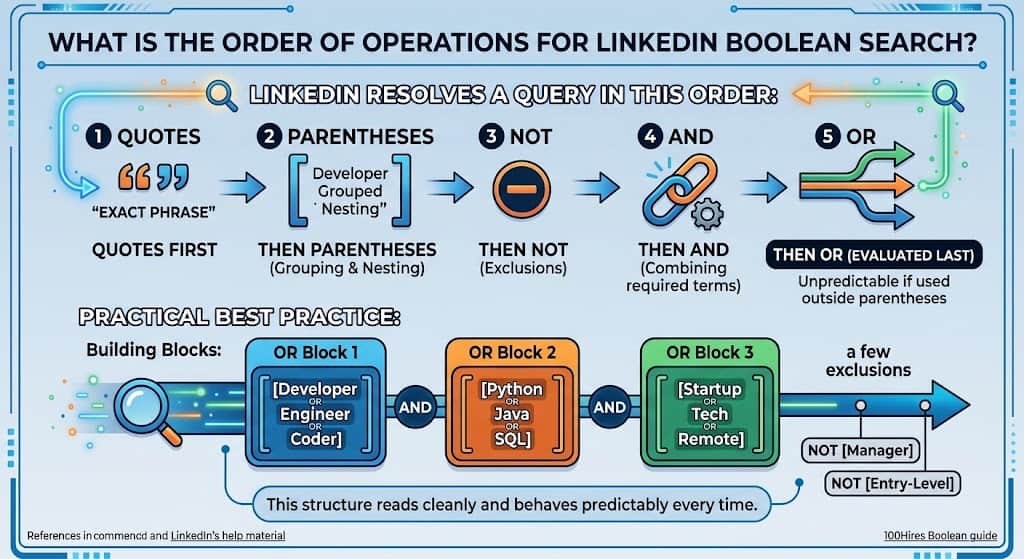
What is the order of operations for LinkedIn Boolean search?
LinkedIn resolves a query in this order: quotes first, then parentheses, then NOT, then AND, then OR. That sequence is documented in LinkedIn’s help material and repeated in the 100Hires Boolean guide. If you remember nothing else, remember that OR is evaluated last, which is why an OR list outside parentheses behaves unpredictably.
A practical way to think about it: build each OR list as its own bracketed block, then connect the blocks with AND, then hang your NOT exclusions on the end. That structure reads cleanly and behaves the same way every time.
What does LinkedIn Boolean search not support?
This is where most frustration comes from. LinkedIn’s Boolean query limitations page and the platform’s behavior in practice rule out several things recruiters expect from Google or an ATS:
- Wildcards. develop* does not return developer, development or developing. Write out every variation with OR.
- Plus and minus signs. A plus sign before java or a minus sign before recruiter is not recognized. Use AND and NOT.
- Field commands. title:engineer or company:google do nothing on LinkedIn. Field targeting happens through filters in Sales Navigator and Recruiter, not through the search string.
- Proximity operators. NEAR and similar commands are ignored.
- Brackets and braces. Only round parentheses work. Square brackets, curly braces and angle brackets are dropped.
- Stop words in the keyword field. Words like of, at, by, with and for are silently removed unless they sit inside quotation marks. “head of engineering” works. head of engineering does not.
How is Boolean different in free LinkedIn, Sales Navigator, Recruiter Lite and Recruiter?
The operators are the same across every tier. What changes is where you can use them and how much you can write.
Free LinkedIn. Boolean works in the main search bar only and applies to the whole profile. LinkedIn caps the number of operators in a single query on free accounts, and long strings get truncated. This tier is fine for a quick check, not for daily sourcing.
Sales Navigator. Boolean can be applied separately to the Keyword, Title and Company fields, and the platform accepts roughly 15 operators in one query. Some recruiters at smaller agencies use it as a cheaper Recruiter substitute.
Recruiter Lite and Recruiter. Boolean works inside individual filters, and LinkedIn’s Recruiter Boolean help page describes the Can have, Must have and Doesn’t have options that map to OR, AND and NOT. There is no published operator limit. This is the tier built for Boolean sourcing.
One behavior that surprises new Recruiter users: results are not ranked by how well they match your string. As the Leonar Boolean guide notes, your best candidate can sit on page 30. Sort by recent activity or use filters to tighten the pool before you start reading profiles.
What are the most common LinkedIn Boolean mistakes recruiters make?
Recruiters on r/recruiting ask the same handful of questions on repeat, and almost all of them trace back to one of these mistakes.
Why is LinkedIn ignoring my AND, OR and NOT?
You typed them in lowercase. LinkedIn reads and, or and not as ordinary words, so “java and python” searches for the word and as a keyword. Capitalize every operator, every time.
Why does my search return people who are obviously not a match?
Usually an OR list without parentheses. (“Java” OR “Kotlin” AND “Android”) does not do what it looks like it does. Wrap the OR group: (“Java” OR “Kotlin”) AND “Android”. The second common cause is a multi word phrase without quotes, which lets each word match anywhere on the profile.
Why did my long Boolean string stop working when I pasted it?
Three likely reasons. The string was written in Word and carries curly quotes. The string exceeds the operator limit on a free or Sales Navigator account.
Or the string includes a symbol LinkedIn does not recognize, such as an asterisk or square bracket, and LinkedIn has silently dropped part of it. Rebuild the string in a plain text editor and test it in pieces.
Why do I keep getting recruiters and job seekers in my results?
Because they list the same titles you are searching for. Add NOT recruiter NOT “talent acquisition” NOT sourcer to the end of the string, and in Recruiter use the Job Titles filter set to Current rather than Past or Current.
How do you write a LinkedIn Boolean string step by step?
Start with the job description, not the search bar. Pull out three things: the core job title and its synonyms, the two or three skills that are actually required, and anything that must be excluded. Then build in this order.
- Title group. (“data scientist” OR “machine learning engineer” OR “ML engineer”)
- Skills group. AND (Python OR PyTorch OR TensorFlow)
- Domain or context group. AND (fintech OR banking OR payments)
- Exclusions. NOT recruiter NOT intern NOT “looking for”
Put together: (“data scientist” OR “machine learning engineer” OR “ML engineer”) AND (Python OR PyTorch OR TensorFlow) AND (fintech OR banking OR payments) NOT recruiter NOT intern
Run the title group alone first and check the count. Add one group at a time and watch how the number moves. If it collapses to near zero, the last group is too tight. If it barely moves, that group is not adding anything and can be cut.
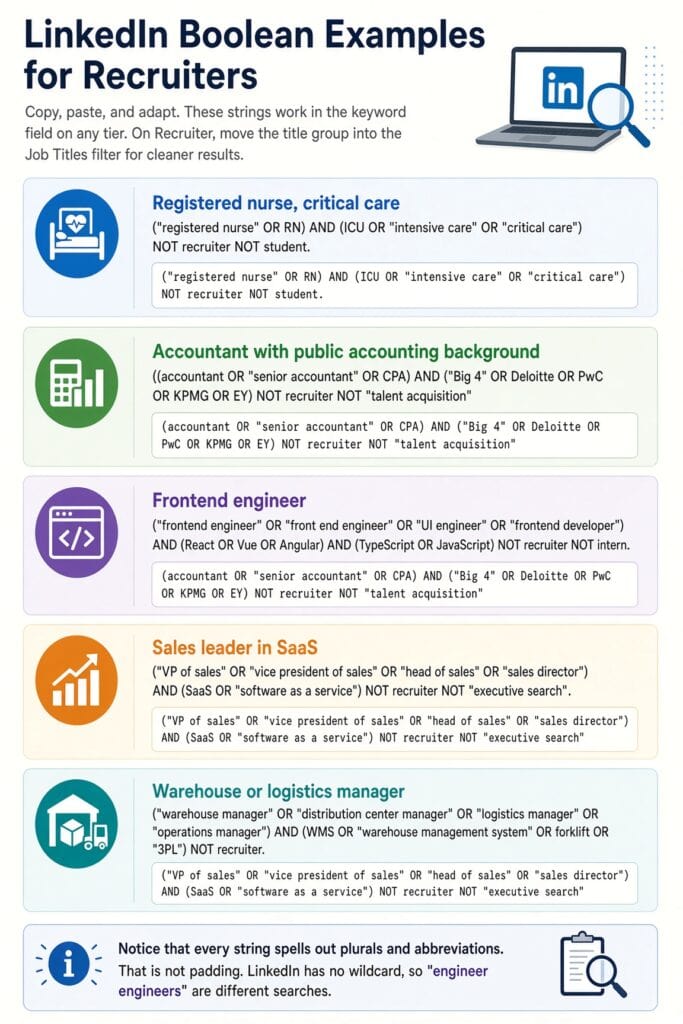
What are some copy and paste LinkedIn Boolean examples for recruiters?
These strings work in the keyword field on any tier. On Recruiter, move the title group into the Job Titles filter for cleaner results.
Registered nurse, critical care
(“registered nurse” OR RN) AND (ICU OR “intensive care” OR “critical care”) NOT recruiter NOT student
Accountant with public accounting background
(accountant OR “senior accountant” OR CPA) AND (“Big 4” OR Deloitte OR PwC OR KPMG OR EY) NOT recruiter NOT “talent acquisition”
Frontend engineer
(“frontend engineer” OR “front end engineer” OR “UI engineer” OR “frontend developer”) AND (React OR Vue OR Angular) AND (TypeScript OR JavaScript) NOT recruiter NOT intern
Sales leader in SaaS
(“VP of sales” OR “vice president of sales” OR “head of sales” OR “sales director”) AND (SaaS OR “software as a service”) NOT recruiter NOT “executive search”
Warehouse or logistics manager
(“warehouse manager” OR “distribution center manager” OR “logistics manager” OR “operations manager”) AND (WMS OR “warehouse management system” OR forklift OR “3PL”) NOT recruiter
Notice that every string spells out plurals and abbreviations. That is not padding. LinkedIn has no wildcard, so “engineer” and “engineers” are different searches.
How do you find passive candidates with LinkedIn Boolean?
Passive candidates rarely describe themselves with the exact title you are hiring for, so widen the title group and tighten the skills group. Search for the tools and outcomes the role produces rather than the label. A string like (Salesforce OR HubSpot) AND (“pipeline” OR “quota”) AND (“enterprise” OR “mid market”) finds account executives who never wrote “account executive” in their headline.
Layer that string with Recruiter filters such as years in current company or open to work signals rather than adding more keywords. Filters do not count toward operator limits and they do not suffer from the stop word problem.
Is LinkedIn Boolean search still worth learning now that AI search exists?
Yes, for three reasons. First, AI search inside Recruiter is a black box; Boolean is auditable, which matters when a hiring manager asks why a candidate was or was not surfaced. Second, Boolean is portable. The same logic works in your ATS, in Google X ray searches and on GitHub. Third, AI search performs better when you understand Boolean, because you can check its results against a precise string and see what it missed.
LinkedIn’s own data shows that 93 percent of talent professionals say accurately assessing candidate skills is crucial to improving quality of hire, according to the 2025 Future of Recruiting report. Skills based searching is exactly what a well built OR group does.
Quick answers: LinkedIn Boolean search FAQ
Does LinkedIn Boolean search work on the free version?
Yes. All five operators work in the main search bar on a free account, but LinkedIn limits the number of operators per query and applies the string to the entire profile rather than a specific field.
Are Boolean operators case sensitive on LinkedIn?
Yes. AND, OR and NOT must be in capital letters. Lowercase versions are treated as keywords.
Can I use an asterisk as a wildcard on LinkedIn?
No. LinkedIn does not support wildcards. List each variation with OR.
Is there a character limit for LinkedIn Boolean search?
LinkedIn does not publish an exact character count, but free accounts hit an operator cap, Sales Navigator accepts roughly 15 operators, and Recruiter has no published limit. Long strings on lower tiers get truncated without warning.
What is the difference between AND and a space on LinkedIn?
In most cases a space is treated as AND, but writing AND explicitly is safer, especially in Recruiter filters and when mixing in OR groups.
Why does LinkedIn drop words like “of” and “for” from my search?
Those are stop words and the keyword field removes them. Put the full phrase inside quotation marks to keep them.
Can I search by title only using Boolean on LinkedIn?
Not on free LinkedIn. Sales Navigator and Recruiter let you apply Boolean inside the Title or Job Titles filter, which is the right way to do it.
Does NOT work in LinkedIn Recruiter filters?
Yes. Recruiter exposes it as the Doesn’t have option inside filters, and NOT also works in the keyword field. No Recruiter seat? See our Recruiter alternatives.
How many OR terms should I include in one group?
As many as genuinely describe the same role or skill. Five to eight synonyms per title group is typical. More than that on a free or Sales Navigator account risks hitting the operator limit.
Should I save my Boolean strings?
Yes. Keep a plain text file of strings by role. Recruiter and Sales Navigator also let you save searches and receive alerts when new profiles match.
What should recruiters do next?
Pick one open role, write the four groups (title, skills, context, exclusions), and run each group on its own before combining them. Keep the strings that work in a plain text file so curly quotes never creep in.
Then, once you trust the string, let Recruiter’s saved search alerts do the daily checking for you. Boolean is not a trick. It is the difference between searching LinkedIn and actually sourcing on it.