

Autodesk’s AI Assistant is a natural language tool built directly into products like AutoCAD, Revit, Fusion, Inventor, Civil 3D, and Vault. It does not replace drafters.
It answers questions, automates repetitive tasks, and helps users find information faster inside their design software, but it still relies on a trained person to set it up correctly, judge its output, and catch mistakes before they reach a client or a construction site.
That’s the short answer. The rest of this article breaks down exactly what the tool does, what it doesn’t do, and what the job market data actually says about drafting careers in the AI era.
What exactly does Autodesk’s AI Assistant do?
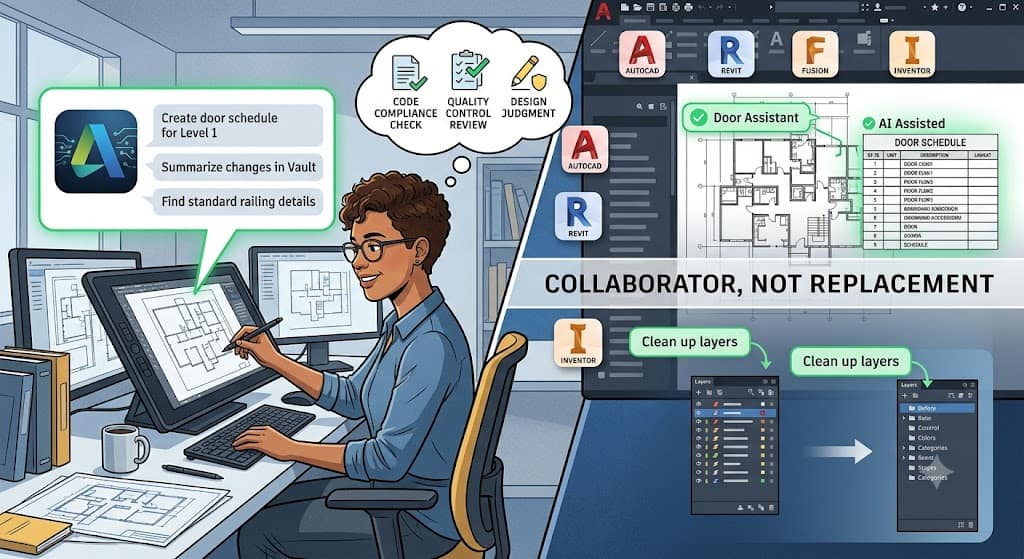
Autodesk Assistant is a conversational AI layer that sits inside Autodesk’s core products so users can type or speak plain language requests instead of digging through menus or memorizing commands.
According to Autodesk’s own product page, the assistant is currently in Tech Preview across Fusion, AutoCAD, Inventor, Civil 3D, Revit, Vault, Moldflow, 3ds Max, Maya, and InfoWater Pro, with a full release already live in Forma.
In practice, this means a user can type something like “create a door schedule sorted by level” in Revit and get a working result without manually building the schedule from scratch, a workflow Autodesk describes on its AEC Tech Drop blog. In Inventor, the assistant can pull information from a model or execute a modeling task from a single prompt rather than a string of clicks, according to Autodesk’s Inventor blog.
Is Autodesk Assistant the same thing in every product?
No. The assistant’s capabilities vary by software and are still expanding. In Fusion, it has what Autodesk calls prompt to API capabilities, giving it access to nearly the full range of Fusion’s functions, as described in Autodesk’s design news.
In Vault, it currently focuses on search and data management rather than design work, helping users locate files or complete routine tasks using plain language. In Moldflow, it acts more like an in-context guide, walking users through simulation results and troubleshooting steps.
Because it’s still a Tech Preview in most products, Autodesk is explicit that it offers no guarantees during this phase and that features will change as it moves toward general release.
Why did Autodesk build an AI Assistant in the first place?
Autodesk frames the assistant as a response to a broader shift in how people want to work with software. Jeff Kinder, an executive vice president at Autodesk, described the strategy as combining general AI models with the company’s own industry specific models built to understand three dimensional design and manufacturing workflows, according to reporting from DEVELOP3D.
The underlying goal isn’t to remove people from the design process. It’s to cut down on the repetitive, low value clicking that eats up a drafter’s or engineer’s day, freeing that time for problem solving and coordination work that actually requires a trained eye.
What tasks is the assistant actually good at right now?
Based on Autodesk’s own documentation and early user reports, the assistant tends to perform well on narrow, well defined tasks: answering “how do I” questions inside the software, generating schedules or reports from existing model data, locating files in Vault, cleaning up layers, and summarizing changes between saves.
One user who tested the tool for a full week wrote about the experience on Medium, noting it was useful for detail edits and plot fixes but stopped well short of full automation, and that language support was still limited to English, German, and Japanese at the time.
Does Autodesk’s AI Assistant replace drafters?
No, and Autodesk does not market it that way. The company has said directly that the goal is not to replace expertise but to expand it, a point made clearly in Autodesk’s own Fusion blog post introducing the assistant.
The tool executes tasks a drafter directs it to do. It does not independently understand a client’s intent, catch a code violation that wasn’t in its training data, or take responsibility when a drawing goes out with an error.
This distinction matters because most AI drafting tools, including Autodesk’s, still require a human to review the output. A generated door schedule still needs someone to confirm it matches the actual building code requirements for that jurisdiction. A cleaned up layer structure still needs someone to confirm nothing important got deleted in the process.
What does the government’s own job data say about this?
The U.S. Bureau of Labor Statistics tracks this question directly, and its numbers don’t point to a disappearing profession. The BLS projects that overall employment of drafters will show little or no change from 2024 to 2034.
At the same time, the agency expects about 16,200 openings for drafters each year over that decade, mostly from workers retiring or moving into other roles, not from the job disappearing outright, as reported on the BLS Occupational Outlook Handbook.
That’s an important nuance. Flat overall headcount doesn’t mean no hiring. It means a steady churn of openings even as the total number of positions stays roughly level, which is a very different story than the “AI is eliminating this job” narrative that circulates online.
What roles are actually growing inside drafting departments?
Firms appear to be reshaping drafting jobs rather than cutting them. Reporting from CAD Drafter’s 2026 outlook points to several hybrid roles gaining ground:
BIM modelers who coordinate across MEP and structural teams, CAD plus AI specialists who know both traditional drafting and how to run AI plugins, CAD automation engineers who write scripts to eliminate repetitive tasks, and QA or CAD auditors whose entire job is reviewing AI generated output before it reaches construction documents.
That last role is worth sitting with for a moment. If AI tools were actually replacing drafters wholesale, there would be no growing need for people whose job is to check AI output. Instead, the opposite is happening. Someone still has to be the final check.
What are people on Reddit and industry forums actually worried about?
The concern showing up most often in drafting and AEC communities isn’t “will I lose my job tomorrow.” It’s closer to “will entry level positions disappear because AI now handles the grunt work that used to train juniors.” That’s a fair and specific worry, and it’s different from the more sensational framing that AI is about to wipe out drafting as a profession.
Industry coverage backs up the more grounded version of this concern. BIM Heroes reports that by 2025, 75% of large organizations were expected to use AI driven tools, and that the U.S. architecture software market was growing at roughly 16.2% annually.
The same reporting notes that AI adoption is cutting project delays by around 20% and budget overruns by about 30% in some organizations, while roughly 60% of professionals still lack formal training on these tools. That gap, more than job loss, is the real risk facing drafters right now. It’s about falling behind on a skill set that’s quickly becoming standard, not losing the job to a machine.
Should a junior drafter be worried about starting a career right now?
Not worried, but not complacent either. The realistic path forward looks like learning the AI tools inside whatever software your firm already uses, not avoiding them.
A junior drafter who can direct Autodesk Assistant to handle routine schedule generation or layer cleanup, then apply human judgment to check the result, is more valuable than one who refuses to touch the tool or one who blindly trusts everything it produces.
What does this mean for the drafting profession going forward?
The clearest way to think about it is that Autodesk Assistant is changing what drafters spend their time on, not whether drafters are needed. Less time goes toward repetitive manual tasks like renaming layers or manually building schedules.
More time goes toward coordination, code compliance, quality checks, and the judgment calls that AI tools still can’t make on their own.
That shift mirrors what happened when CAD software first replaced hand drafting decades ago. The job title survived.
The daily tasks changed. Based on Autodesk’s own stated goals and the government’s employment projections, the same pattern looks likely here: fewer hours lost to busywork, and a continued need for skilled people to direct the tool, verify its output, and take responsibility for the final drawing.
Quick answers
Does Autodesk Assistant design buildings or parts on its own? No. It executes tasks based on prompts from a user and works within the context of an existing model or project. It doesn’t independently generate a complete, code compliant design without human direction and review.
Which Autodesk products currently have the AI Assistant? As of mid-2026, it’s in Tech Preview across Fusion, AutoCAD, Inventor, Civil 3D, Revit, Vault, Moldflow, 3ds Max, Maya, and InfoWater Pro, and fully available in Forma.
Will learning to use AI tools help a drafter’s career? Based on current industry reporting, yes. Firms appear to be creating hybrid roles that combine traditional drafting skills with AI tool proficiency, rather than eliminating drafting positions outright.
Is drafter employment actually shrinking because of AI? According to the BLS, overall drafter employment is projected to stay roughly flat through 2034, with thousands of annual openings driven mostly by retirements and career changes, not by the job disappearing.
Free newsletter
Get the Work Insiders weekly
One email a week: the recruiting and HR tech news that mattered, the tools we just added to the directory, and one practical guide. No spam, and you can unsubscribe in one click.