

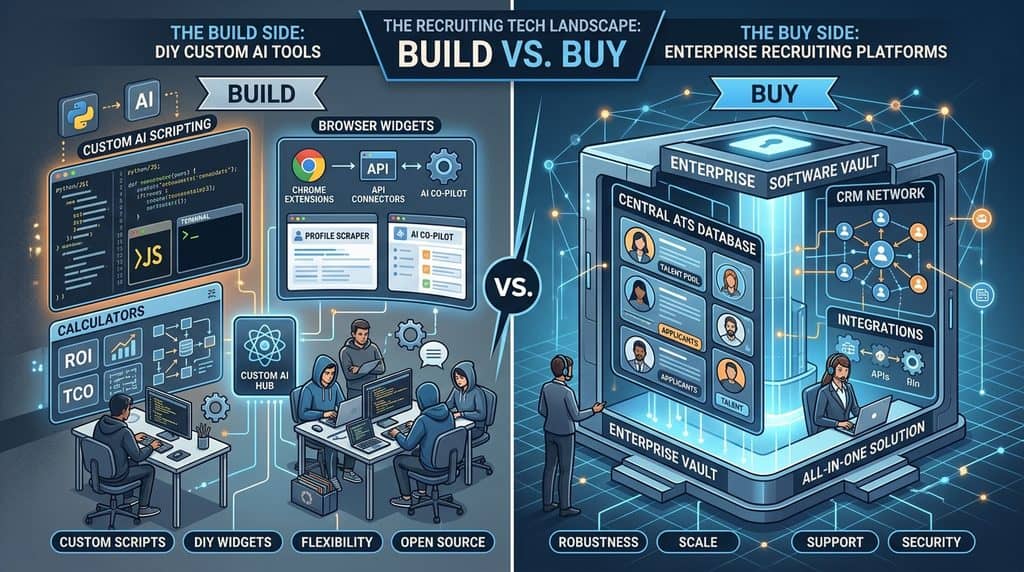
Quick answer: Build the small stuff, buy the shared stuff. A recruiter with Claude, ChatGPT or Grok can now describe a single purpose tool, such as a fee calculator, a Boolean builder for one niche or a scorecard template, and get a working page in an afternoon. Anything several people rely on at once, anything that keeps candidate records for years and anything that sends email at volume is still cheaper and safer to buy.
The proof is already live: Work Insiders runs 13 free recruiting tools built this way. Each one does one job, runs in your browser, needs no account and stores nothing. They show both what a small tool can do and where it stops.
Who this is for: agency and in house recruiters paying for small add ons around their ATS who want to know which they could replace.
What can a recruiter actually build with AI in 2026?
A recruiter can build a tool that takes some input, does one clear job with it and shows a result on one screen. Claude, ChatGPT and Grok will all write the code for a simple web page if you describe what it should do in plain English. Claude can show the finished page as an Artifact right inside the chat, and its pricing page lists Artifacts on the Free plan.
What changed is that the smallest kind of software, a calculator or a form that turns answers into a document, no longer needs a developer. You still have to know exactly what the tool should do, and that is the real work.
What you cannot build in an afternoon is anything with logins, a shared database, live connections to other software or messages going out to candidates. Those need security, backups and support.
What do our own free tools prove?
Every tool on our free tools hub follows the same rules: one recruiting job, no account, no email field, nothing stored or sent.
| Free tool | The one job it does | Candidate data involved? |
|---|---|---|
| Boolean string builder | Turns titles and skills into a LinkedIn or X ray query | None |
| Cost per hire calculator | Adds recruiter time and spend, divides by hires | None |
| Spam word checker | Flags trigger words and unfilled merge tags | None if you paste a template |
| SPF, DKIM and DMARC checker | Checks a domain’s email records | None |
| Job ad bias checker | Flags gendered and exclusionary wording | None |
| ATS compatibility checker | Shows which tools connect to the ATS you pick | None |
| Playbook builder | Turns your rules and routine into one playbook | None |
| AI instructions builder | Writes custom instructions for your assistant | None |
| Which tasks can AI do? | Sorts your tasks into AI, assisted or human | None |
| Stack recommender, cost estimator, $0 stack builder, MCP readiness checker | Suggest, price or check a recruiting stack | None |
None of them asks for a candidate’s name. The moment a tool holds personal data, the build gets harder and legal duties start, so we kept ours out of that territory.
Which recruiting automation tools should you build, and which should you buy?
Ask who else needs to see the same screen. If nobody, build it. If a teammate, a client or another system needs the same record at the same time, buy it.
| Job | Build it? | Buy it? | Why |
|---|---|---|---|
| Fee, margin and rate calculators | Yes | Rarely | Pure arithmetic in your own terms, no personal data |
| Boolean strings for your niche | Yes | No | Personal, fast, and you know the title variants better than any vendor |
| Interview scorecards and intake forms | Yes | Only inside your ATS | Your criteria, your format; buy only if scores must sit on the candidate record |
| Job ad and outreach checkers | Yes | No | Rules you can write down, run on text you paste |
| CV reformatting into your template | Maybe, for low volume | Yes, at volume | Handles full CVs, so data safety and odd file layouts become the hard part |
| Scheduled research, such as a weekly list of hiring companies | Yes, as a scheduled task | Only for live signal data | All three assistants can run a prompt on a timer |
| Moving data between apps | No | Yes | Zapier, Make or n8n already do this and handle the failures |
| Cold email sending and deliverability | No | Yes | Mailbox warmup and sender reputation are not a weekend project |
| ATS and candidate database | No | Yes | Many users, years of records, audit trails and deletion requests |
| Recruiting CRM and pipeline | No | Yes | Shared state across a team plus integrations you did not write |
Which small recruiting tools could you build with Claude, ChatGPT or Grok?
Here are nine that fit on one screen, with what each does, what to type and the candidate data risk. Ask for a single HTML file that runs in the browser with no server.
1. Placement fee and contractor margin calculator
Enter salary, fee percentage, any rebate terms, or a contractor’s pay rate and bill rate, and it shows the fee, the margin and the gross profit per hour. Data risk: none, it is arithmetic.
Type this: Build a single HTML page with no server that calculates a permanent placement fee from base salary and a fee percentage, and a contract margin from pay rate, bill rate and employer burden percentage. Show results in dollars with two decimals. Add a print button.
2. A Boolean builder for your own niche
A personal version of our builder can preload the title variants, certifications and competitor names you use every week. Data risk: none.
3. Interview scorecard generator
Paste the must haves for a role and it prints a scorecard with a rating scale and evidence boxes for each one. Data risk: low while it holds job criteria only; it rises if you start saving filled scorecards with candidate names.
4. Intake call brief
A form that walks you through your standard intake questions and prints a one page brief to send back to the hiring manager. Our playbook builder is a good model for the questions. Data risk: low, mostly client information.
5. House style checker for job ads
Flags words your firm avoids, missing pay ranges and ads over your word limit. Data risk: none.
6. Outreach length and merge tag checker
Counts words, flags a leftover {first_name} and warns on long subject lines. Data risk: none for templates.
7. Blind candidate profile maker
Paste a summary you wrote and it lays it out as a redacted profile for business development: role, years of experience, location, pay expectation, no name. Data risk: medium, because the input is about a real person. Keep it in the browser and paste your own summary, not the raw CV.
Type this: Build a single HTML page that runs only in my browser and never sends data anywhere. It has fields for job title, years of experience, city, willingness to relocate, base salary expectation and three achievement lines. It outputs a clean, anonymized candidate profile I can copy into an email. Do not include any name or contact fields.
8. CV reformatter for low volume
Paste CV text and it lays it out in your colors and headings. Data risk: high, since full CVs hold names, contact details and dates that reveal age. If you format more than a handful a week, a specialist like RemakeCV from $25 per user a month or CVFAST with a free plan handles scanned files and ATS uploads you would otherwise have to build.
9. A weekly market scan on a timer
This one is a scheduled task rather than a page: a saved prompt that searches for companies in your niche showing hiring signals and returns a table every Monday. Our automation recipes give the prompt and the setup for ChatGPT, Claude and Grok. Data risk: low, as it handles company data, not candidates.
What are the honest limits?
An AI written tool can look finished and still be wrong. Test every calculator against sums you have done by hand. If it breaks later, you are the support desk.
Scheduled research has its own limits. In a r/RecruitmentAgencies thread, an agency lead gen recruiter described a Claude workflow that finds companies with many open roles and recent funding. Replies warned that funding news often surfaces a month late, that “15+ roles” can mean low level jobs you would never work, and that costs are hard to control. Treat the output as a list to check, not a list to send.
What does building your own recruiting tools really cost?
The money cost is small; the time cost is deciding what the tool should do, testing it and fixing it later. Here are the assistant plans, checked in October 2026.
| Assistant | Free plan | Standard personal plan | Heavy use | Team plan |
|---|---|---|---|---|
| Claude | $0, includes Artifacts and Skills | Pro, $20 a month or $17 billed yearly | Max, from $100 a month | Team, $25 a seat monthly or $20 billed yearly |
| ChatGPT | $0 | Plus, $20 a month (Go is about $8) | Pro, from $100 a month | Business, $25 a seat monthly or $20 billed yearly |
| Grok | $0 | SuperGrok, $30 a month | SuperGrok Plus, $100 a month | Business, on xAI’s site |
A free plan builds most of the nine tools above. Paid plans add higher usage limits, bigger files and, for Grok, Grok Bot, which SuperGrok includes. Running a finished tool costs nothing: it is a file you open in your browser.
Our stack cost estimator adds up what you pay for add ons today, so you can see which seats are worth replacing.
Is the plan you build on safe for candidate data?
It depends on the plan, not the brand. Claude’s pricing page lists model training as opt out on Free, Pro and Max, and off by default on Team and Enterprise. Our lesson on ChatGPT, Claude and Grok plans shows the same split for all three and where each setting lives.
How do you keep candidate CVs safe in a tool you built?
The safest tool never receives a CV at all. Next best is one that works only in the browser, sends nothing and keeps nothing after you close the tab.
The law points the same direction. Article 5 of the GDPR principles requires personal data to be used only for the purpose it was collected for, limited to what is necessary and kept no longer than needed. In the US, California’s CCPA guidance defines personal information to include a name, email address and inferences used to build a profile, and gives California residents the right to know about and delete it. Our lesson on candidate data in ChatGPT covers how that applies to applicants.
| Rule for your tool | Why it matters |
|---|---|
| No server, no database | Nothing to breach and nothing to delete on request |
| Strip names and contact details before pasting into a chat | Data minimization; “Candidate A” is enough to match back in your ATS |
| Never paste ID numbers, health details or background check results | ID numbers and health details are sensitive personal information under the CCPA |
| Use a business plan for anything with real candidate details | Training is off by default on business plans |
| No ranking or rejecting candidates | Automated screening can bring in AI hiring laws and audit duties |
That last row matters most. A tool that scores CVs and drops the lowest is an automated hiring decision, and rules such as New York City’s Local Law 144 and California’s regulations can apply. Our map of AI hiring laws lists which ones.
Where does buying recruiting software still win?
Buying wins wherever a record has to be shared, kept for years or synced with other systems.
Your ATS and CRM
An ATS holds every application, stage move and note for many users, with permissions and an audit trail. Compare the 177 options in our ATS directory and the 65 in our recruiting CRM directory. Agency desks often look at Bullhorn or Loxo, which starts at $149 per user a month billed yearly; in house teams often look at Ashby.
Anything that moves data between apps
Automation tools handle retries and failures you would never think to code. Zapier has a free plan with 100 tasks a month and paid plans from $19.99, and n8n is free to host yourself. See the full automation category and our lesson on automating a recruiting workflow.
Email sending and anything candidates see
Sending at volume needs warmed mailboxes and correct DNS records, which our DNS checker can test but not fix. Candidate facing booking pages and portals must work on every device. Buy those.
Some narrow jobs are still worth buying when a good tool is cheap. HireScribe takes interview notes on your laptop with no bot in the call, free for transcripts and $79 once for unlimited AI write ups.
How should a recruiter start building?
Start with the task that annoys you most and involves no candidate data. Write down the inputs, the output and one example, ask for a single HTML page, and test it on a real case. Two of our tools help with the thinking first. The task checker sorts your week into what to hand AI, and the playbook builder writes down the rules any tool you build should follow. If you use Claude, our list of free Claude skills covers ready made recruiting workflows you can install instead of building, and the free AI Recruiting Academy covers the basics.
Quick answers
Do I need to know how to code to build a recruiting tool with AI?
No. You need to describe the inputs, the output and the rules clearly. The assistant writes the code, and you test the result against cases you already know the answer to.
Which assistant is best for building small tools?
Claude previews a working page inside the chat, which makes testing quick. ChatGPT and Grok write the same HTML file for you to open. Use the one you already pay for.
Can I build my own ATS with Claude or ChatGPT?
You can build a demo, not a safe ATS. Logins, backups, permissions and deletion requests are the expensive part.
Is it safe to paste CVs into a tool I built?
Only if the tool runs in your browser and sends nothing anywhere. Even then, strip names and contact details first, and never let it rank or reject candidates.
Can a built tool connect to my ATS?
Not without real development work and API keys. Check whether your ATS has an MCP with our MCP readiness checker.
The bottom line
Recruiting automation tools no longer all have to be rented. Calculators, checkers, scorecards, intake briefs and scheduled research are now quick to build with Claude, ChatGPT or Grok on a plan you may already have, and our 13 free tools show what that looks like. Keep candidate data out of anything you build, and keep buying your ATS, CRM, email sending and automation glue, because shared records and syncing are where homemade tools fail.
Sources: Claude pricing, ChatGPT pricing, xAI pricing, GDPR Article 5, California CCPA, r/RecruitmentAgencies thread
Free newsletter
Get the Work Insiders weekly
One email a week: the recruiting and HR tech news that mattered, the tools we just added to the directory, and one practical guide. No spam, and you can unsubscribe in one click.