

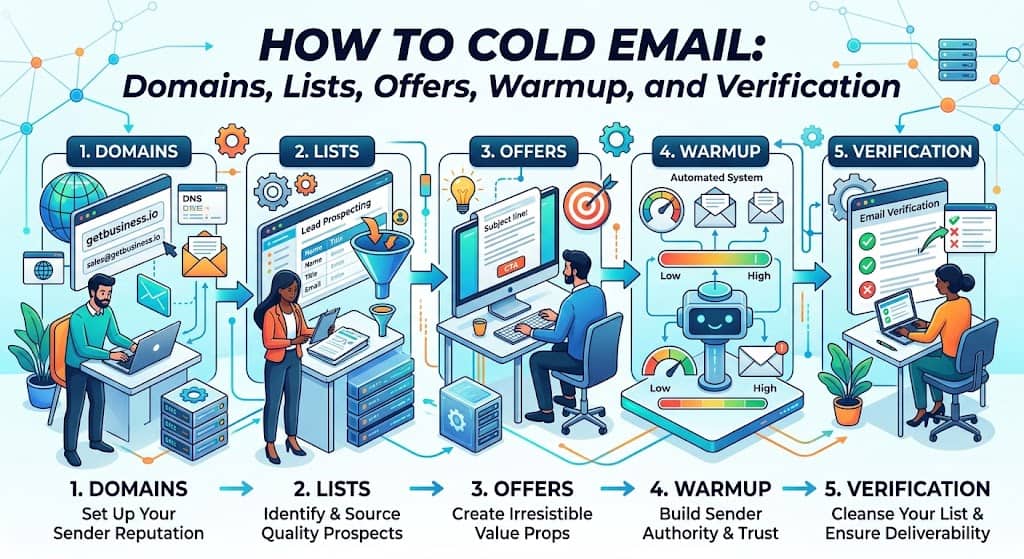
Cold email fails in the setup, not in the subject line. You already have a sequencer. What you do not have is a sending domain that is not also running payroll, a list you built backwards from where the person actually shows up, an offer a stranger can say yes to, warmup you still trust after the scoreboard lies, and verification before you pay a finder.
You are the sender. Recruiter, agency owner, founder hitting send. This page is the system: infrastructure, list, offer, warmup, verification. Templates and cadence already live on our cold email playbook. Keep that page for copy. This page is the stack that has to exist first.
Eric Nowoslawski of Growth Engine X recorded this as a 25 minute talk on 30 Aug 2026.
The numbers below are from that talk and from his tests. Nick Abraham of Leadbird (@NickAbraham12) is the copy and list overlay, from posts he published.
The lazy mistake is a scene, not a metaphor. You log into the same company.com inbox payroll uses. You paste 40 first touch emails. Finance gets a bounce storm the next morning, Google Workspace locks the domain, and nobody can send offer letters. That is why you never send cold from the domain you already live on.
How do you start cold emailing?
Start with Eric’s three buckets, in this order. He says whenever he is thinking about a positive response, he is thinking about how you send, who you email, and what you say.
- Infrastructure. Separate domains. Inboxes that are not payroll. A sequencer. Warmup running. Extra capacity sitting idle on purpose.
- List. Think backwards from where the person shows up. Guess common email patterns. Verify. Pay a finder only for the leftovers; see the top work email finders.
- Offer. A cold traffic offer, not a company bio. Then copy. Then a sequencer. Then 1,000 sends before you call the campaign.
If a campaign is dead, ask which bucket broke. Do not rewrite the first line while the domain is in spam.
Commands, in order you can actually run:
Buy sending domains that are not the company domain.
Stand up Google or Microsoft inboxes on those domains. Authenticate SPF, DKIM, DMARC.
Connect a sequencer. Warm the inboxes. Leave warmup on.
Hold spare capacity. Eric’s rule is about 50% extra, sitting in warmup, so a burned inbox does not halt volume.
Build the list backwards. Verify before you pay for mystery finds.
Write the offer against Eric’s five pillars. Keep the body short. Point templates to the playbook post.
Send. Do not call the campaign until 1,000 emails.
What is cold email infrastructure?
Cold email infrastructure is everything that has to exist before a sentence leaves the box. Domains, DNS, inboxes, tenants, warmup, the sequencer, and the spare pool. It is not the copy. It is not the CRM.
Eric says the generic advice is already burned into every video: buy separate domains, get inboxes, use a mailbox provider, hook them to Instantly and Smartlead. Table stakes. The work is proving those inboxes still land.
Never send from the main domain. Eric still sees people refuse lookalike sending domains because they “look weird.” His risk framing: if you lose the ability to send real business email on the company domain, that is worse than a stranger noticing the sending domain forwards to the real site. Payroll, ATS alerts, and customer invoices live on company.com. Cold does not.
Hold 50% extra capacity. In the talk he walks a 3,000 email per day client: 100 inboxes at 30 per day in the campaign, plus insurance inboxes with 1,500 per day capacity kept warming. When an active inbox dies, cancel it, promote from the insurance pool, keep sending. He names this as always holding 50% extra capacity.
He also describes a Hypertide beta, as of that August 2026 talk, that warms spare domains for free so you only pay billing on the active pool, then turn Google inboxes on and go live in 24 to 48 hours.
That is his test of that product, not a Work Insiders product review. Hypertide’s own site also talks about a shorter path to monthly send caps after a share of a traditional warmup period. That vendor line is not Eric’s 50% spare capacity rule. Keep them separate.
What is email warmup?
Email warmup is the period where a new inbox sends and receives low risk mail so mailbox providers treat it like a person before you dump cold volume on it. In practice it is a pool or a sequencer feature that slowly raises volume, fakes some human replies, and tries to keep the mailbox off a spam list.
It is not a score you glance at once. Eric’s level one is warmup reputation inside Instantly or Smartlead. He does not think those scores are great. He still gets suspicious below 99 or 100. A 92, in his shop, comes out of the campaign immediately. A 100 can still be in spam. That is why warmup is a layer, not the whole check.
Leave it on. Nick Abraham posted that people complain mail is in spam after inboxes sat disconnected and warmup sat off for two weeks. If warmup is off, you do not have a copy problem.
What is cold email warmup?
Cold email warmup is warmup pointed at outbound. Same mechanism. Different failure mode. You are about to send mail nobody asked for, so the inbox has to look like it already has a life.
Eric keeps a second class of mail on those boxes: candidate sourcing or partner emails that already get real positive replies. Warmup mail, he says, is something Google already knows is warmup. Real positive replies prolong the inbox. That is his level five, not a vendor checkbox.
If you are not in a free warmup beta, you still buy spare capacity and you still wait. Vendor FAQs change. Check the provider before you plan volume around someone else’s screenshot.
How do you protect cold email deliverability?
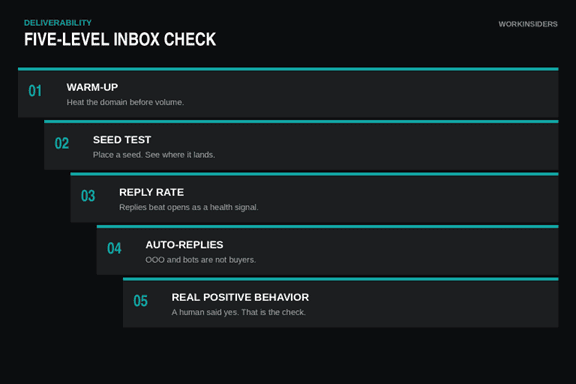
Cold email deliverability is whether the mail lands where a human will see it, and whether the domain still has a future after this week’s sends. Eric’s five level inbox check is the spine. Most people stop at one and two. He says he has not seen others talk about four and five.
Level 1. Warmup reputation. Instantly or Smartlead score. Suspicious below 99 to 100. Pull a 92. Do not trust a 100.
Level 2. Seed inbox test. Send through the sequencer’s seed list. Directional only. Those seeds, in his words, have never marked mail as spam, so the test is not human behavior.
Level 3. Real campaign reply rate. Friday job across every domain and inbox: sends and replies this week versus two weeks ago. Anything that has sent at least 100 emails and sits under a 1% reply rate gets cancelled and removed. His threshold.
Level 4. Auto responder seeds. They save replies. Automated “this mailbox is no longer monitored” bounces become an internal test list. He talked about thousands of those. Domains can pass seeds and pass reply rate and still get nothing back. He would kill anything under 60% on that test. He wants something like 80%. Use a model to scan replies for those auto responses. Do not paste those addresses into a public sheet.
Level 5. Real positive behavior. Put a high reply campaign on the same inboxes: candidates, partners, influencers. When a campaign that should get replies dies on some inboxes, that is a deliverability signal, not an offer signal.
He automates spam tests daily, reply rate weekly, auto response checks on Saturdays, and keeps the likely positive campaign on. Drop alerts sit on top of the 7 day and 14 day windows. Example from the talk: 1.5% reply rate falling to 0.2%. Look immediately. First suspect is a spam trap. Pull those domains. Second suspect is content fingerprinting.
Nick runs a cousin of the drop alert at Leadbird. Track reply rate at the domain. Average the client’s domains. Flag anything 30 to 40% below that average. Keep replacements warming. Swap when needed. His percentages. His shop.
Spintax is how Eric fights fingerprinting. Captions say “spin tax.” Same thing: greetings and body lines rotate so one inbox is not blasting the identical string. He did not think it was necessary a year before the talk. The day of the recording he says a campaign at 0.3% reply rate moved to 1.2% after he added it. Put spintax on signatures and unsubscribe language too. Tell the model to do word level variants or it will change one word and call it done.
Nick’s March deliverability thread agrees on the copy surface, not always on images. Plain text only. No fancy formatting. Spintax everything, but review all variants yourself because AI creates variants that sound unnatural. Keep it simple: no images, PDFs, or links in the first email, in his rules. Eric still wants you to test images if the picture is the offer. His illustration: plain text might be seen by more people with zero replies; an image that explains the product might be seen by fewer and still book. Test. Do not freeze a rule from a channel.
Do not track opens if you are taking Nick’s deliverability rules. He says open data is unreliable and hurts deliverability.
How do you build the list for B2B cold email?
B2B cold email is unsolicited mail to a person at a company who did not raise their hand. The list is the campaign. Copy cannot save a scrape of the wrong job titles.
Think backwards, Eric’s phrase. Ask how these people show up. SaaS, finance, professional services: LinkedIn. Local operators: Google Maps. Niches that live on neither: an AI research tool. He named several vendors; treat those as his examples, not a ranked list. Compare any paid database to a live Sales Navigator search for that niche. He says most of those databases are built on LinkedIn data anyway, so the live Nav list is the yardstick.
Nick’s version of a better list is intent, not a celebrity name drop. Scrape people who are already engaging with the topic you sell. Do not write “saw you follow @whoever.” Write that you noticed they have been engaging with that topic. Build the do not contact list before you scrape. He says Leadbird has been running variations of this across verticals and it outperforms a standard list pull. No invented multiplier.
Guess, then verify, before you pay a finder. Eric’s point 10. Most work emails are a name permutation at the company domain. First line of defense: generate the common patterns and validate them. He uses LeadMagic for that validation in the talk because of catch all handling and price. He told the camera he did not know the pricing. Check the vendor before you budget it.
On Work Insiders, run the same job on the finder and verify tools below. Guess the easy patterns. Verify. Pay a finder for catch alls, odd patterns, and the names you cannot construct. Do not buy six overlapping finder subscriptions that all return the same first.last. Eric wants each paid vendor to solve a leftover problem. His overpay line, his number: more than about 2 cents per contact including the company.
What makes a B2B cold email offer work?
A cold traffic offer is what you can put in front of a stranger. Eric lists five pillars. Nick later recapped the same five as a copywriter scorecard. Credit Eric for the pillars. Credit Nick for using them as a scorecard.
- Make money, or a save time or save money claim that is a categorical shift. Eric says nobody moves on email for a 10% time save or a 10% discount. If it is save time, talk like 80 to 90%.
- Relevant signals. Do not email every restaurant about paving. Filter to lots that already look broken. The list can turn a warm traffic product into a cold traffic send.
- A case study that looks like them, not a logo wall.
- A next step that is easy to say yes to. His dental example: a free sample. He claimed Facebook CAC for that form was $300 versus $40 on the cold send. His numbers.
- Something they cannot get from a generic search. He reframes bookkeeping as tax second look work. Treat the IRS anecdote as a story he told, not a study we verified.
Nick’s overlay when the offer is saturated: stop the overplayed “if we could generate X with our unique mechanism, would you be interested in speaking?” He posted that template as burned. Replacement he published: a free, specific deliverable. One example he showed: a reactivation campaign run free for a local business, then you ask about the rest of marketing after they are satisfied. Related: Leadbird offered to build a free ICP list for hopping on a demo. Pick something cheap to deliver that every customer already needs. Center the campaign on that. Do not paste the burned template as a script to copy.
How do you write a cold email?
How to write a cold email, on this page, is the offer and the constraints. Full templates live on the live playbook. Do not redo that post here.
Write against the five pillars. Then apply Nick’s two tests: can a 10 year old understand what you are selling, and would you say this out loud. Plain text. Conversational. He puts strong offers above complex personalization workflows.
Intent copy stays two or three sentences. Name the topic they are already engaging with. Do not name drop a creator they follow.
Eric’s personalization rule: not “I loved your website” and not “you have been CEO for two years.” Write the sentence you would write after ten minutes of real research.
Hyper personalization at scale, in Nick’s posts, is not an LLM first line that “looks human.” He mocks that. He has not found AI able to produce great copy across all spintax variants, and he says people who claim end to end AI copy are lying or writing bad mail. What he does post: AI as a one to one channel through deep segmentation at a scale that used to take manual research. Niche ways to personalize at scale sit in his 2026 playbook next to list scoring and a front end offer. If TAM is under 500 accounts and LTV is high, he would still personalize by hand. If TAM is large, he will take automated volume. He posted 20,000 automated emails at 1% versus 2,000 manual emails at 10% as the same 200 replies, 10x less time. His math.
Email one versus email two. Eric says 99% of the time email one gets the positive replies. He also told a customer they were the first he had seen where email two stayed stronger even after they swapped the two emails. Test. Do not clone the channel.
How do you send cold emails?
How to send cold emails is volume, rotation, and a stop rule, not a new template pack.
Pick a sequencer. Connect the warmed inboxes. Keep warmup on. Randomize send time inside business hours if your tool supports it. Nick’s March thread also says do not isolate ISPs on the list and always validate right before launch.
Do not call the campaign until 1,000 sends. Eric’s line: people tell him cold email does not work after 300. He will not call success or failure until 1,000. If 1,000 produces zero positive replies, shut it off. If you get one positive, take it to 3,000 before you decide.
Campaigns work quickly or they do not, up to the first positive. Booking, no shows, and the sales process after that are a different job. Watch drop alerts while it runs. If reply rate falls off a cliff, stop blaming the subject line. Check traps, then fingerprinting, then pull domains.
Which outreach tools belong on the stack?
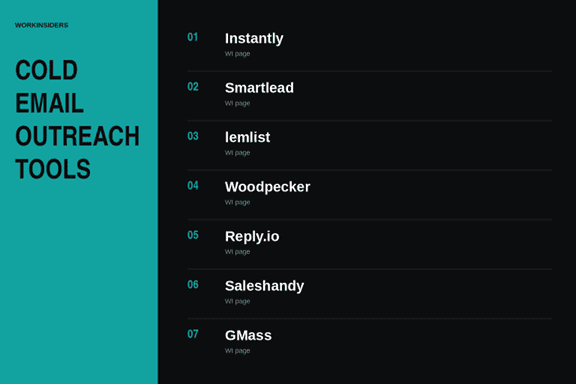
These sending tools sit on Work Insiders. Link the name. Use the page for the current feature set.
Instantly is built for volume outbound. You connect many mailboxes, keep warmup running, and push sequences at scale.
Smartlead is an agency style mailbox and warmup layer. It is one of the sequencers Eric names next to Instantly when he talks about table stakes infrastructure.
lemlist runs multichannel sequences. Keep the first cold email shorter than anything you would put in a LinkedIn step.
Woodpecker is a deliverability first sequencer. Use it when you care more about inbox health than flashy personalization widgets.
Reply.io combines email with LinkedIn, calls, and SMS in one sequence. Useful when the campaign is not email only.
Saleshandy is another sequencer on the same shelf. Pick it if your team already lives there. Do not buy two sequencers that do the same job.
GMass is Gmail native merge sending. Fine for smaller volume from Google Workspace. It is not a replacement for a spare domain pool.
Which finder and verify tools belong on the stack?
Guess, then verify. Start with Tomba and Reoon on this page.
Tomba finds and verifies on one credit meter. Use it when you want a single tool for pattern guessing leftovers and a confidence check.
Reoon is bulk list cleaning. Run the sheet through it before the first send so catch alls and dead mailboxes do not burn the domain.
Hunter is name plus domain search with a verifier. Good for the easy first.last patterns Eric wants you to guess before you pay a specialty finder.
SignalHire pulls verified emails and dials from LinkedIn. Use it when the person lives on LinkedIn and the email is the missing field.
Cleanlist is waterfall enrichment across many providers. It is not a sequencer. It is how you fill gaps without buying six overlapping finder seats.
Verification is a step in the setup, not the whole article. Do not turn this page into a generic verification roundup.
There are many different stack options for inboxes, email verification, finding etc… so choose what works for you.
What do you do this week?
Buy the sending domains. Do not touch payroll’s domain. Warm the inboxes. Hold spare capacity. Build the list backwards from LinkedIn or Maps, then from intent if you can scrape it without name dropping a creator.
Guess emails. Run Tomba and Reoon. Pay a finder only for what guessing missed. Write the offer against the five pillars, or replace a burned “if we could generate” line with a free unique deliverable Nick actually posted. Load the sequencer. Send 1,000 before you call it.
When it fails, name the bucket. Infrastructure, list, or offer. Then fix that bucket. Then send again.
FAQ
Should you leave email warmup on after you start sending?
Yes. Leave warmup on for as long as those inboxes send cold mail. Nick Abraham posted that people complain mail is in spam after inboxes sat disconnected and warmup sat off for two weeks. If warmup is off, you do not have a copy problem. Warmup is also not a score you glance at once. Eric still runs it as level one of a five-level inbox check.
What warmup score means you should pull a cold email inbox?
Treat anything below 99 or 100 on Instantly or Smartlead as suspicious, and pull a 92 immediately. Eric does not think those scores are great. A 100 can still be in spam. That is why warmup reputation is only level one. You still need seed tests, weekly reply rate, auto-responder seeds, and a campaign that should already get real positive replies.
How do you know cold email is in spam if warmup looks fine?
Watch real campaign reply rate, then auto-responder seeds, then a campaign that should already get replies. Eric’s pull rule: any inbox that has sent at least 100 emails and sits under a 1% reply rate gets cancelled. His auto-responder seed test: kill anything under 60%, aim near 80%.
If a high-reply campaign dies on some inboxes only, that is deliverability, not the offer. First suspect on a cliff drop is a spam trap. Second is content fingerprinting. Add spintax on greetings, body, signatures, and unsubscribe language.
Should you track opens on cold emails?
Not if you are taking Nick Abraham’s deliverability rules. He says open data is unreliable and hurts deliverability. Use reply rate at the domain instead. Average the client’s domains and flag anything 30 to 40% below that average. Keep replacements warming and swap when needed.
How many cold emails before you know if a campaign works?
Do not call success or failure until 1,000 sends. Eric’s line: people tell him cold email does not work after 300. If 1,000 produces zero positive replies, shut it off.
If you get one positive, take it to 3,000 before you decide. Email one gets the positive replies 99% of the time in his shop. Booking, no-shows, and the sales process after that are a different job.
How do you build a B2B cold email list without overpaying finders?
Think backwards from where the person shows up, guess the common name patterns at the company domain, verify, and pay a finder only for leftovers. SaaS, finance, and professional services usually live on LinkedIn. Local operators live on Google Maps.
Compare any paid database to a live Sales Navigator search for that niche. Eric’s overpay line is more than about 2 cents per contact including the company. On this stack, start with Tomba and Reoon. Hunter covers easy first.last patterns. SignalHire is for LinkedIn-native people. Cleanlist is waterfall enrichment, not a second sequencer.
Instantly vs Smartlead vs Saleshandy: which sequencer do you need?
You need one sequencer, not three. Instantly is the volume outbound box. Smartlead is the agency-style mailbox and warmup layer Eric names next to Instantly as table stakes. Saleshandy is another sequencer on the same shelf.
Pick it if your team already lives there. Do not buy two sequencers that do the same job. Woodpecker if inbox health matters more than widgets. Reply.io if the sequence is not email only. GMass is Gmail-native merge sending for smaller Workspace volume. It does not replace a spare domain pool.
Free newsletter
Get the Work Insiders weekly
One email a week: the recruiting and HR tech news that mattered, the tools we just added to the directory, and one practical guide. No spam, and you can unsubscribe in one click.