

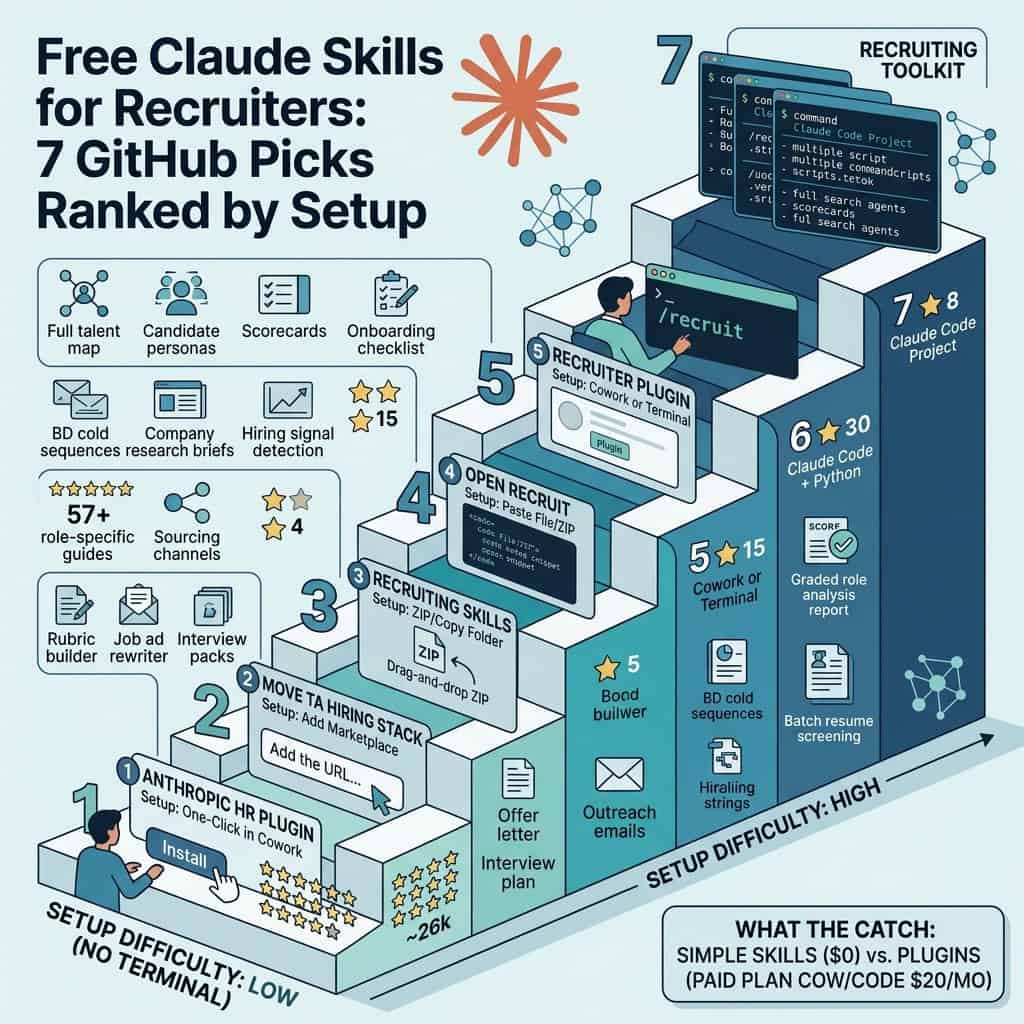
Quick answer: The best free Claude skills for recruiters on GitHub right now are Anthropic’s own HR plugin, Move’s TA Hiring Stack, Michal Juhas’s Recruiting Skills, Open Recruit, the Recruiter Plugin, AI Recruiter and the Recruiting Toolkit. All seven are free to download under open licenses. They cover job descriptions, sourcing strings, resume screening, outreach, interview kits and offers.
The catch: the skill files are free, but you still need Claude. Simple skills can be uploaded on any Claude plan, including Free. Plugins need Cowork or Claude Code, which come with paid plans such as Claude Pro at $20 a month. A few packs also need paid data APIs for LinkedIn sourcing or email lookups.
Who this is for: agency and in house recruiters who already use Claude, or want to, and would like it to work like a trained sourcer or coordinator instead of a blank chat box.
What are Claude skills, and why should recruiters care?
A Claude skill is a folder of instructions that teaches Claude how to do one job the same way every time. Instead of pasting a long prompt for every resume screen or job ad, you install the skill once and Claude loads it on its own when your request matches. Anthropic introduced Agent Skills in October 2025 and later published the format as an open standard.
For recruiters, that means consistency. A good skill bakes in a scoring rubric, the questions a seasoned recruiter would ask at intake, or the Boolean patterns a specialist sourcer uses. Everyone on the desk gets the same baseline, and the output stops depending on who wrote the best prompt that day.
A plugin is a bundle of several skills plus slash commands, and sometimes connections to tools like your ATS. Plugins run in Cowork, the Claude desktop app’s agent mode, or in Claude Code, the command line version. If skills and plugins are new to you, our guide to MCP for recruiters explains how Claude connects to outside tools.
Do Claude skills work on the free plan?
Yes, for single skills. Claude’s help center says skills are available on Free, Pro, Max, Team and Enterprise plans, as long as code execution is switched on in Settings. You upload a skill as a ZIP file under Customize, then Skills. Full plugins with slash commands need Cowork or Claude Code, which require a paid plan.
Which free Claude skills for recruiters are worth installing?
We searched GitHub for recruiter focused Claude skills and plugins and kept the seven that are free, work today and target recruiters rather than job seekers. They are ranked by how easy they are to set up for someone who has never opened a terminal. Star counts were checked on October 2, 2026.
| Pack | Best for | Setup | GitHub stars |
|---|---|---|---|
| Anthropic HR plugin | Pipeline tracking, interview plans, offers, comp benchmarking | Easy: one click in Cowork | About 26,000 (whole repo) |
| Move TA Hiring Stack | Job spec audits, intake to outreach, interview packs | Easy: add marketplace in the desktop app | 5 |
| Recruiting Skills | Non technical recruiters who want a full sourcing workflow | Medium: download ZIP, copy a folder | 14 |
| Open Recruit | Sourcing strings and role specific hiring guides | Medium: plugin, or paste a file into any chat | 4 |
| Recruiter Plugin | Agency business development and hiring signals | Medium: Cowork, or terminal for Claude Code | 15 |
| AI Recruiter | Client ready hiring reports with PDF output | Hard: Claude Code plus Python | 30 |
| Recruiting Toolkit | Running a whole search, intake to close, as files | Hard: Claude Code project | 8 |
Only the Anthropic plugin is popular in GitHub terms. The recruiter built packs are small personal or agency projects, so judge them on what they do, not on stars.
What does each recruiting skill pack actually do?
Anthropic HR plugin: the official starting point
Anthropic’s HR plugin lives in its open source knowledge work plugins collection. For recruiting it includes a recruiting pipeline skill, an interview prep skill for structured plans and scorecards, compensation benchmarking, and a slash command that drafts offer letters. It works on its own with details you type in, and it can connect to Greenhouse, Lever or Ashby for live candidate data. It is the safest first install because Anthropic maintains it.
Move TA Hiring Stack: best for talent acquisition leads
Move, an embedded talent consultancy, open sourced five skills from its own desk. The job spec auditor scores a spec out of 100 and rewrites it. The outreach writer turns a hiring manager intake transcript into a four touch email sequence and a LinkedIn message. The interview pack builder produces a recruiter pack and a hiring manager pack as Word documents. It also includes a LinkedIn profile auditor and a bank of 66 hiring prompts. Each skill folder can also be zipped and uploaded on its own, so it works on the Free plan.
Recruiting Skills by Michal Juhas: best for non technical recruiters
This pack was written for HR and talent people who do not code. Its six skills chain together: job requirement analysis, a scoring rubric builder, a job ad rewriter, a sourcing strategy generator with Boolean and Google X ray strings, a candidate screener and an outreach writer. Each skill has a folder for your own past examples, such as outreach that got replies, so the output starts to sound like you. Install means copying one folder into your Claude settings.
Open Recruit: best for sourcing by role
Built by a recruiter at Ahrefs, Open Recruit holds 57 skills. Nine cover sourcing channels: LinkedIn, GitHub, X, Google Scholar, open web X ray and online communities, plus a Greenhouse skill. The rest are hiring guides for specific tech, marketing and sales roles, each with must have, differentiator and rare upside criteria, title variants, red flags and pay benchmarks. The author explains the method in a LinkedIn article. You can paste any single skill file into Claude, ChatGPT or another assistant with no install at all.
Recruiter Plugin: best for agency business development
This plugin lists 18 commands. Seven work with no extra accounts: hiring signal detection with a one to ten score, company research briefs, three email cold sequences to hiring managers, candidate messages, resume screening, market maps and candidate scoring. The sourcing, hiring manager lookup and job board commands need a RapidAPI key, and email finding needs Hunter or Icypeas. The author shared it on Reddit and says you can paste the GitHub link into Cowork and ask Claude to install it.
AI Recruiter: best for client ready reports
AI Recruiter adds 14 /recruit commands to Claude Code. Its headline feature runs five agents at once to grade a role on job description quality, screening, interview design, pay and employer brand, then produces a Hiring Readiness Score and a PDF report. Other commands screen resumes in batches, write 40 to 60 interview questions, draft offer letters and build 30, 60 and 90 day onboarding plans. It needs Claude Code and Python, so it suits recruiters who are comfortable with a terminal. Treat its salary bands as a starting point and check them against real data.
Recruiting Toolkit: best for running a full search
The Recruiting Toolkit turns Claude Code into a small recruiting team: 11 agents and 16 skills split between sourcing and talent partner work. For each role it creates a folder with a job description, candidate persona, talent map, Boolean strings, outreach sequence, interview plan, scorecards, offer brief and onboarding checklist. It is the most complete desk on this list and also the most technical to set up.
How do you install a Claude skill if you are not technical?
The easiest route depends on what the pack ships as. Most recruiters can use one of these three methods without touching a terminal.
| Method | How it works | Works with | Plan needed |
|---|---|---|---|
| Plugin directory | Open Customize in the Claude desktop app, browse plugins and click install | Anthropic HR plugin | Paid plan with Cowork |
| Add a marketplace | Paste the repo name from the README into the plugin marketplace box | Move, Open Recruit | Paid plan with Cowork |
| Upload a skill ZIP | Download the repo, zip one skill folder, upload it under Customize, then Skills | Move, Recruiting Skills, Open Recruit | Any plan, including Free |
| Paste the file | Open a SKILL.md file on GitHub, copy it and paste it at the start of a chat | Open Recruit, any single skill | Any assistant |
If you get stuck, ask Claude itself. Cowork can read a GitHub link and walk you through the install, which is how the Recruiter Plugin’s author suggests non technical users set it up.
Are free Claude recruiting skills really free?
The skill files cost nothing, and all of these packs use open licenses. What you pay for is the Claude plan that runs them and any data services a skill calls.
| Cost item | What it covers | Price as listed, October 2026 |
|---|---|---|
| Claude Free | Uploading and using single skills | $0 |
| Claude Pro | Cowork, Claude Code, plugins and higher usage | $20 a month, or $17 a month billed annually |
| RapidAPI data | LinkedIn profile and job board data for the Recruiter Plugin | About $50 a month, per the plugin’s README |
| Hunter or Icypeas | Verified email lookups in the Recruiter Plugin | About $44 to $59 a month, per the plugin’s README |
Most of the useful work, such as screening, rubrics, outreach drafts, interview kits and Boolean strings, runs on Claude alone. The paid add ons only matter if you want Claude to pull profiles or contact details for you.
What should you check before installing a recruiting skill?
Skills can include scripts that Claude runs, so Anthropic’s own advice is to install only from sources you trust and to read the files first. Here is what to look for with recruiting packs in particular.
- Where candidate data goes: most packs keep files on your own computer or in your Claude account. Packs that call outside APIs send names and companies to those services, so check that this fits your privacy rules and client contracts.
- LinkedIn scraping: the Recruiter Plugin’s paid sourcing uses a third party LinkedIn profile data API. LinkedIn’s terms prohibit scraping, so weigh that risk before you switch it on.
- A record of every decision: one recruiter in the Reddit thread said screening output was fine, but when a hiring manager questioned a rejection weeks later there was nothing to show which resume claims matched which requirements. Save the scored output for every candidate.
- A human on every rejection: AI screening can drop good people. Our guide to the AI resume screener covers bias and the hiring laws that apply.
- Freemium funnels: we left out packs whose free version mainly exists to sell a paid upgrade, and packs built for job seekers rather than recruiters.
Which recruiting skill pack should you start with?
Pick by the work that eats your week. You can run more than one pack, since Claude only loads a skill when your request matches it.
| If you are | Start with | Why |
|---|---|---|
| New to Claude and not technical | Recruiting Skills or Move TA Hiring Stack | Plain language triggers, simple install, works from day one |
| An in house recruiter with an ATS | Anthropic HR plugin | Official, maintained, connects to Greenhouse, Lever and Ashby |
| A sourcer working technical roles | Open Recruit | GitHub, Scholar and X ray strategies plus role guides |
| An agency recruiter chasing new clients | Recruiter Plugin | Hiring signals, company research and hiring manager outreach |
| A consultant who sends clients reports | AI Recruiter | Scored role analysis and PDF output |
| Comfortable in Claude Code and running full searches | Recruiting Toolkit | Every deliverable from intake to onboarding, filed per role |
Want the basics first? The free AI Recruiting Academy covers how assistants like Claude fit into a recruiting desk, and the recruiting prompt library gives you copy ready prompts while you decide which skills to install.
Quick answers
What is the difference between a Claude skill and a prompt?
A prompt is text you paste each time. A skill is saved once and Claude loads it on its own whenever your request matches, often with templates, examples and scoring rules attached.
Can I use these recruiting skills with ChatGPT?
Partly. Skills are written for Claude, but a single SKILL.md file is plain text you can paste into ChatGPT or Grok. Slash commands and plugins only work in Claude.
Do these recruiting skills work in Grok?
Mostly, yes. Grok Build reads the same SKILL.md skill files as Claude, and Grok Bot can follow one if you point it at the file or save the workflow as a skill. For skills built for Grok itself, see our list of Grok Bot skills and plugins.
Do these skills connect to my ATS?
The Anthropic HR plugin can connect to Greenhouse, Lever and Ashby, and Open Recruit has a Greenhouse skill. Most of the others work from files and pasted text.
Can Claude skills source candidates from LinkedIn?
Not on their own. Skills can write Boolean and X ray strings for you to run. Pulling profiles automatically needs a paid data API, which brings LinkedIn terms of service risk.
Can I edit a skill to match my process?
Yes. Every skill is a text file you can open and change, and Recruiting Skills by Michal Juhas is built around adding your own examples.
The bottom line
Free Claude skills are the cheapest way to make Claude work like a trained recruiter. Start with Anthropic’s HR plugin or one small pack such as Recruiting Skills, test it on a live role for a week, and keep a human reviewing every rejection. Add the paid data APIs only if automated sourcing is worth the cost and the LinkedIn risk to you. Compare paid options in our guide to AI recruiting tools.
Sources: Anthropic Agent Skills, Claude help center, Claude pricing, Anthropic plugins repo, Move TA Hiring Stack, Recruiting Skills, Open Recruit, Recruiter Plugin, AI Recruiter, Recruiting Toolkit, r/RecruitmentAgencies thread
Free newsletter
Get the Work Insiders weekly
One email a week: the recruiting and HR tech news that mattered, the tools we just added to the directory, and one practical guide. No spam, and you can unsubscribe in one click.