

LinkedIn outreach: list first, then the channel
LinkedIn outreach is every cold send you make on the platform: Open Profile messages, InMail, a LinkedIn connection request message, and the first DM after they accept. It is not one box. Pick the channel that already exists, then write two lines.
You are the sender. Recruiter, sourcer, hiring manager typing it yourself. If you searched how to do cold outreach on LinkedIn, the order is the list, then the channel, then the copy. Reverse that and you scale a paste.
Din (@DinScales26) publishes LinkedIn cold outreach plays for sales outbound. His company site is eaglerev.io. They built InMailer.ai. Work Insiders has no tool page for InMailer. Credit him. These are his claims, not Work Insiders tests. Map them to recruiting. Do not treat InMail as the only channel, and do not treat the invite note as the whole guide.
What is LinkedIn outreach?
LinkedIn outreach is unsolicited contact on LinkedIn to someone who did not ask for it. LinkedIn cold outreach is the same job when there is no prior thread.
Four surfaces do the work.
Open Profile: if they turned it on, you can message without a connection request and without spending a credit the same way. Din’s first play, from his spine post, is messaging open profiles, no connection request needed.
InMail: a premium message to someone you are not connected to. It has a subject and a body. Help’s “Send an InMail Message” page is a546814.
A 1st degree message: they already accepted, or they were already in your network. This is where the voice note lives. Not in the invite.
A personalized invitation: the optional note on a connection request. Help calls it a personalized invitation. Recipients can reply to that note without accepting. That is Help, not a growth hack.
Email is a fifth inbox, not a LinkedIn surface. If you also write email, keep the same rule: one reason, one question. Our email outreach guide covers that channel. Do not paste the same paragraph into both.
LinkedIn Help’s “Alternatives to inviting someone to connect” (a551295) says members have said they do not like invites from people they do not know. They ignore them. Some mark them spam. Follow, Groups, InMail, Sales Navigator, and Recruiter InMail to non applicants are Help’s alternatives. Use them when the invite is the wrong channel. Do not treat them as a click path to dodge a restriction.
What LinkedIn outreach strategy actually moves replies?
Build the list before you write anything. That is Din’s line, from his LinkedIn post on nine things that decide whether LinkedIn outbound works. Same message, two lists. He claims the better list triples the reply rate. That multiplier is his.
The account matters less than follower count. He says that in the campaign post. The first line must touch a problem this quarter. For you, the “account” is your company page. The problem this quarter is their search, their team gap, or the thing they posted about. Name that. Do not open with your agency bio.
Filter for activity in the last 30 days. Dead profiles do not open the app. Din repeats this on LinkedIn and in the spine list: filter to people active in the last 30 days so your sends reach people who open the app. In the 100k DMs piece he calls that filter the most valuable targeting criterion on LinkedIn.
Fix the sender profile before you send. Photo, a headline with a number, recent activity. They check who you are before they reply. That is his sender hygiene, not a Help rule.
Send window is his, not Help. He prefers Tuesday to Thursday in their timezone, around 8 to 10am or 1 to 2pm. He says Monday morning is buried under the weekend backlog.
Keep the body short. On LinkedIn he says under 400 characters because it gets read on a phone, inside a preview, between two meetings. Your invite box is tighter than that. An InMail can run longer. Still write two lines and one question in the first message. A second question gives them a reason to defer the whole thing.
Route volume through open profiles when they exist. In that campaign post he says 4705 of 4905 sends were InMails through open profiles, and 200 were connection requests, because in his telling they cap at roughly 100 a week. That is Din’s campaign claim. LinkedIn Help does not publish a weekly invite number. Do not treat 100 a week as Help policy.
He also says an InMail credit returns if they reply within 90 days, including a no. That is about InMail credits. Invite notes do not spend InMail credits.
Answer every reply inside 5 minutes. Spine play ten. His campaign claim is that campaigns that produced nothing were losing replies sitting two days. The LinkedIn version is work the replies within the hour. A lead that sits for two days is a lead you paid for and lost. Set a phone alert. Answer.
How do you do cold outreach on LinkedIn?
How to do cold outreach on LinkedIn is a sequence, not a template pack.
Open the profile. Confirm they posted or changed something this quarter. Confirm they were active in the last 30 days. Pick the channel the profile already gives you.
If Open Profile is on, message them. Skip the invite. You save the pending slot and you skip the accept gate.
If you have InMail credits and they are not Open Profile, write InMail. First name only as the subject. That is Din’s play three. It belongs on InMail. Invite notes have no subject field.
If you only have the Connect button, write a LinkedIn connection request message. Two lines and one question. Watch the counter.
If they already accepted last month and you never wrote, that is a 1st degree message, not a cold invite. Still one question. Do not dump the req.
Then stop. Do not add a third paragraph because the box still has room.
Open Profile first. InMail second if you have credits and a reason this quarter. Invite note third, and only if you can name why this person, this week. Follow or a Group if you cannot name that. Recruiter search and InMail to non applicants when you are already in Recruiter and the seat is a search, not a network add.
Skip People You May Know on mobile. Help says you cannot personalize those. A bare invite from a grid is the default network add with extra steps.
How do you cold message on LinkedIn?
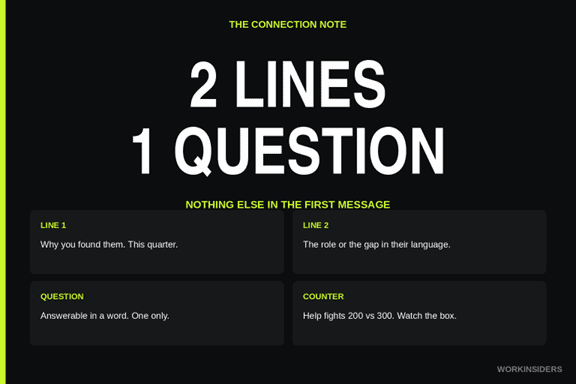
How to cold message on LinkedIn is the first message, on any of those surfaces. Two lines. One question. Nothing else.
Line one is the string that found them, or the public fact from this quarter. Line two is the role, the gap, or a result from their exact industry if you actually have one. The question is answerable in a word.
Din’s 100k DMs article is InMail volume. Credit him. A few lines still apply to every cold message. The rest stays InMail. Do not treat his reply rates as Work Insiders stats.
Relevance beat fake personalization. He tested scraping a recent post, mentioning college, city, or a compliment, against a result from their exact industry. He says relevant won every time, by 3 to 5 times on reply rate. That multiplier is his. “Loved your post on leadership” is the test he already lost. “We filled a plant engineer seat at a mill like yours last quarter” is the test he says won. Do not invent a result. If you do not have one, use the public hiring string instead.
People decide in two seconds. He says the first 10 words decide whether they read anything else, which is why two lines beat five paragraphs. Spend the characters on line one.
People trust a number from a real engagement, not “we help companies hire.” If you cannot name a hire, a day count, or their own post, skip the proof line.
Highest replies, he says, come from people already in the pain: job posts, funding, posts about hiring. The message only works if the list already picked that moment.
Make the ask small. On LinkedIn he wants an opinion or a short breakdown they can send in a line. “Open to a 15 minute intro?” is fine. “Would you like to see 12 candidates across three business units with a full market map attached?” is how you lose the first message.
First name only as the subject line is InMail. He even cites a VP who opened from an account with 77 connections. Do not fake a subject by stuffing “Sarah |” into the first line of an invite note.
What should the first line say?
Name the string that found them. Then stop.
You saw they posted they are hiring two firmware engineers this quarter. Say that. You saw they started as VP of Sales 40 days ago. Say that. You saw their last company is now hiring the seat they vacated. Say that.
Do not open with who you are. They will tap your face. Do not open with “hope you are well.” Do not open with a compliment on their keynote from 2019. Din’s first line rule from the campaign tweet: it must touch a problem this quarter. A req from last year is not this quarter. A generic “always looking for talent” is not a problem.
How is InMail different from a message and an invite note?
LinkedIn InMail vs message is a credit and a subject, not a personality transplant.
InMail is a premium message to someone you are not connected to. Help’s “Send an InMail Message” page (a546814, last updated 5 months ago as of 3 Sep 2026) says the subject can run up to 200 characters and the body up to 2000. Help’s older “InMail character limits” page (a411986, last updated 1 year ago) says the body is 1900. Trust the counter in the compose box. Do not pick a winner from a blog.
Basic must upgrade for InMail. Members can opt out of InMail. Open Profile Premium members can be messaged for free. You cannot purchase extra InMail credits outside the monthly allotment. Premium InMail credits cannot be used on Sales Navigator or Recruiter. Those are separate pools.
A regular message is 1st degree, or Open Profile. No subject field on the invite. No InMail credit on the invite.
Help’s “Differences between InMail Messages and personalized invitations” (a6239760, last updated 2 years ago) is the comparison page. It also fights other Help pages on how many personalized invitations Basic gets. Name the pages. Trust the box.
Din’s first name subject is InMail. His voice note is after they accept. His under 400 characters line is for a phone preview. Your invite box may cut you at 200. Watch it. Do not retarget Help’s InMail articles as this page. This page is LinkedIn outreach. InMail is one channel on it.
How do you build the LinkedIn prospecting list?
LinkedIn prospecting is the list. The note is the last step.
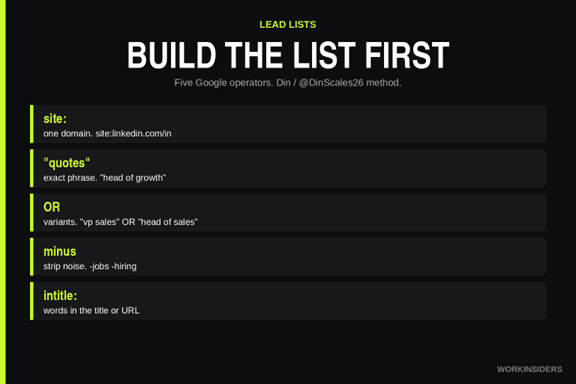
The list method here is Din’s, from his list article on X by Din / @DinScales26. Credit him. Do not add steps he did not write. Google indexes public LinkedIn profiles, company sites, and job boards. He treats the search bar as a lead database.
Five operators do the work in that article.
site: restricts results to one domain, meaning site:linkedin.com/in for personal profiles.
Quotes force an exact phrase, so “head of growth” stays together.
OR catches variants, meaning “vp sales” OR “head of sales”.
A minus sign strips noise, meaning -jobs -hiring.
intitle: and inurl: target words in the page title or URL.
He says put your most specific term first, because Google weights early terms heavily. Test each string on a small result set before you scale it. One wrong operator returns thousands of irrelevant pages. Use the date filter under search tools to restrict results to the last month, which surfaces recent posts and new profiles rather than pages indexed years ago.
He also says combining those operators reaches profiles Sales Navigator hides behind its 2,500 result ceiling, and that Google applies no equivalent cap to what it returns. That ceiling claim is his.
Which strings does he actually run?
Start from the signal rather than the title. His strings:
“title” “industry” “city” plus site:linkedin.com/in for exact roles in a place.
“keyword only your buyer would have” plus site:linkedin.com/in for niche signals.
“we’re hiring” plus the role your service replaces, for budget and pain together. For recruiting, that is the role you are filling, on their careers page or a public post.
“recently funded” or a raise phrase plus your niche, for fresh money.
“team” or “leadership” plus site: on the company domain, for named decision makers.
A problem phrase plus site:linkedin.com/posts, to find people publicly discussing it.
He calls the hiring string the sharpest. A company posting for the exact role has approved budget and an active problem in one signal. The posts string is the one he says almost nobody runs. Someone writing publicly about a problem has already named the pain, so the opener writes itself from their own words.
Point the same strings at job boards and company pages, not just profiles, so you find the account first and the person second. Save every string that works. Reuse them. Swap the niche.
How do you get volume?
To get volume past a few hundred leads, he runs each string across every city, region, and industry variant in the market. He uses a scraper to pull result pages into a sheet rather than copying by hand. He sets Google Alerts on trigger phrases so new matches arrive. He runs the set on a schedule, since hiring posts and funding announcements appear weekly. One string across 20 cities and 5 industry variants is 100 searches from one piece of work. That is his volume math.
He names two constraints. Google rate limits aggressive automated querying, so he says pace the scraping and rotate rather than hammering it in one session. Results are pages, not structured records, so budget time for cleanup.
His pipeline:
Pull results into one sheet with the URL, the company, and the string that found it.
Enrich each row by reading the profile and company.
Qualify against your ICP, keeping a written reason on every drop.
Verify every email before it touches a domain. If you are only sending LinkedIn invites, you still keep the sheet clean. Do not invent addresses.
Dedupe against everyone already contacted.
The string column is the one he says earns the money. It records why each lead surfaced, the hiring post or the funding phrase, and that becomes the first line of the message. For you, that string becomes the first line of the invite note or the InMail. If the string was a “we’re hiring” post for a controls engineer in Austin, the note starts there. If the string was a LinkedIn post where they named a hiring freeze that just lifted, start there.
Read the drop reasons in bulk. When a few thousand records get cut for the same cause, he says your ICP definition was wrong before your copy was. Track which strings produce conversations, not which produce the most rows. A string returning 200 leads and two meetings beats one returning 5,000 leads and none. That comparison is his.
If you want his firm, go to eaglerev.io yourself. Do not treat that site as a Work Insiders intake form.
What is a LinkedIn connection request message?
A LinkedIn connection request message is the optional note you attach when you ask someone to connect. LinkedIn Help calls it a personalized invitation. You open the profile, choose Connect, choose Add a note, type, send.
On mobile the path is More, then Personalize Invite. People You May Know on the mobile app cannot take a note. Help also says your primary email address has to be on the account before you can send invitations.
The recipient can reply to that note without accepting the invitation. If they write back and stay unconnected, you still have a conversation. If they ignore you, the pending invite sits until they act, you withdraw, or LinkedIn restricts you.
The note is not a job description. It is not an InMail. It is not a cold email. It is a short reason to connect now.
What does a good recruiting invite note do?
It proves you know who they are and why this week. Map the spine list onto the box. Open profiles skip the invite. Two lines and one question is the whole note. First name subject is InMail, not this box. Voice note after they accept. The box is text.
New VP of sales in the first 90 days becomes a new hiring manager, a new head of engineering, a new People lead. Anyone who changed jobs in the last quarter has a new seat and new holes. The company they just left now has a gap; the opening is the vacancy, not a compliment. Last 30 days of activity still applies. A client result from their exact industry is a hire you actually made. Do not invent a case. If you do not have one, drop the line. Answer every reply inside 5 minutes.
Which notes work and which fail?
Open the profile. Read the About. Read the latest post. Type the note in the box. Watch the counter.
Weak note, the lazy scene: you click Connect. LinkedIn fills “I would like to add you to my professional network.” You paste the req. “We have an exciting opportunity for a Senior Mechanical Engineer, competitive salary, great benefits, apply here.” You hit Send. They never met you. You just mailed them a poster.
Still weak: “Loved your post on leadership. I help companies hire top talent. Let’s connect.” You named nothing they can verify.
Better, still short: “You posted you are hiring two plant engineers in Houston this month. I filled that seat last quarter at a similar mill. Open to a note on how we sourced it?”
Better, job change: “You started as Head of Quality 6 weeks ago. The plant you left is now posting your old title. Worth a 10 minute compare?”
Better, their words: “Your post this week on the PLC hire that took 90 days. We keep a bench for that exact search. Want the short version?”
None of those are magic templates. They are proofs you used the string. If you cannot point at a public fact from this quarter, do not send the note. Skip, or go back to the list.
Help’s own “what to include” is how you found them or what you have in common, why connect now, and a clear polite tone. Shared role, event, group, or post. That is enough. You do not need a paragraph.
When should you skip the note?
Skip when you cannot name why this person, this week.
Skip People You May Know on mobile.
Skip when they are Open Profile and you can message without the invite. Din’s volume sat there on purpose.
Skip when you are already at LinkedIn’s invitation wall, or when you are about to blast. The numbers and restriction clocks live in the Help section below. This article does not teach you how to get past a cap.
If a third party app or extension copies data or automates in violation of the User Agreement, Help a551012 says disable it. That is the warning for every tool below.
Premium gets unlimited personalized invitations on some Help pages, while connection request limits may still apply. Read both sentences. Unlimited notes is not unlimited invites.
Which LinkedIn outreach tools actually touch a send?
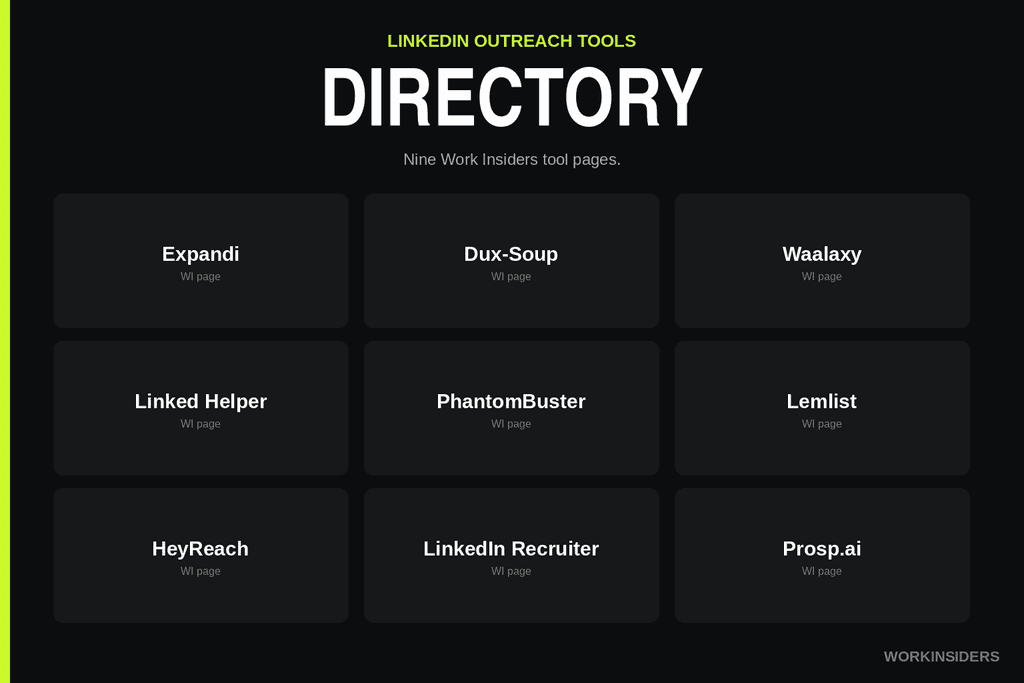
LinkedIn outreach tools are supporting gear on this page, not the product. Independent roundup only. Use a tool to remember the string, queue a note you already wrote, or work inside Recruiter. Do not use a tool to spray the default network add. LinkedIn Help a551012 treats suspected automation as a restriction path.
Work Insiders has pages for the ten below
Dripify runs LinkedIn drip campaigns. A drip of empty notes is still empty. Put the hiring string in step one or do not turn it on.
Prosp is a LinkedIn-first outreach tool. Work Insiders lists it for connection messages and voice notes. Same test as HeyReach: more automation is not more reasons. The string still has to be in the first note.
If a tool copies profile data or automates against the User Agreement, Help says disable it. That is the whole warning. No bypass steps.
Expandi is a cloud LinkedIn outreach tool. People use it to send connection notes and follow up sequences. If you load it with one generic note, you scaled the lazy paste. If each row carries the string that found them, the note can stay two lines and a question.
Dux-Soup is a browser extension for LinkedIn visit and invite workflows. It can attach a note to a connection request. You still type the note. The extension does not read the About for you.
Waalaxy sequences invites and messages. Same test: does the first invite note name a problem this quarter, or does the sequence start with “I’d like to add you”?
Linked Helper is a desktop LinkedIn automation client. It will send notes at volume if you let it. Volume is how Help describes “many invites in a short time.” Keep the human in the list, not only in the signature.
PhantomBuster pulls public data and can run LinkedIn flows. Treat it as a list helper, not as a way around invitation limits. The sheet still needs the string column.
Meet Alfred is a social outreach client people point at LinkedIn sequences. Same test as Waalaxy. The sequence is not the reason. The string is.
Lemlist is built for multichannel sequences. LinkedIn steps sit next to email. Keep the invite note shorter than the email. The invite is not the place to paste the sequence.
HeyReach is a LinkedIn sending layer, often through extra sender seats. More seats is not more reasons. Each sender still needs a profile that looks like a person, which is Din’s sender hygiene point.
LinkedIn Recruiter is native. InMails to non applicants live here, with a separate credit pool. Recruiter is the Help alternative when a connection request is the wrong channel. Use it for search and InMail. Do not treat Recruiter InMail as an invite note with extra characters.
What does LinkedIn actually allow?
LinkedIn Help disagrees with itself. Name the pages. Trust the compose box.
“Personalize invitations to connect” (answer a563153, last updated 4 months ago as of 3 Sep 2026, the most recent note quota page) says a personalized message is up to three connection requests per month, each message up to 200 characters. Premium: unlimited personalized invitations, and it warns connection request limits may still apply.
“Differences between InMail Messages and personalized invitations” (answer a6239760, last updated 2 years ago) says Basic members get up to five personalized invitations with a 200 character limit, and Premium gets unlimited personalized notes with a 300 character limit each.
“Invitation limit reached” (answer a550555, last updated 1 year ago) still says Basic can include a personalized message on five connection requests per month, Premium unlimited. Same five versus three fight.
Do not invent an official 2026 number. If the box cuts you at 200, you have 200. If it lets you hit 300, you have 300. The counter is the live rule.
InMail body length fights the same way: 2000 on a546814 (updated 5 months ago) versus 1900 on a411986 (updated 1 year ago). Subject is 200 on both.
None of this is a weekly invite cap. Blogs will sell you 100 or 200 per week. Help does not publish it. Din’s “roughly 100 a week” is his campaign claim about why he sent 200 connection requests next to 4705 open profile InMails. Keep that attribution.
Help a551012 is the restriction page. Reasons: many invites in a short time, many ignored or pending or marked spam, and suspected automation tools. Network size maxes at 30,000 first degree connections. After you withdraw, you cannot resend to the same person for up to three weeks. Most restrictions auto remove within one week. Outstanding invitations can mean waiting up to one month. First restriction: wait a few hours. Multiple in a day: wait a few days. If a third party app or extension copies data or automates in violation of the User Agreement, disable it.
Help’s “Invitation limit reached” page (a550555) says all members, Basic and Premium, are subject to invitation limits. It does not publish the weekly number. The restriction typically lasts one week. Withdrawing pending invites does not lift it. You cannot buy more. Support will not disclose the type or reason.
Help a551295 is the alternatives page. Read those if you hit a wall. Do not look for a workaround in a tool blog.
What do you do after they reply?
Send the voice note Din calls for, or a one line follow up that still asks one question. Do not dump the req the minute they accept. You already spent the first message proving you read them. Spend the next message on the same fact.
Answer inside 5 minutes if they reply, including a no. His InMail credit returns on a no within 90 days. Your recruiting pipeline returns on a no you actually logged.
Withdraw stale pending invites on a schedule. Withdrawing does not lift a restriction, Help says, and you cannot resend to that person for up to three weeks. Still clean the pile so you are not the person with hundreds pending.
If they never accept and never reply, the list was wrong or the first line missed this quarter. Change the list. Do not write a longer note.
Conclusion
LinkedIn outreach isn’t one box you fill in it’s four surfaces, and the sender’s job is to pick the right one after doing the work that comes before any message gets typed.
Build the list first. The string that found each person the hiring post, the job change, the funding announcement becomes the first line. Skip that step and every channel below it inherits a guess instead of a reason.
Then let the profile pick the channel. Open Profile skips the invite entirely. InMail if there are credits and a reason this quarter. The connection note only when you can name why this person, this week. A 1st degree message once they’ve already said yes. None of these are interchangeable, and none of them fix a weak list.
Whatever the surface, the message stays the same shape: two lines, one question, nothing invented. No fake proof line, no compliment on a 2019 keynote, no third paragraph because the box has room. And when someone replies even a no answer inside five minutes. That’s the part most campaigns lose on, not the copy.
Tools can queue the send. They can’t write the string, read the About section, or know why this person matters this week. That’s still the sender’s job.