

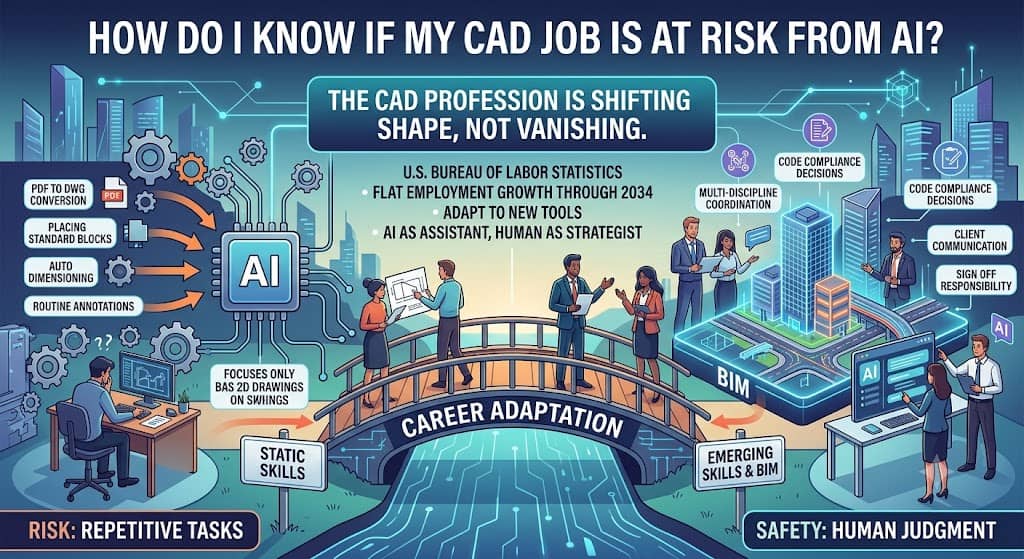
Your CAD job is most at risk if your daily work is mostly repetitive: converting PDFs to DWG files, placing standard blocks, auto dimensioning, or producing routine annotations. Your job is much safer if it involves code compliance decisions, multi discipline coordination, client communication, or sign off responsibility.
Government data backs this up. The Bureau of Labor Statistics projects little to no change in overall drafter employment through 2034, which means the profession is shifting shape rather than vanishing.
Apollo Technical has spent more than a decade placing CAD drafters, designers, and engineers with employers across mechanical, civil, electrical, and MEP disciplines. We talk to hiring managers and job seekers about this exact question every week, and the pattern is consistent.
The people who lose ground are not being fired because AI showed up. They are being passed over because they never adapted to what AI now handles. This article breaks down exactly how to tell where you stand.
What Makes a CAD Job More at Risk From AI?
Are you doing mostly repetitive drafting tasks?
If your day is filled with tasks that follow the same pattern every time, your job carries more automation risk. Converting scanned drawings into editable geometry, placing standard blocks from a library, auto dimensioning a sheet, and adding routine annotations are exactly the tasks that generative design tools and AI powered CAD features are built to handle.
These are not edge cases. They are the core use case that companies like Autodesk are actively marketing their AI tools around.
Is your job entry level with little client contact?
Entry level drafting roles that mostly involve executing someone else’s design intent, without direct client interaction or design decisions, sit in a more exposed spot.
One analysis of engineering occupations found that drafters and technicians doing routine CAD work and specification documentation face the highest replacement risk in the entire architecture and engineering field, precisely because that work is well represented in AI training data and follows predictable rules.
Do you work in 2D drafting rather than BIM or 3D modeling?
Pure 2D drafting, especially in industries where the deliverable is a flat drawing set with little coordination across disciplines, is more automatable than 3D BIM work. BIM coordination requires managing clashes between structural, mechanical, electrical, and plumbing models in real time, a task that still leans heavily on human judgment.
If your daily tool is a simple 2D CAD package and your output rarely touches other disciplines, your risk profile is higher than a colleague managing a full building model.
Do you spend most of your time on documentation instead of design?
Documentation heavy work, like assembling spec sheets, formatting title blocks, and generating boilerplate calculation reports, is disproportionately automatable. One industry analysis found AI tools can already handle roughly 43 percent of time spent on routine drafting tasks such as documentation assembly and generating standard outputs.
If documentation is most of your job description, that is the part of your role most likely to shrink first.
What Makes a CAD Job Safer From AI?
Do you coordinate across disciplines?
Coordinating between structural, mechanical, electrical, and civil teams on a single project requires reading intent, resolving conflicts, and making judgment calls that current AI tools cannot reliably make. If a meaningful part of your job is catching a clash before it becomes a $50,000 field problem, that responsibility is not going anywhere soon.
Are you responsible for code compliance and sign off?
Interpreting a building code, deciding which standard applies to an unusual situation, and being professionally accountable for a stamped or approved drawing set is legal and professional liability, not just geometry.
AI can suggest a layout. It cannot take responsibility for it. That accountability gap is one of the biggest reasons experienced drafters and designers remain hard to replace.
Do you manage client relationships?
Reading a client’s frustration in a design review, adjusting a plan based on an offhand comment, or negotiating scope changes over a phone call requires social and interpretive skills that current AI systems do not have.
If client facing communication is part of your role, you are working in territory that stays firmly human for the foreseeable future. Our guide on how to future proof your career covers the skills to add.
Do you have specialized domain knowledge in an emerging field?
Highly specialized work in fields like robotics, photonics, or nanosystems design carries lower AI risk simply because there is not enough existing data for AI models to learn from. If your expertise sits in a niche that has not been extensively documented online, you have more of a buffer than someone doing standardized architectural or mechanical drafting.
What Does the Data Actually Say About CAD Job Risk?
What do government projections say about drafting jobs?
The most credible source on this question is the U.S. government itself. The Bureau of Labor Statistics reports that overall employment of drafters is expected to show little or no change from 2024 to 2034. Drafters held about 192,100 jobs in 2024, with a median annual wage of $65,380. About 16,200 openings are projected each year, mostly from retirements and career changes rather than layoffs. That is not a booming outlook, but it is also not the collapse that headlines sometimes imply.
What percentage of CAD tasks can AI actually automate?
Estimates vary by specialty, but the numbers cluster in a similar range. Industry analysis of electrical and electronics drafting found AI tools can automate around 43 percent of time spent on routine tasks like documentation and standard outputs. For general drafting, tasks like PDF to DWG conversion, auto dimensioning, and block placement are already largely automatable today. The remaining work, judgment calls, client interaction, and compliance decisions, is not close to being automated.
What skills are employers asking for now?
Job posting data shows a real shift happening in real time. One analysis found traditional drafting skills made up 50 percent of CAD job requirements in 2023, but that number fell to 31 percent by 2024. Over the same period, demand for AI and machine learning skills jumped from 7 percent to 21 percent. That is not a prediction. That is what employers are already writing into job listings today.
How worried are workers across industries about AI and job security?
Workers outside CAD feel the same pressure. According to PwC’s Global Workforce Hopes and Fears Survey, 44 percent of workers globally fear losing their job to automation, and nearly 60 percent are concerned about their long term employment stability.
Among those surveyed, 85 percent believe adopting AI will require them to take on new roles and learn new skills. CAD professionals are not experiencing a unique threat. They are experiencing a version of what most knowledge workers are dealing with right now.
What Are People Actually Asking About AI and CAD Jobs?
Will AI replace CAD drafters completely? No, not based on current tools or near term forecasts. AI is very good at repetitive, rule based tasks but still struggles with judgment calls, client communication, and legal accountability for a finished drawing set.
Will there even be CAD drafting jobs in five years? Yes. Government projections show a roughly flat headcount through 2034, with steady demand for BIM coordination and multi discipline roles even as pure 2D drafting shrinks in relative importance.
Is generative design the same as AI replacing designers? No. Generative design tools can propose thousands of geometry options in seconds, but a human still needs to set the right constraints, evaluate the tradeoffs, and choose which option actually works for the project.
Should I be more worried if I only know AutoCAD and not Revit or BIM? Somewhat, yes. Employers are increasingly asking for BIM and coordination skills alongside traditional 2D CAD knowledge, so staying purely in 2D narrows your options over time.
Do CAD jobs pay less because of AI automation? Not currently. Median pay for drafters remains well above the national median wage, and job postings that combine CAD skills with AI tool literacy tend to pay more than either skill set alone.
How Can You AI Proof Your CAD Career?
Should you learn BIM if you only know 2D CAD?
Yes, and sooner rather than later. BIM modeling and coordination roles are among the fastest growing parts of the field, since they require managing relationships between systems rather than just producing flat drawings. If your current job is entirely 2D, adding BIM skills is one of the highest value moves you can make.
Is it worth learning to use AI tools like Autodesk AI?
Yes. Treating AI as a tool you operate, rather than a threat you avoid, changes your position entirely. Learning how to prompt an AI assistant for a first draft, then reviewing and correcting that output, is quickly becoming a baseline expectation rather than an advanced skill.
Should you learn scripting like Python or AutoLISP?
It helps. Even basic scripting that automates one repetitive task can save hours every week, and it repositions you as the person who builds tools instead of the person who only uses them. You do not need to become a software engineer. You need enough scripting knowledge to automate the boring 20 percent of your own job.
Should you focus on soft skills like client communication?
Yes, and this is often overlooked. The parts of drafting work that are hardest to automate, translating a vague client request, resolving a disagreement between trades, or explaining a design tradeoff in plain language, are also the parts that get you promoted.
Building these skills protects your role from automation and makes you a stronger candidate for coordination and management positions.
Signs Your Specific CAD Job Might Be at Risk
If more than half of your week is spent on tasks that look identical from project to project, that is a signal worth taking seriously. If you have no direct client contact and your work is reviewed and approved entirely by someone else, you are further from the decision making layer of the project.
If your job description has not changed in several years while job postings for similar roles increasingly mention BIM or AI tool experience, that gap is worth closing before it becomes a liability. None of these signs mean your job disappears tomorrow. They mean your specific role is drifting toward the part of the profession that gets automated first.
The Bottom Line
CAD jobs are not disappearing, but they are changing shape, and the shift is already visible in hiring data rather than just speculation. The safest position is not avoiding AI.
It is becoming the person who can operate it, review its output, and still handle the judgment calls, compliance decisions, and client relationships that AI cannot take responsibility for. Drafters and designers who make that shift are set up to stay in demand well beyond the next decade of government projections.
Free newsletter
Get the Work Insiders weekly
One email a week: the recruiting and HR tech news that mattered, the tools we just added to the directory, and one practical guide. No spam, and you can unsubscribe in one click.