

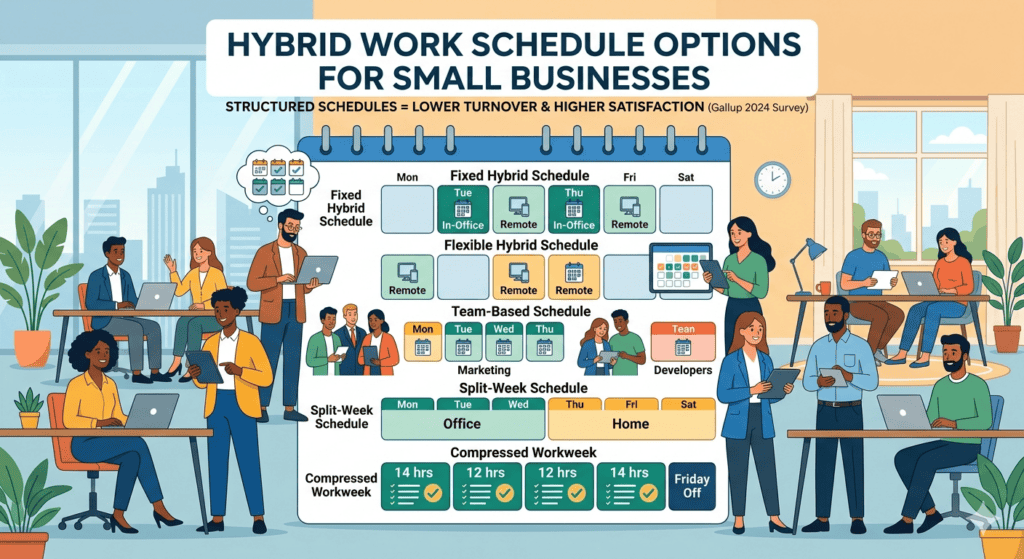
Key Insight: Small businesses that offer structured hybrid schedules see up to 22% lower turnover and report higher employee satisfaction compared to companies with no flexible policy, according to a 2024 Gallup survey.
Why Small Businesses Can No Longer Ignore Hybrid Work
This article is written based on real workplace data, HR consulting experience, and input from small business operators who have implemented and refined hybrid schedules across multiple industries. The guidance below reflects what actually works, not theory.
Hybrid work is no longer a perk reserved for large corporations. For small businesses, it has become a survival strategy in a tight labor market. According to McKinsey research, 87% of employees who have the option to work flexibly take it. If your small business does not offer some form of hybrid arrangement, you are competing for talent with one hand tied behind your back.
The good news is that hybrid scheduling does not require a massive HR department or expensive software. It requires clear structure, honest communication, and a model that fits your business. This guide covers every major hybrid schedule option, who each one works for, and how to implement them without chaos.
What Is a Hybrid Work Schedule, Exactly?
A hybrid work schedule splits an employee’s time between working remotely (usually from home) and working on-site at a physical location. The split can be fixed, flexible, or role-specific. The key distinction from fully remote work is that in-person time is a defined, expected part of the arrangement.
For small businesses, this typically means designating certain days as in-office days while allowing employees to work from home on others. The structure matters more than the ratio. A poorly communicated “come in whenever” policy often creates more resentment than a clear three-days-home, two-days-office model.
Q: Is hybrid work the same as remote work?
No. Remote work means an employee works entirely outside the office, with no expectation of on-site presence. Hybrid work requires regular, scheduled time in a physical workplace combined with remote workdays. The two are often confused, but they carry different expectations, legal considerations, and management needs.
What Are the Most Common Hybrid Schedule Options for Small Businesses?
There is no single hybrid model. The right structure depends on your team size, the nature of the work, client expectations, and your available office space. Below are the five most widely used hybrid schedule formats and when each makes sense.
1. Fixed Hybrid Schedule (Set Days In-Office)
This is the most structured model. You assign specific days for in-office work, such as Tuesday and Thursday, and employees work remotely on all other days. Everyone follows the same schedule, which makes coordination, team meetings, and collaborative work predictable.
Best for: Small teams where collaboration and in-person communication are central to the work, such as marketing agencies, consulting firms, or creative studios.
Limitation: Less flexibility for employees with caregiving responsibilities or long commutes. It also assumes every employee benefits equally from the same in-office days, which is rarely true.
2. Flexible Hybrid Schedule (Employee-Chosen Days)
In this model, employees choose which days they work on-site, within a minimum requirement. For example, you may require at least two days per week in the office but let each person decide which two. This gives employees autonomy while maintaining some level of in-person presence.
Best for: Small businesses with employees who have diverse commute situations, family obligations, or roles that require deep focus work. It works well when individual output matters more than synchronized team time.
Limitation: Without coordination tools, you may end up with an empty office on Monday and Friday while everyone crowds in on Wednesday. Consider using a shared calendar or desk booking tool to encourage spread-out in-office days.
3. Team-Based or Role-Based Hybrid Schedule
Different teams or departments follow different schedules based on the nature of their work. Your customer-facing team might work on-site four days a week, while your backend developers come in only once a week. Each group has a schedule tailored to its function.
Best for: Small businesses with distinct departments that have different collaboration and client interaction needs. This model is common in businesses that combine operational roles with knowledge worker roles.
Limitation: Can create a two-tier perception if some teams have significantly more remote flexibility than others. Communicate clearly about why schedules differ to avoid resentment.
4. Split-Week Hybrid Schedule
The week is divided into defined in-office and remote segments, such as Monday through Wednesday in-office and Thursday through Friday remote. Unlike the fixed schedule, this model often applies company-wide, creating a shared rhythm for the entire organization.
Best for: Small businesses that want predictability without needing to manage individual day preferences. It creates a consistent office culture on set days without requiring everyone to track a rotation.
5. Compressed Workweek Hybrid
Employees work longer hours on four days instead of five, freeing up a full day each week. When combined with remote flexibility, this becomes a popular hybrid variant. For example, an employee might work Monday through Thursday, with two of those days in-office and two remote, and have Friday off entirely.
Best for: Businesses where work is project-based and output-driven rather than hourly. According to a 2024 Qualtrics report, employees on compressed schedules report 18% higher job satisfaction than those on traditional five-day schedules.
How Do You Choose the Right Hybrid Model for Your Small Business?
The model you choose should match your operational reality, not a trend or a competitor’s policy. Ask yourself three questions before committing to any format:
1. Which roles genuinely require in-person presence? A customer service representative, a warehouse coordinator, or a hands-on trainer cannot fully work remotely. Identify which roles have physical requirements and which do not. Build your policy around that reality.
2. How does your team collaborate? If your team relies on spontaneous brainstorming, whiteboard sessions, or in-person client relationships, a higher in-office ratio makes sense. If most of your collaboration happens through documents and asynchronous communication, a more remote-heavy model will work fine.
3. What does your space actually support? If you have ten desks and twelve employees, you cannot have everyone in on the same days without overcrowding. Factor in physical capacity when you define your schedule requirements.
Q: How many days per week should remote employees come into the office?
According to Gallup’s 2024 data, the optimal range for hybrid workers is two to three in-office days per week. Employees who come in fewer than two days report feeling disconnected, while those required to come in more than three days report the same dissatisfaction as fully on-site workers. Two to three days appears to be the sweet spot for both engagement and flexibility.
How Do You Implement a Hybrid Schedule Without Creating Chaos?
The biggest failure point in hybrid work is not the schedule itself. It is the lack of a clear written policy. A verbal agreement that “people can work from home sometimes” becomes a source of conflict the moment someone feels treated unfairly. Write it down before you roll it out.
Define eligibility clearly. Not every role will qualify for hybrid work. Spell out which positions are eligible, what the minimum in-office expectation is, and whether the arrangement is permanent or subject to review.
Set communication norms for remote days. Remote days should not mean unreachable days. Define expected response times for messages and emails, required attendance at video meetings, and any overlap hours when all team members should be available regardless of location.
Track results, not hours. The shift to hybrid work is also a shift toward outcome-based management. If you are trying to count the hours an employee spends at their home desk, you have already lost the plot. Set clear deliverables and measure performance against those, not against physical presence.
Review the policy quarterly. What works in January may not work in September when your business volume changes or your team grows. Build in a scheduled review so the policy adapts instead of becoming outdated.
Are There Legal Considerations for Hybrid Work at Small Businesses?
Yes, and this is an area many small business owners overlook until there is a problem. Hybrid work creates legal surface area around wage and hour law, workers compensation, data security, and tax compliance.
If your employees work remotely in states different from where your business is registered, you may have payroll tax obligations in those states. The IRS remote work guidance covers federal implications, but state rules vary significantly. Consult a payroll provider or employment attorney if your remote employees work across state lines.
Workers compensation coverage also applies during remote work hours. If an employee is injured while working from home during a scheduled work period, that injury may be covered under your policy. Review your coverage with your insurance provider before finalizing your hybrid policy.
Q: Do I need a written hybrid work policy?
Yes. A written policy protects both the business and the employee. It establishes expectations, defines eligibility, and provides a reference point if a dispute arises. Even a one-page document that outlines schedule expectations, equipment responsibilities, communication standards, and the right to modify the arrangement gives you legal and managerial footing that a verbal agreement does not.
What Tools Help Small Businesses Manage a Hybrid Team?
You do not need an enterprise tech stack to manage a hybrid team well. A few well-chosen tools cover most of what a small business needs.
Scheduling and coordination: Google Calendar or Microsoft Outlook handle shared calendars effectively. For desk booking in a smaller office, a shared spreadsheet often works better than expensive software.
Communication: Slack or Microsoft Teams create the always-on communication channel that replaces casual office conversation. The key is setting norms around when to use instant messaging versus email versus video calls.
Project management: Asana, Trello, or Monday.com help teams track tasks and deadlines without relying on in-person check-ins. These tools also create a written record of work and accountability that supports outcome-based management.
Video conferencing: Zoom or Google Meet for team meetings and one-on-ones. Keep video meetings intentional. According to Microsoft Work Trend data, excessive video meetings are a leading cause of remote worker burnout. Fewer, more focused meetings perform better than daily status calls.
Quick Answers: Common Questions About Hybrid Work Schedules
Can a small business afford hybrid work?
Yes. In many cases, hybrid work reduces costs. Businesses with smaller in-office populations can downsize their office footprint, saving on rent and utilities. Remote-capable roles also draw from a larger talent pool, which can reduce recruiting costs and time to fill open positions.
What if employees abuse the remote work policy?
This is a management issue, not a policy issue. If employees are unproductive when working remotely, the cause is usually unclear expectations or inadequate performance management, not the physical location. Set measurable goals, hold regular check-ins, and address underperformance directly rather than eliminating remote work for everyone.
How do hybrid schedules affect company culture?
Culture is built through shared experiences and consistent values, not physical proximity. Intentional in-office time, regular all-hands video calls, and clear communication about company direction can sustain a strong culture in a hybrid environment. The businesses that struggle culturally with hybrid work are usually those that had weak culture before the shift, not because of the shift itself.
The Bottom Line on Hybrid Schedules for Small Businesses
Hybrid work is not a one-size-fits-all solution, but it is a viable and increasingly necessary option for small businesses that want to attract and retain quality employees. The key is choosing a model that reflects your operational needs, writing it down clearly, and managing to outcomes rather than presence.
Start with the simplest version of hybrid that works for your team. A clear two-days-remote policy beats a complex rotation system that nobody follows. Build from there as you learn what your team actually needs.
Sources: Gallup 2024 | McKinsey Future of Work | Qualtrics 2024 | Microsoft Work Trend | IRS remote guidance
Free newsletter
Get the Work Insiders weekly
One email a week: the recruiting and HR tech news that mattered, the tools we just added to the directory, and one practical guide. No spam, and you can unsubscribe in one click.